TallyPrime GET API Integration Documentation
Follow the instructions and steps explained below to implement TallyPrime GET API Plugin to Pull/GET Data from TallyPrime software to Integrate with your ERP, CRM, Mobile App, Web App, SQL database and so on.
TallyPrime GET API Integration mainly requires 2 parties as below;
- Software Developer, Who can do the data integration programmatically
- TallyPrime User, Who understand the TallyPrime and Accounting
General Guidelines
-
- Unzip the plugin folder & copy “TallyPrime API Rel 4 & Above.tcp” file in your local TallyPrime application directory/folder.
- Use the .tcp file from the downloaded plugin folder depending upon TallyPrime version you are using i.e. TallyPrime release 4.0 & above or Tallyprime release 3.0 & below.
Configure TallyPrime GET API Plugin in your Tally
-
Local TDL Method
- Open TallyPrime > Press F1: Help
- Go to TDLs & Add-ons
- F4: Manage Local TDL’s > Load TCP file as shown in below snapshot
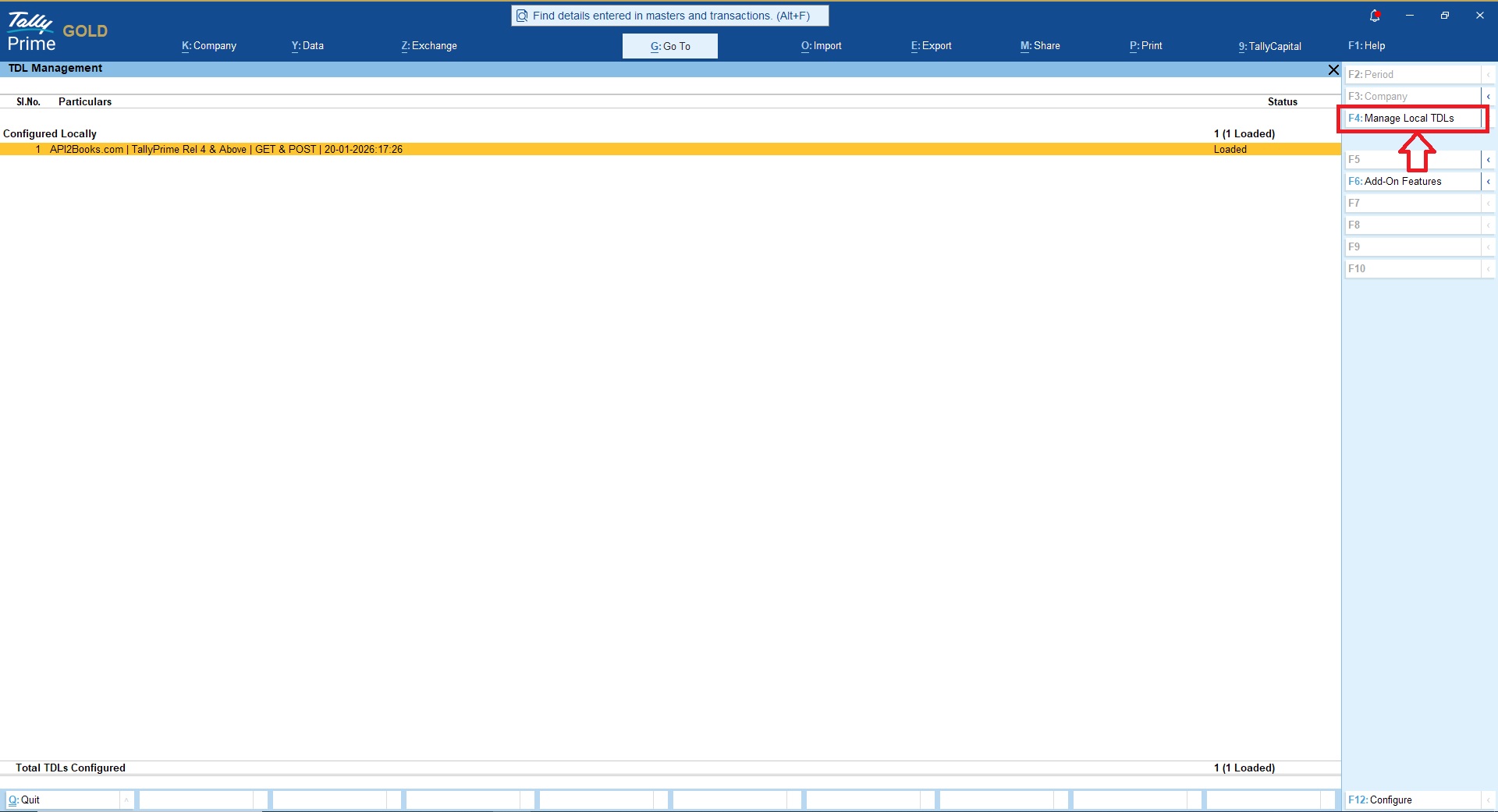
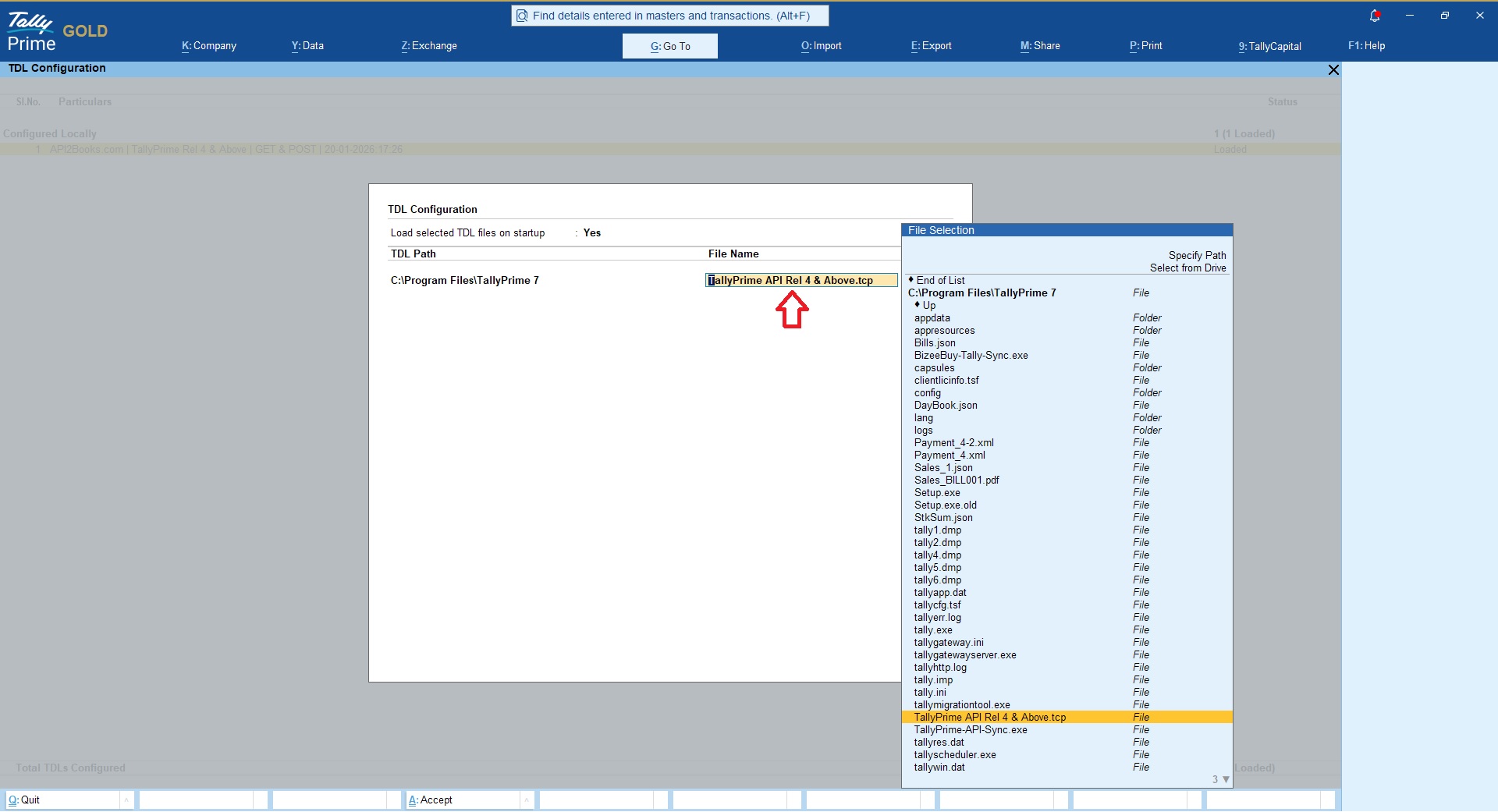
Make sure that .tcp file is loaded on all the computers where TallyPrime is being used else data won’t be uploaded.
If you are using TallyPrime Gold Multi User version and TallyPrime being used on multiple systems then use “Account TDL” method to upload .tcp file via Tally.NET account.
Account TDL auto loads .tcp file on all the systems automatically.
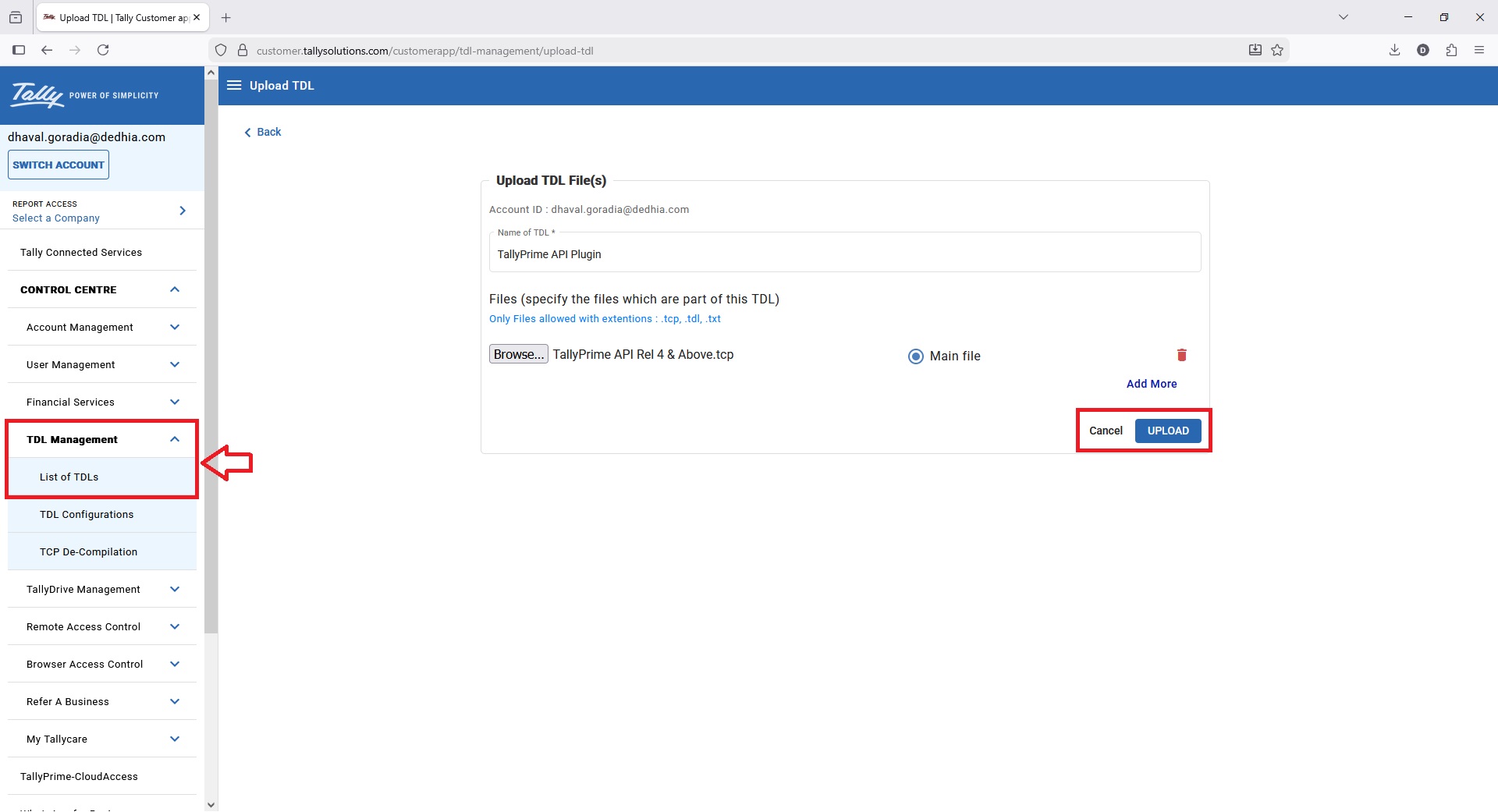
Activating TallyPrime GET API Plugin
Make sure you are logged-in to the Tally company using Administrator ID & Password in which you wish to activate the API module
- Press F1: Help > TDL’s & Add-ons
- Press F6: Add-on Features

- You can now enable the GET API module for the selected company
- Free trial allows you to extract 450 records for each API module and valid for 15 days whichever is earlier
- Once you Subscribe API module you can extract unlimited data for the activated module valid for 12 Months or 1 month depending upon your subscription

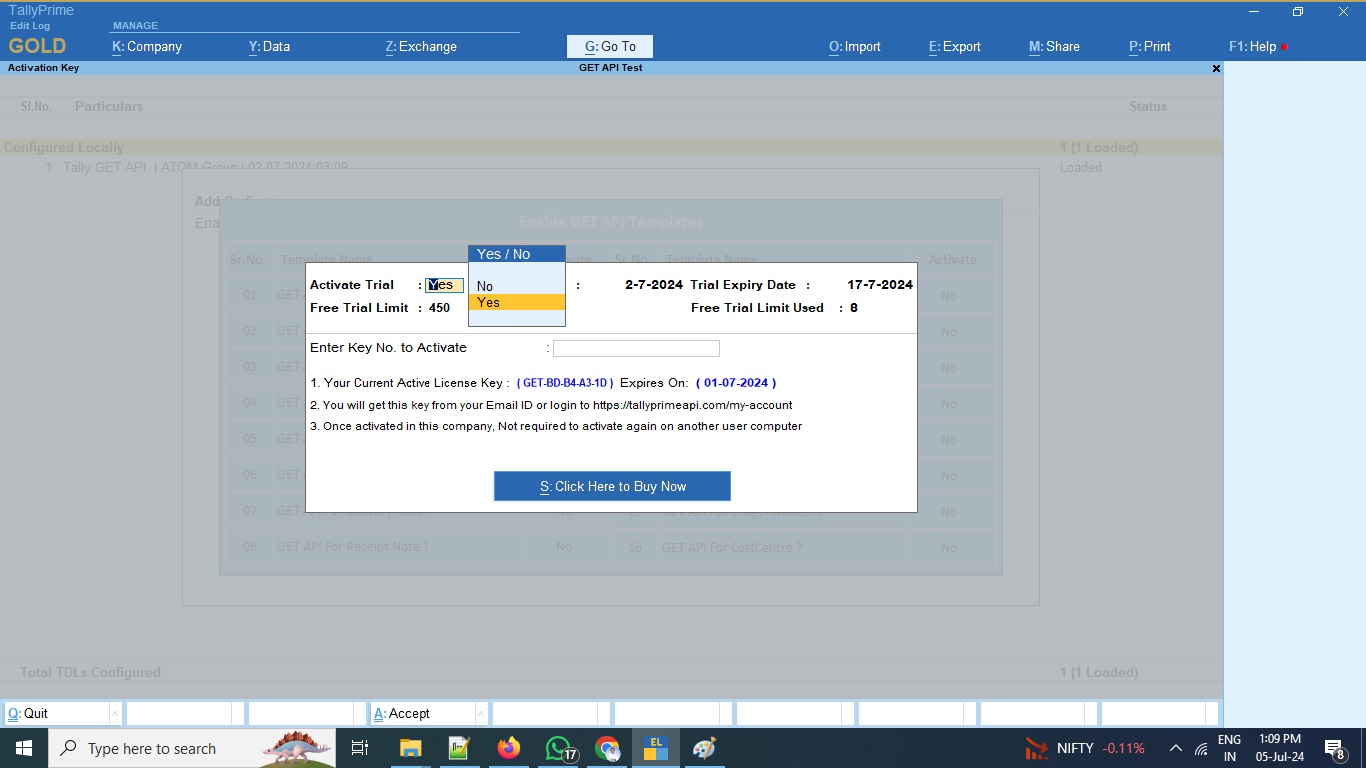
Please be noted that our API plugin free trial activation will need a valid TallyPrime license.
If you are not having TallyPrime license you can get 7 days free trial from here or you can buy Tallyprime monthly subscription from here
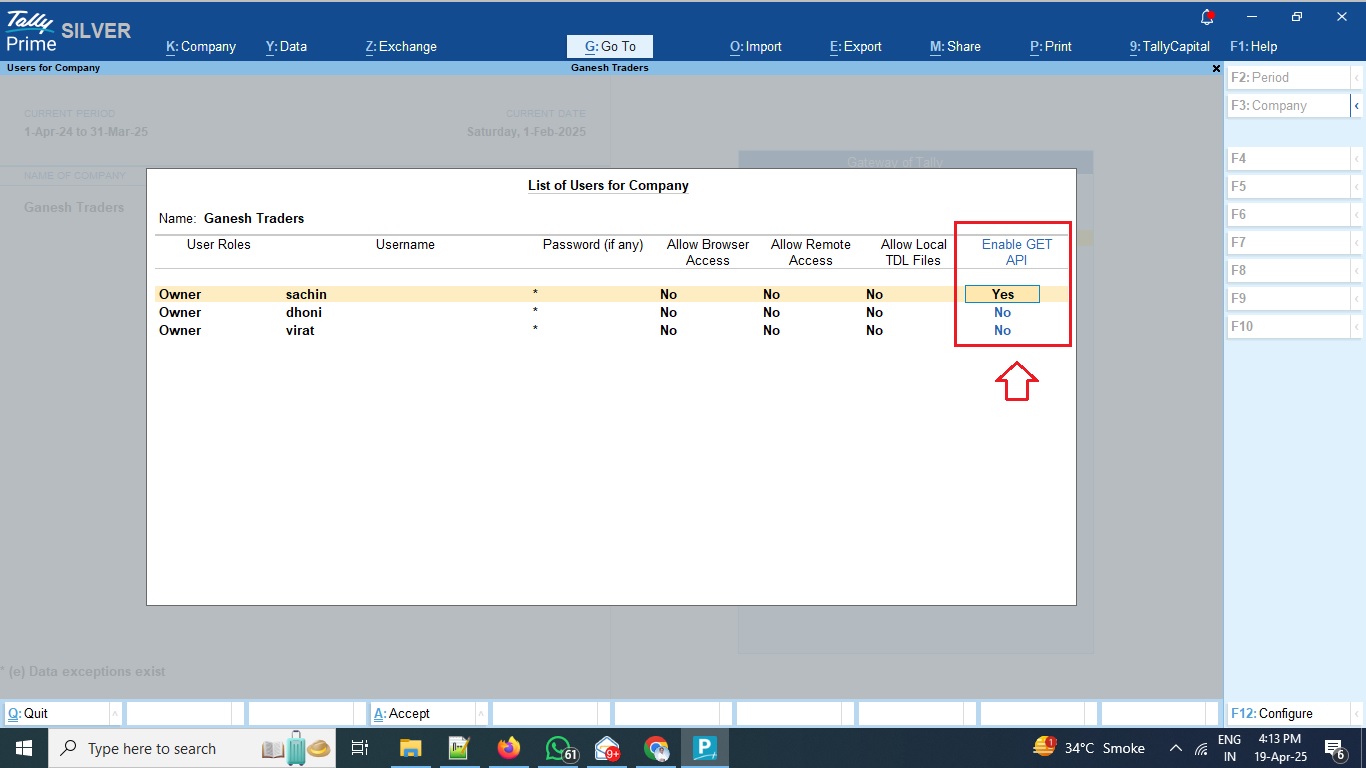
Assign Users
Administrator can assign users who can access GET API features as shown in below snapshot to prevent duplication of data uploads.
Go to Company > Users & Passwords
GET API Data Upload Settings
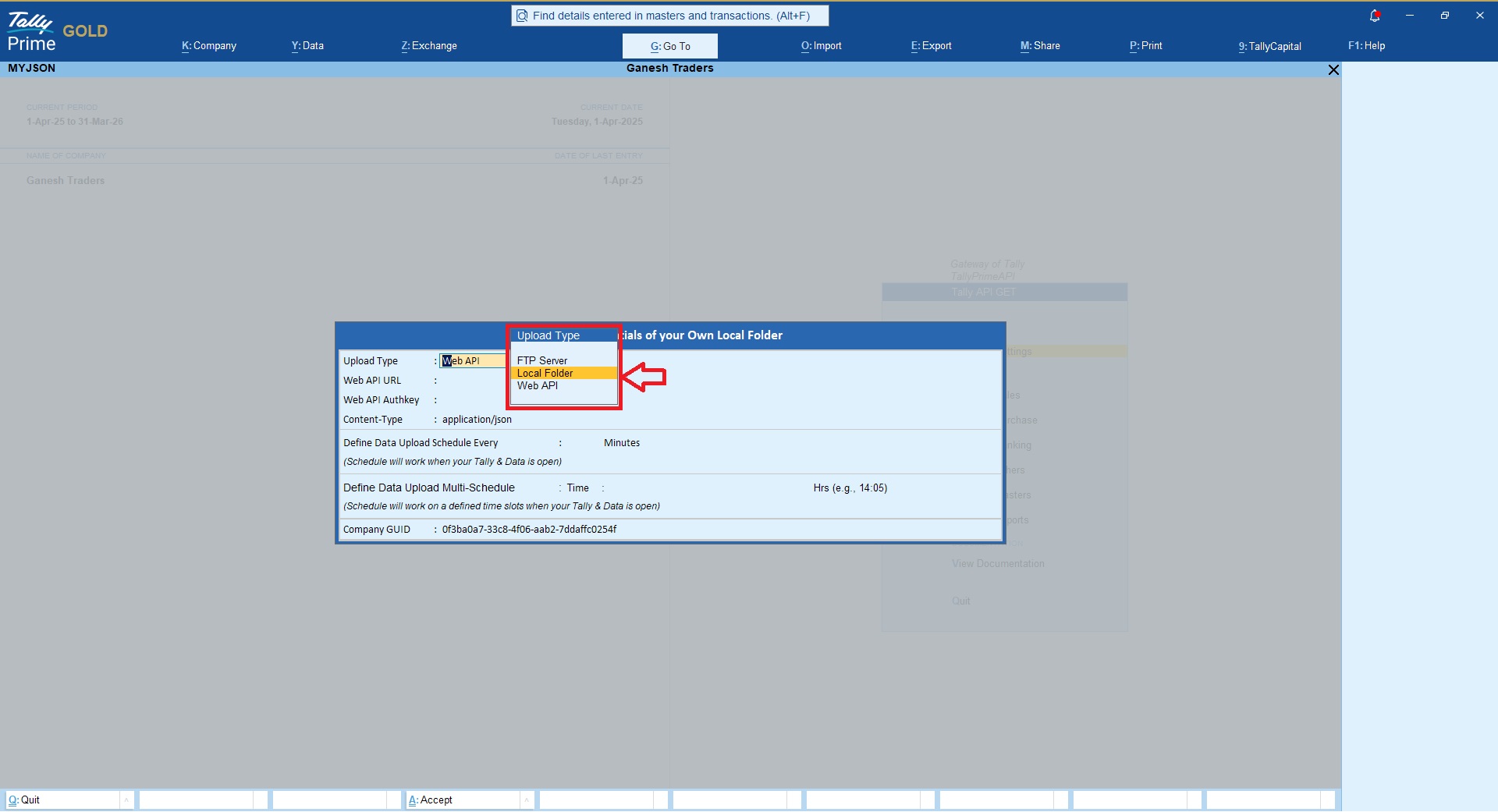
Data from TallyPrime can be uploaded in 3 ways using our API Plugin;
- Local Drive
- FTP Server
- Web API
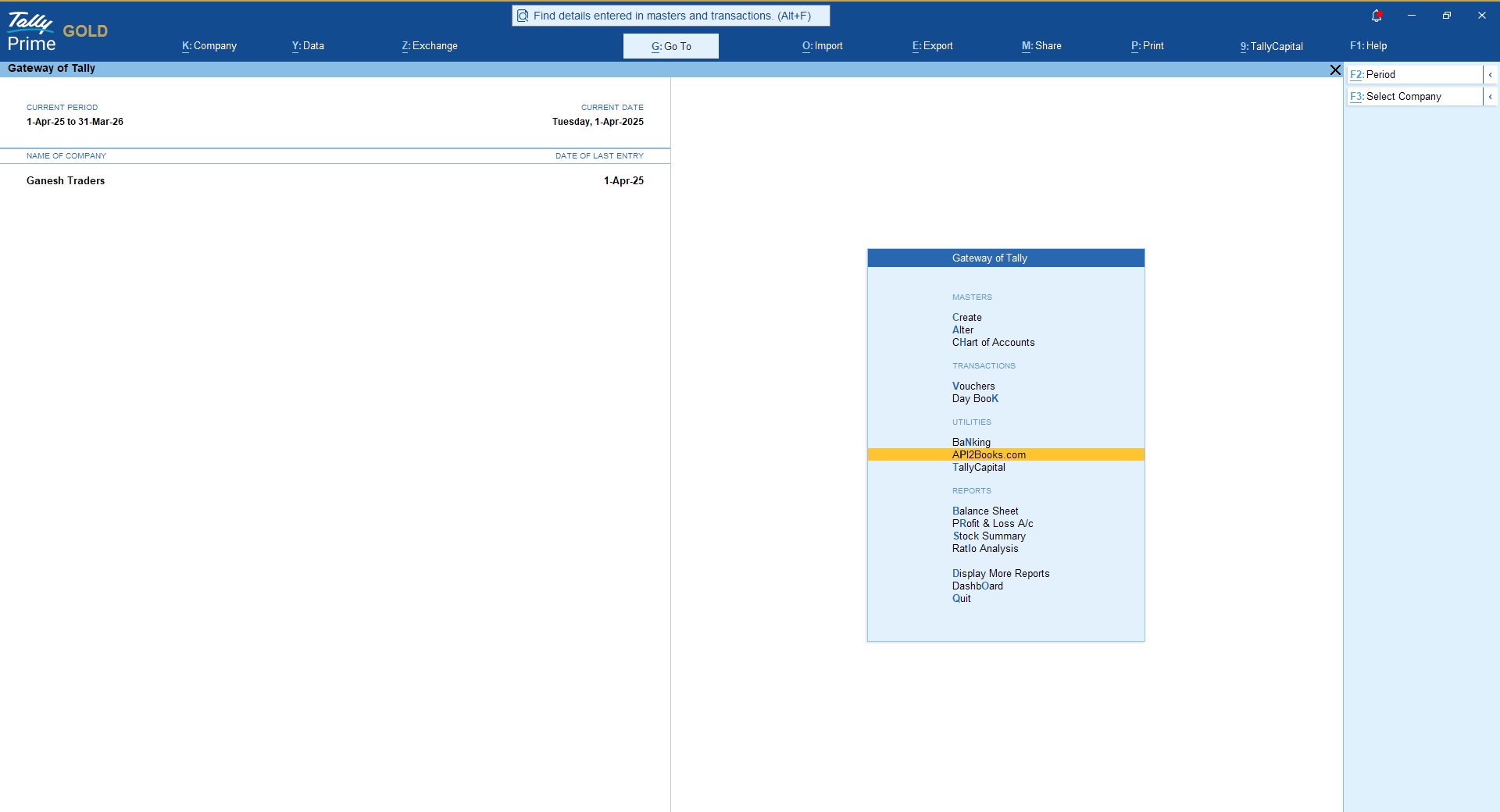
Once you have activated the TallyPrime GET API plugin, you will find new menu option on Gateway of Tally as API2Books.com as shown in below snapshot;
Data Upload via FTP Method
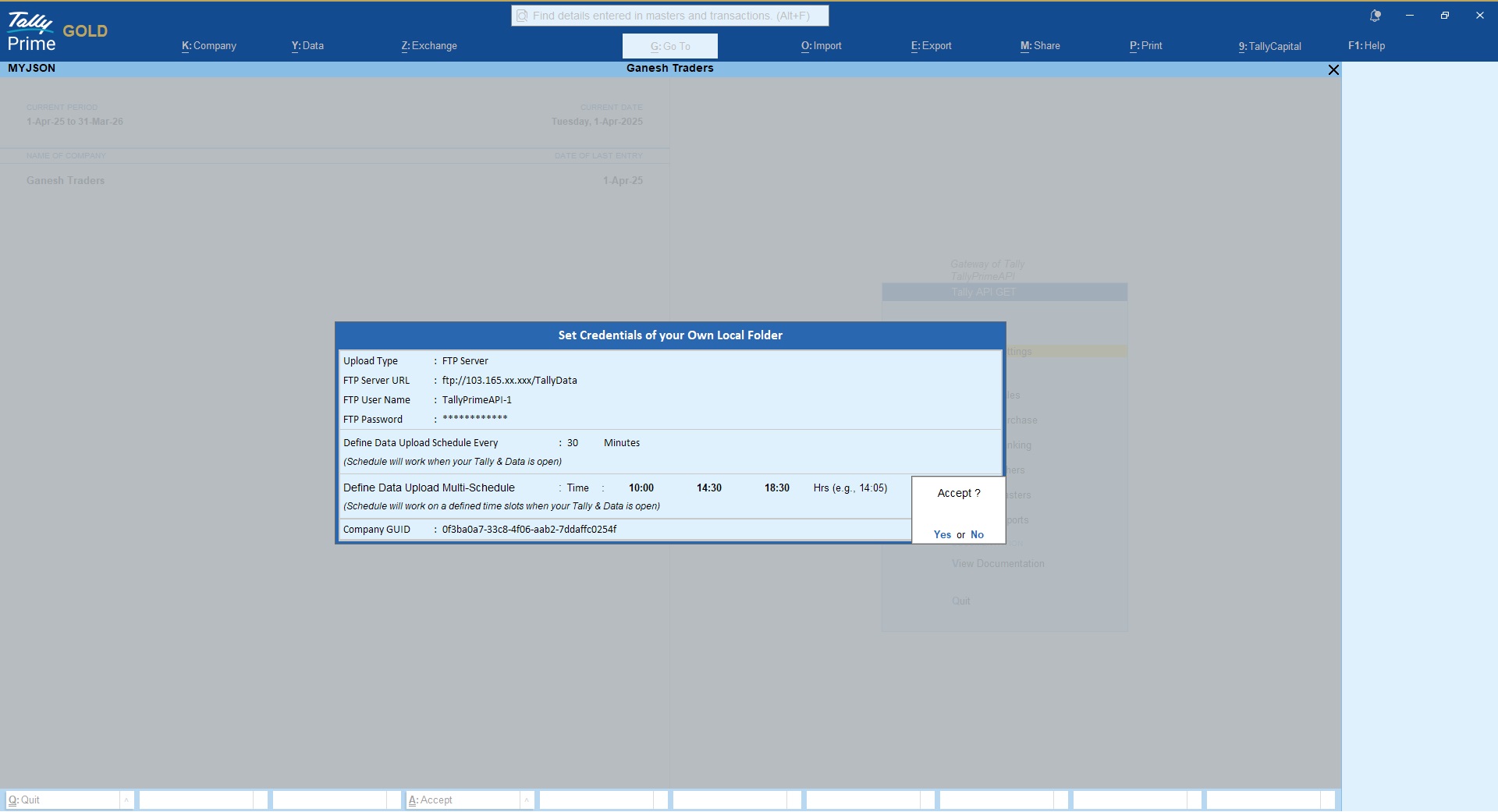
Follow the steps explained below to upload TallyPrime data over FTP server;
- Go to GET API Option > GET API Settings
- Choose option “FTP Server”
- Provide your FTP server details like FTP Server URL, FTP User Name, FTP Password
- Define data Sync/Upload schedule to upload TallyPrime data automatically on defined schedule without user intervention.
- Make sure your TallyPrime and Data is open else sync will not perform
Data Upload via Local method
- If you are planning to extract data locally then you may define local directory path in which you want to extract Tally data as shown in below snapshot
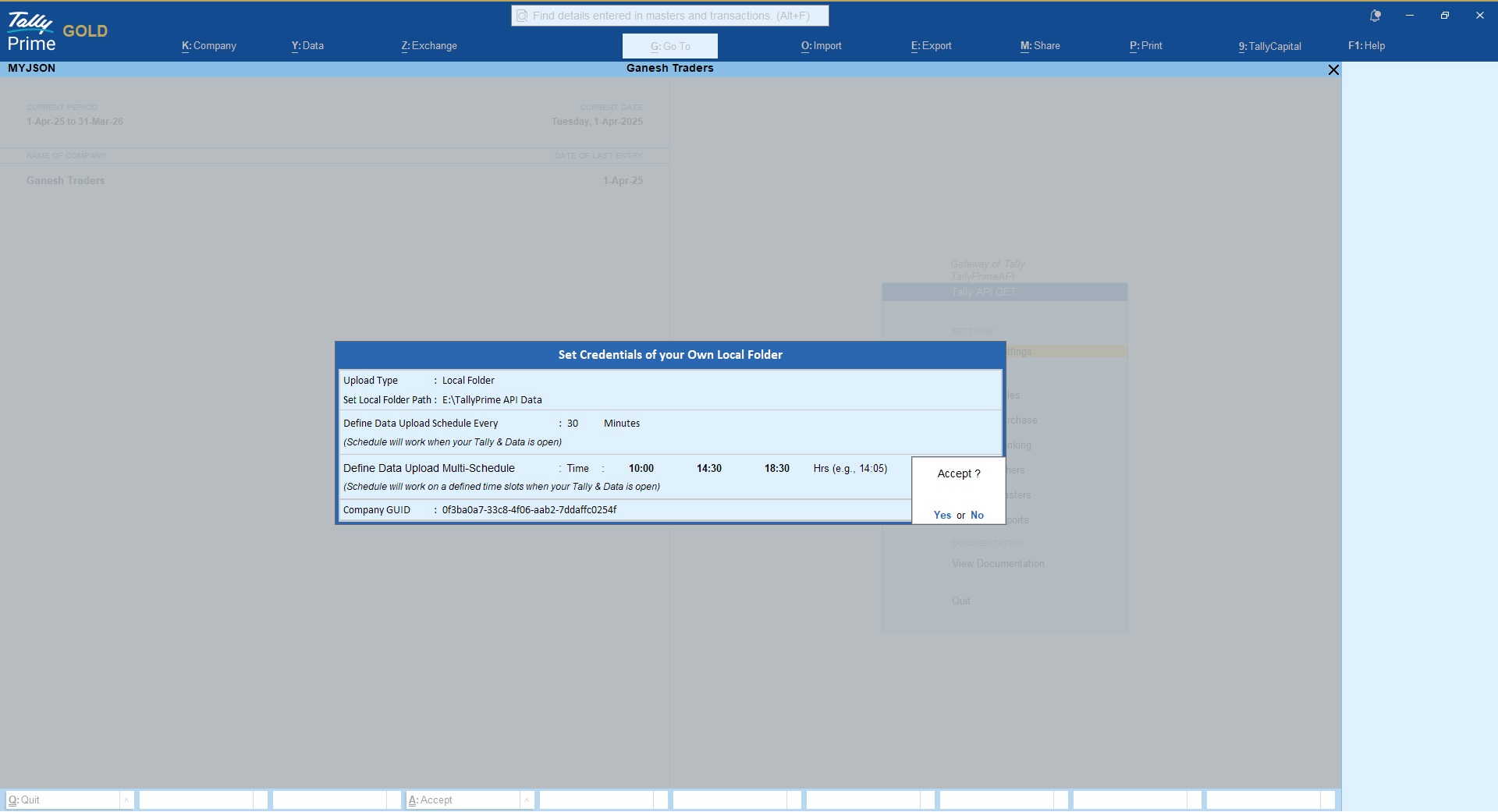
Data Upload via WEB API Method
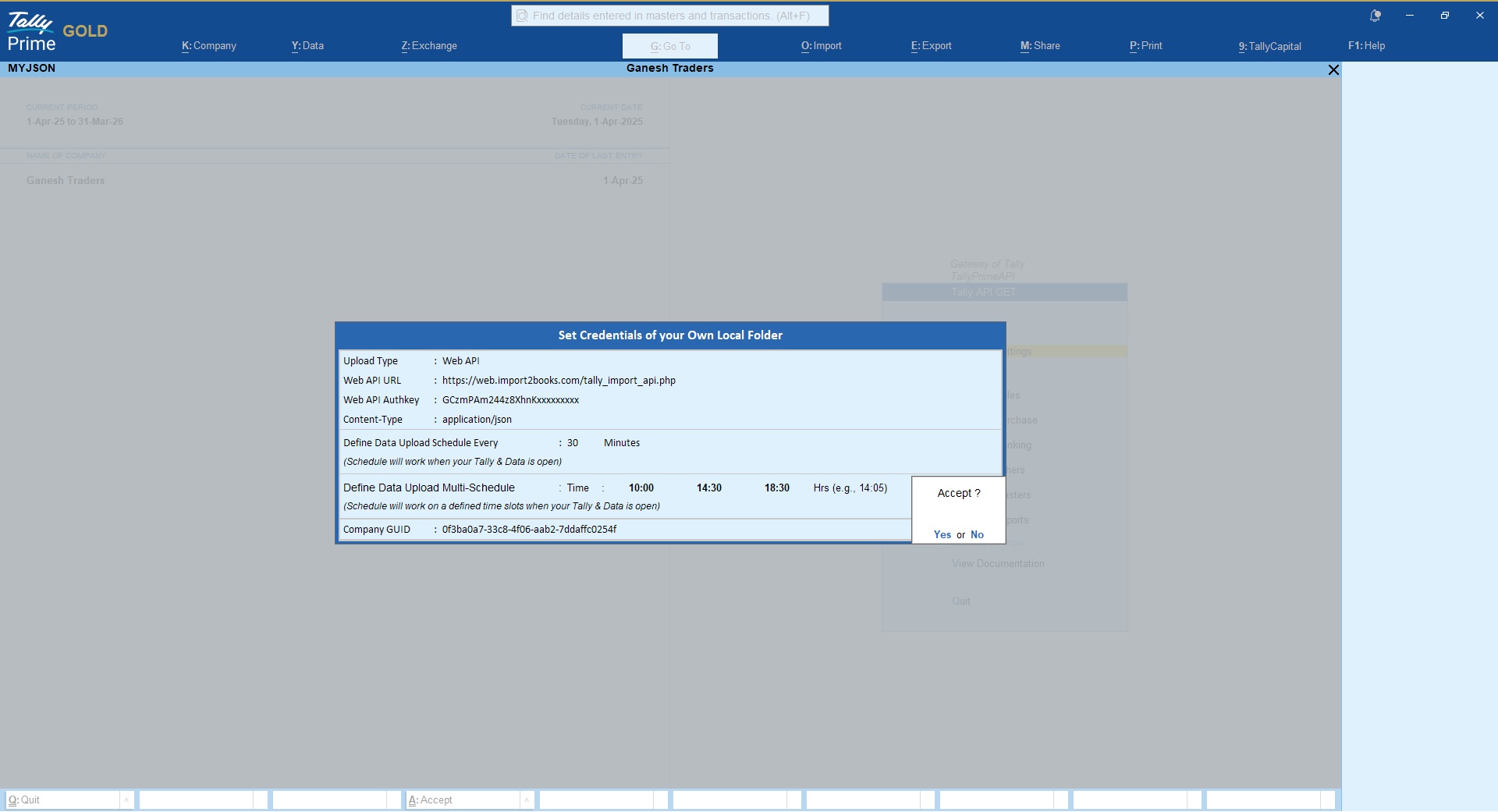
If you are planning to integrate your application/database directly with TallyPrime then you may achieve the same using Web API method.
This method will insert TallyPrime data directly to your application/database.
Please refer settings below to upload TallyPrime data over Web API;
TallyPrime GET API Data Upload Events
Our API plugin supports multiple trigger events to GET TallyPrime data either on your FTP server or in your local directory or on Web API.
1. Data Upload on Save (Real-time)
If you wish to upload vouchers instantly after they have created/modified in TallyPrime then you can enabled the option from the voucher type alter mode as shown in below snapshot;

2. Manual Upload Single Voucher (On-Demand)
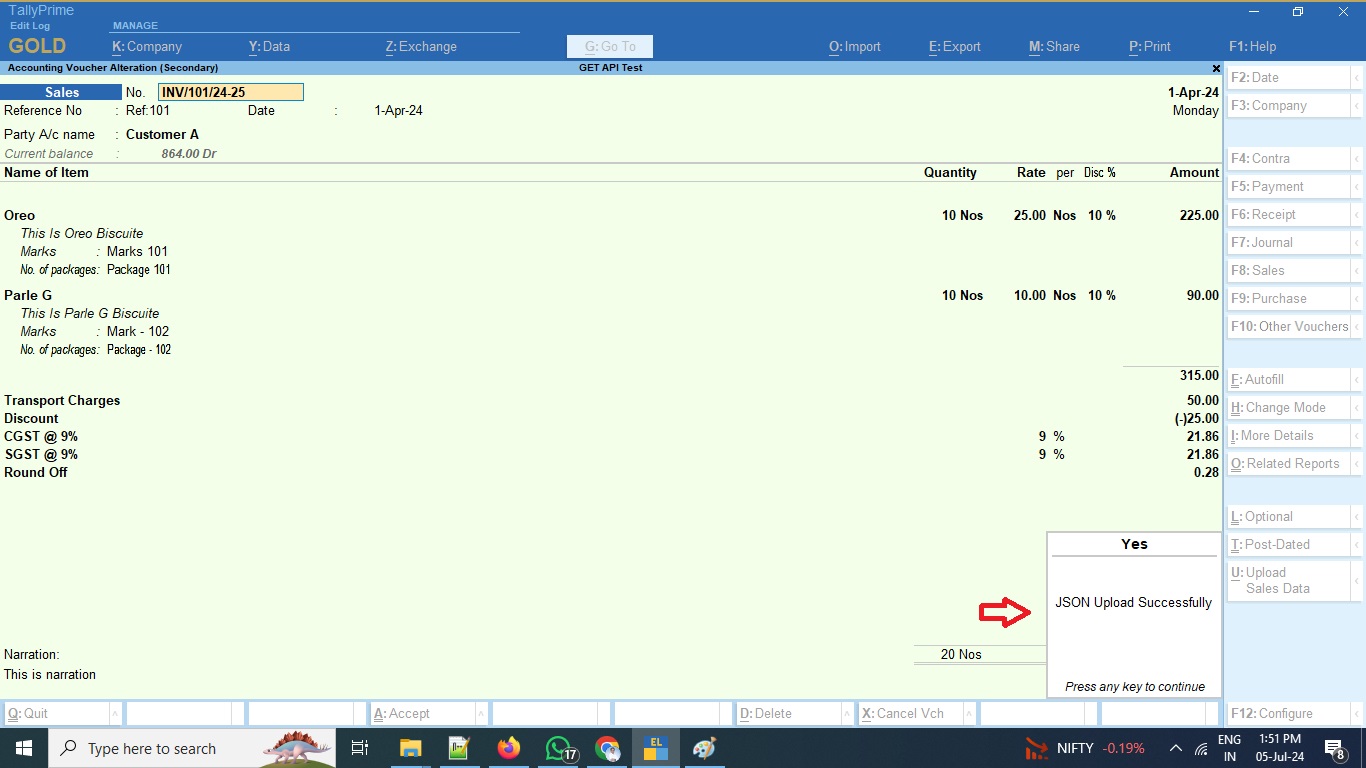
If you wish to upload voucher manually then you can do so by clicking on the “Upload Data” button given inside the voucher

3. Upload Bulk Vouchers (On-Demand)
If you wish to upload multiple/bulk vouchers then you can do so by selecting multiple vouchers and then click on the button Upload


4. Scheduled Interval
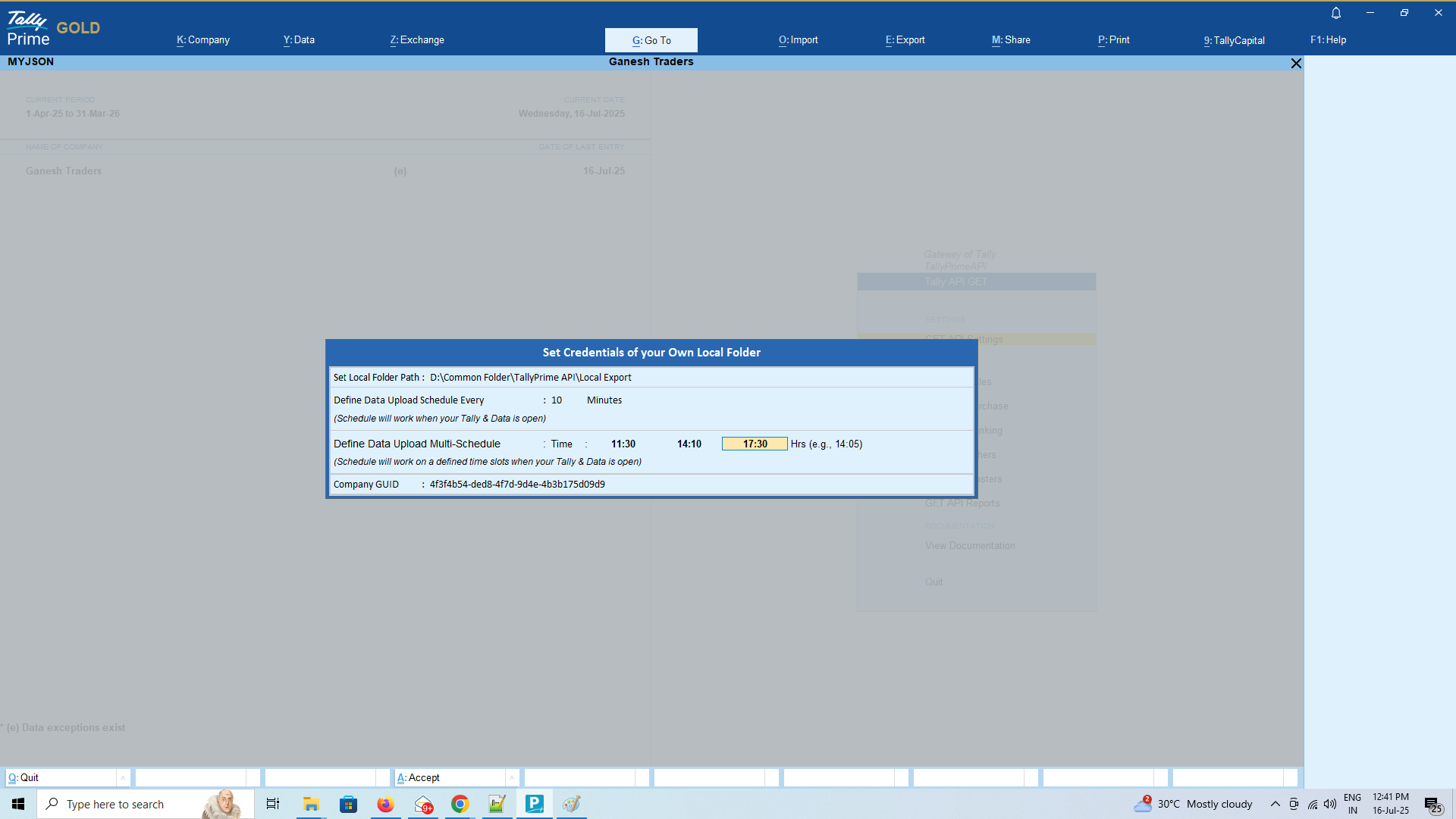
Use this method if you wants to auto upload Tally data on scheduled intervals.
If you are planning to use this option, Tally user has to make sure TallyPrime is running and company data is kept open to perform the schedule event.
Data Format & Integration
Data from TallyPrime will be extracted in structured JSON format and that can be used for integration with your database like MySQL, MSSQL, Mongodb, etc
Using our TallyPrime GET API plugin you can use Tally data to build MIS reports using PowerBI, Tableau and similar BI tools, you can integrate Tally data with your existing ERP & CRM, you can use Tally data to build your mobile apps to display important financial information’s.
Support
If you need assistance on a query not addressed in above documentation, you may reach us on support@api2books.com
Download Latest TallyPrime GET & POST API Plugin
TallyPrime GET API FAQ
-
What is TallyPrime GET API?
- TallyPrime GET API is an TDL/Plugin that helps to extract/pull required data from TallyPrime software to integrate with third-party applications.
-
Where can I extract TallyPrime data using GET API plugin?
- You can either extract TallyPrime data on your local computer by defining a local computer path OR you can publish TallyPrime data on your FTP/Web server by defining your FTP/Web server credentials in the plugin settings
-
In which format data will be extracted using TallyPrime GET API Plugin?
- TallyPrime GET API plugin will extract/pull data in JSON format
-
Can I get Free Trial of TallyPrime GET API plugin?
- Yes, you can download 15 days free trial plugin from our website
-
How can I purchase TallyPrime GET API Plugin?
- You can purchase any of our TallyPrime GET API plugin module either Monthly or Yearly subscription basis directly from our website only and get your unique plugin activation key instantly
-
Will my TallyPrime Data is secured?
- Yes…you are the owner of your TallyPrime data and you only can define where you want to extract/pull TallyPrime data. It can’t be access by us in any circumstances.
-
How is the cost of TallyPrime GET API?
- Please visit our pricing section here https://api2books.com/pricing/#get_api_pricing for detailed pricing options
- You may subscribe the API modules based on your requirements
-
Once subscribed can I use it for unlimited companies?
- Yes….you can use the GET API plugin for unlimited companies running on same Tally License number that has been provided during purchase
-
Is there any limitations on data extract?
- If you are using our free trial then you can extract 450 records for each API modules
- If you are our Monthly or Yearly paid user then there will be no limitations on data extract
-
Can I use it on any TallyPrime License?
- Free trial will work on any Tally License number
- Paid version allowed to use only on the Tally License number provided during purchase
- If you have multiple Tally Licenses then you will have to subscribe separately for each unique Tally Licenses
-
Does it supports multi user?
- Yes…..it works on multi user environment using the same Tally License
- You no need to subscribe separately for each users
Set your categories menu in Header builder -> Mobile -> Mobile menu element -> Show/Hide -> Choose menu

5Gringos z pohledu platformy, plateb a bonusových podmínek
5Gringos působí jako velké kasino se silným důrazem na šíři nabídky i na podmínky, které si hráč obvykle přečte ještě před prvním vkladem. Pro orientaci je užitečné sledovat nejen počet her, ale také rychlost plateb, měny, ověření účtu a to, jak přísně jsou nastavené bonusové limity. Právě tyto faktory často rozhodují o tom, zda platforma vyhoví spíše příležitostnému hráči, nebo člověku, který chce dlouhodobě pracovat s promyšleným bankroll managementem.
Při prvním porovnání může být vhodné začít základními informacemi o provozovateli, financích a podmínkách vyzvednutí výher; přehled na hlavní stránce značky to usnadňuje. 5gringo.cz
Z veřejně dostupných údajů vyplývá, že 5Gringos provozuje společnost SKY RAIN LIMITED a kasinová část je podpořena licencemi pro webový provoz i pro vzdálené sázení. V praxi to znamená, že platforma staví na formálním zázemí a jasně popsaných pravidlech pro vklady, výběry i bonuse. Hráč by ale měl počítat s tím, že výběr předchází ověření identity a že dokumenty je potřeba dodat ve stanovené lhůtě.
Rychlé srovnání klíčových platformních parametrů
| Oblast | Jak je 5Gringos nastaveno | Co z toho plyne pro hráče |
|---|
| Herní nabídka | Více než 4 000 kasinových her | Vysoká rozmanitost, vhodná pro hráče, kteří rádi střídají typy her |
| Platby | Karty, e‑peněženky, převody i kryptoměny | Širší výběr metod, ale je nutné hlídat podmínky výběru |
| Měny | Včetně CZK | Méně potřeby přepočtů a lepší orientace v hodnotě sázek |
| Bonusová pravidla | Všechny bonusy mají wagering a limity sázek | Bonus může být atraktivní, ale vyžaduje disciplínu |
Druhou silnou stránkou je rozsah her. K dispozici je více než 4 000 titulů od známých dodavatelů, například NetEnt, Play’n GO, Pragmatic, Microgaming nebo Booongo. Nabídka zahrnuje sloty, živé kasino i klasické stolní hry, přičemž nechybí demo režim pro vybrané hry. To je praktické hlavně pro ty, kteří si chtějí před ostrou hrou ověřit tempo hry nebo si jen porovnat různá studia bez okamžitého rizika.
Co je při posuzování 5Gringos nejdůležitější
- široká herní knihovna s více než 4 000 hrami
- podpora CZK a dalších hlavních měn
- okamžité připsání vkladů po úspěšném dokončení platby
- výběry s omezeným časem zpracování a předchozím KYC ověřením
- bonusy s wageringem a jasně stanovenými limity sázek
- mobilní webová optimalizace pro telefon i tablet
Užitečné orientační body před prvním použitím
| Téma | Důležitý údaj |
|---|
| Ověření účtu | Před výběrem je vyžadováno |
| Zpracování výběrů | Obvykle do 3 pracovních dnů |
| Doba nečinnosti | Po 180 dnech může být účtován měsíční poplatek 5 EUR |
| Podpora | Live chat a e-mail, dostupné nepřetržitě |
Z hlediska plateb je pozitivní široká škála měn včetně CZK a také kombinace karet, e‑peněženek, rychlých převodů a kryptoměn. Vklady se připisují okamžitě po dokončení, výběry se zpracovávají do tří pracovních dnů v rámci vymezených hodin. Zároveň však platí 1× protočení vkladu před výběrem a u neprohraných vkladů může být účtována komise. Zákazník proto získá flexibilitu, ale za cenu poměrně přísného finančního režimu.
AmunRa Casino: přehled platformy, plateb a podmínek
AmunRa Casino působí jako platforma, která staví na široké nabídce her, pestré platební škále a výrazně strukturovaných pravidlech pro bonusy i výběry. Pro hráče, kteří si před vstupem na účet rádi porovnají praktické detaily, je důležité sledovat nejen herní katalog, ale také limity, ověřování a časové lhůty spojené s penězi a odměnami.
Při prvním orientačním pohledu na značku může být užitečné projít si i oficiální domovskou stránku amunra-cz.eu, protože právě tam se propojují informace o nabídkách, platbách a pravidlech do jednoho celku.
Z hlediska herního prostředí působí AmunRa Casino jako rozsáhlá platforma. V nabídce je více než stovka poskytovatelů, nechybí klasické automaty, live kasino ani kategorie jako ruleta, blackjack, herní show nebo jackpoty. Důležitým bodem je také to, že web je optimalizovaný pro mobilní prohlížení, takže se dá rozumně používat na telefonu, tabletu i počítači bez nutnosti samostatné aplikace.
Srovnání klíčových provozních parametrů
| Oblast | Co nabízí AmunRa Casino | Praktický dopad pro hráče |
|---|
| Herna | Automaty, live kasino, herní show, ruleta, blackjack a další kategorie | Širší výběr usnadňuje hledání podle stylu hry |
| Platby | Karty, převody, e-peněženky i kryptoměny | Více možností pro různé preference i měny |
| Vklad | Od 10 EUR u řady metod, 30 EUR u bitcoinu | Nízká vstupní bariéra u většiny plateb |
| Výběry | Finanční kontrola do 3 pracovních dnů | Vyplatí se počítat s prodlevou u vyřízení |
Platební stránka je poměrně široká a zahrnuje tradiční karty, bankovní převod, vybrané elektronické peněženky i kryptoměny. Minimální vklad je u části metod už od 10 EUR, zatímco u bitcoinu je nastaven vyšší vstupní práh 30 EUR. U výběrů se navíc počítá s tím, že zpracování prochází finančním oddělením, které má dle pravidel reagovat do tří pracovních dnů, a výběry se obvykle zpracovávají v pracovním okně mezi 6:00 a 17:00 GMT od pondělí do pátku.
Co je dobré si před použitím AmunRa Casino zkontrolovat
- Přijímaná měna účtu a zda odpovídá preferovanému způsobu vkladu či výběru.
- Minimální vklad podle zvolené platební metody, protože se může lišit mezi kartami, převody a kryptem.
- Časový rámec pro výběry, zejména pokud hráč počítá s rychlejším vyřízení mimo bankovní zpracování.
- Podmínky bonusů, včetně maximální sázky při aktivní odměně a časového limitu na protočení.
- Požadavek na ověření totožnosti ještě před prvním výběrem.
- Důsledky neaktivity účtu, které mohou ovlivnit zůstatek i náklady na vedení účtu.
Bonusové podmínky v přehledné podobě
| Prvek | Základní nastavení |
|---|
| Maximální sázka při bonusu | 100 EUR, případně ekvivalent podle měny |
| Obrat pro kasino bonus | Obvykle x35 až x40 podle typu nabídky |
| Doba na splnění podmínek | 10 dnů u hlavních casino bonusů |
| Ověření před výběrem | Vyžadováno před výběrem prostředků |
Pro rozhodování před registrací je stejně podstatná i regulační a provozní stránka. Kasino vyžaduje ověření identity před výběrem, na dokončení KYC může mít uživatel až 30 dnů od vyžádání a při neaktivitě po 180 dnech může být účtován měsíční poplatek 5 EUR. Pozornost si zaslouží i bonusová pravidla: při aktivním bonusu platí limity na sázku, některé herní skupiny se z obratových podmínek vylučují a při nedostatečném protočení může být uplatněna komise. To jsou přesně ty faktory, které rozhodují o tom, zda je platforma pro konkrétního hráče vhodná.
Beep Beep Casino: co zvážit před prvním použitím platformy
Beep Beep Casino působí jako platforma s poměrně širokým záběrem: kombinuje klasické kasino, výrazně nastavený VIP systém, různé bonusové balíčky a také rozsáhlé platební možnosti včetně kryptoměn. Pro hráče je před registrací důležité hlavně to, jak jsou nastavené vklady, výběry, ověření účtu a pravidla pro bonusy, protože právě tyto detaily často rozhodují o celkové uživatelské zkušenosti.
Při orientaci v nabídce i podmínkách může být užitečné projít si také oficiální vstupní stránku beep-beep.co.cz, protože tam bývají soustředěné základní informace o brandu i odkazy na důležité dokumenty.
Z pohledu důvěryhodnosti stojí za pozornost licencování pod Curaçao Gaming Control Board a zázemí provozovatele WoT N.V. To samo o sobě neříká vše o kvalitě služby, ale dává rámec pro posuzování pravidel a řešení sporů. Důležité je i to, že kasino uvádí povinné ověření identity před výběrem a počítá s vyřízením KYC zpravidla do 24 hodin od dodání posledního dokumentu. Pro hráče to znamená, že vyplatí se počítat s tímto krokem předem, ne až ve chvíli, kdy chce účet vybrat.
Rychlé srovnání praktických parametrů
| Oblast | Co Beep Beep Casino uvádí | Co to znamená pro hráče |
|---|
| Licence | Curaçao Gaming Control Board | Základní regulační rámec a formální dohled |
| Vklady | Bez poplatku, minimum už od 5 USD nebo ekvivalentu | Nízký vstupní práh a široká volba měn |
| Výběry | Běžně do 24 hodin, zpracování denně 8.00–24.00 | Výplata může být rychlá, ale záleží na pořadí a metodě |
| Bonusem podmíněné hry | Karetní hry a všechny typy rulety se nezapočítávají | Některé strategie nebo oblíbené hry nejsou pro protočení vhodné |
V oblasti plateb platforma podporuje více měn i kryptoměn a deklaruje vklady bez poplatku. Minimální vklad se podle zvoleného způsobu pohybuje už od 5 USD, 5 EUR, 10 PLN, 150 RUB nebo 50 UAH, zatímco výběry začínají obvykle na 20 USD, 20 EUR, 80 PLN, 1000 RUB nebo 600 UAH. Výběry se podle podmínek zpracovávají denně mezi 8.00 a 24.00, typicky v rozmezí od 5 minut do několika hodin, přičemž některé platební systémy mohou účtovat dodatečný poplatek. Pro orientaci je podstatné i to, že výběr má probíhat stejným způsobem, jakým byl proveden vklad.
Nejdůležitější body, které si před použitím ověřit
- Platná licence a kdo je provozovatel platformy.
- Povinné ověření identity ještě před výběrem peněz.
- Minimální vklad a minimální částka pro výběr podle zvoleného způsobu.
- Zda vybraný platební kanál nemá vlastní dodatečný poplatek.
- Pravidla bonusů, zejména protočení, limity sázek a platnost.
- Zaměření podpory a dostupné komunikační kanály.
Vybrané limity a opěrné body
| Parametr | Hodnota |
|---|
| Ověření účtu | Před výběrem je povinné |
| Běžná lhůta pro KYC | Až 24 hodin od dodání posledního dokumentu |
| Podpora | E-mail a telefon |
| Jazyky rozhraní | Angličtina, němčina, španělština, portugalština, polština, finština, ruština |
Bonusová stránka Beep Beep Casino je spíše aktivní a vrstevnatá než jednoduchá. K dispozici je například no deposit bonus, nabídky pro první i další vklady, narozeninový bonus a VIP program s osmi úrovněmi. Současně ale platí přísnější podmínky: obecné protočení bývá x35, pro některé akce x30 nebo x50, u bonusu je omezen maximální sázkový limit a z bonusových pravidel jsou vyňaty karetní hry a všechny typy rulety. To je přesně ten typ detailu, který by měl hráč sledovat ještě před přijetím nabídky, protože může zásadně ovlivnit reálnou použitelnost bonusu.
Beep Beep Casino: co zvážit před prvním použitím
Beep Beep Casino působí jako platforma s výrazným důrazem na bonusy, kryptoměny a širší nabídku platebních možností. Pro hráče z Česka je důležité dívat se nejen na lákavé promo nabídky, ale hlavně na to, jak jsou nastavené vklady, výběry, ověření totožnosti a pravidla pro bonusové hraní. Teprve kombinace těchto prvků ukáže, zda bude prostředí spíš pohodlné, nebo naopak plné podmínek, které stojí za pozornost.
Podrobný přehled tohoto kasina a jeho klíčových parametrů je vhodné projít ještě před prvním krokem; beepcasino.cz pomůže rychle ověřit, zda odpovídá očekáváním ohledně plateb, bonusů a uživatelské zkušenosti.
Z pohledu platformy je Beep Beep Casino postavené hlavně na širokém platebním zázemí a na častých promo mechanikách. K dispozici je více měn včetně eura, dolaru i různých kryptoměn a u vkladů se neúčtuje poplatek. Minimální vklad začíná na 10 USD nebo 10 EUR, případně ekvivalentu v dalších měnách, což je pro opatrnější rozpočet přijatelný vstupní bod. U výběrů je pak dobré počítat s tím, že zpracování obvykle probíhá do 24 hodin a některé platební systémy mohou mít vlastní dodatečný poplatek.
Rychlé srovnání klíčových parametrů
| Oblast | Co je na platformě důležité | Praktický dopad pro hráče |
|---|
| Platby | Vklady bez poplatku, minimální vklad od 10 USD nebo 10 EUR | Nižší vstupní bariéra a méně nákladný start |
| Výběry | Zpracování obvykle do 24 hodin, některé systémy mohou účtovat poplatek | Vyplatí se předem zkontrolovat zvolenou metodu |
| Bonusy | Více promo balíčků, x30 až x50 u vybraných nabídek | Vyšší potenciál, ale i více podmínek k hlídání |
| Ověření | KYC před výběrem, standardně do 24 hodin po dodání dokumentů | Bez kompletních dokladů nelze spoléhat na rychlou výplatu |
Důležitou součástí celkového dojmu je i ověřování účtu. Casino vyžaduje KYC před prvním výběrem a doklady se běžně posuzují do 24 hodin od dodání posledního potřebného dokumentu. Z hlediska bonusů je prostředí poměrně aktivní: existuje bezvkladový bonus, vícestupňové vkladové nabídky, uvítací balíčky i věrnostní program Beep Points. Současně ale platí pevná pravidla pro sázky během bonusu, časové limity a omezení pro některé typy her, zejména karetní hry a všechny druhy rulety.
Nejdůležitější body při porovnání platformy
- Široká nabídka měn a kryptoměn usnadňuje volbu platební cesty.
- Vklady jsou bez poplatku, ale výběry mohou být zatíženy poplatkem třetí strany.
- Ověření identity je povinné před první výplatou, proto je vhodné mít doklady připravené.
- Bonusy jsou rozmanité, avšak mají přísná pravidla pro sázky, čas i výjimky u některých her.
- Věrnostní program Beep Points přidává cashback, bonusy i možnost směny bodů za peníze.
Kdy může Beep Beep Casino dávat smysl a kdy být opatrný
| Situace | Hodnocení |
|---|
| Hráč hledá hodně platebních možností včetně kryptoměn | Spíše vhodné |
| Hráč chce jednoduché bonusové podmínky bez omezení her | Vyžaduje opatrnost |
| Hráč preferuje rychlé výběry po splnění KYC | Potenciálně vhodné |
| Hráč nechce řešit ověřování před výběrem | Méně vhodné |
Pro rozhodování před registrací je užitečné sledovat i servisní a bezpečnostní rámec. Podpora funguje přes e-mail a telefon, přičemž dostupné jsou různé jazykové verze rozhraní. Z hlediska odpovědného hraní jsou k dispozici limity na vklady i self-exclusion, což patří mezi praktické nástroje pro kontrolu rozpočtu. Na druhé straně je vhodné počítat s tím, že některé podmínky bonusů a výběrů mohou být přísnější, než se může na první pohled zdát, a že výběr bývá vázán na stejnou platební metodu, jaká byla použita pro vklad.
Bizzo: přehled platformy před prvním použitím
Bizzo působí jako mezinárodní kasino s důrazem na širokou nabídku her, mobilní přístup přes prohlížeč a poměrně detailně popsaná pravidla pro bonusy i platby. Pro hráče z České republiky je důležité hlavně to, že platforma pracuje s více měnami včetně CZK, podporuje české prostředí a zároveň staví na jasných limitech u bonusových akcí, výběrů i ověřování účtu.
Před rozhodnutím má smysl projít si také oficiální přehled značky bizzocasino-cz.eu, protože právě tam bývají shrnuté informace, které ovlivní první dojem z platformy i praktické používání účtu.
Z pohledu uživatelského zážitku Bizzo staví na responzivním webu bez nutnosti instalace aplikace. To je výhoda pro hráče, kteří chtějí přejít mezi počítačem a mobilem bez komplikací. V nabídce jsou nejen sloty, ale i blackjack, ruleta, poker, live kasino, baccarat, crash hry a jackpotové tituly. K dispozici je také demo režim bez registrace, který slouží k orientaci v herním prostředí, i když samozřejmě neumožňuje hrát o reálné peníze.
Srovnání klíčových provozních parametrů
| Oblast | Co je dobré vědět | Praktický dopad pro hráče |
|---|
| Přístup na platformu | Responzivní web bez nutnosti instalace | Snadné používání na počítači i v mobilu |
| Platby | Minimum pro vklad 10 EUR; více metod včetně karet, peněženek a kryptoměn | Nízká vstupní bariéra, ale je nutné hlídat dostupnost konkrétní metody |
| Výběry | Denní limit 4 000 EUR, týdenní 16 000 EUR, měsíční 50 000 EUR | Větší výplaty mohou být rozloženy do více částí |
| Ověření | KYC před výběrem, přibližně 72 hodin | Počítat s prodlevou před první výplatou |
Důležitým bodem je i platební logika. Bizzo uvádí minimum pro vklad 10 EUR nebo 10 USD, přičemž podporuje i české koruny a několik běžných elektronických peněženek, karty i kryptoměny. Vklad je popisován jako okamžitý, výběry však závisí na zvoleném způsobu a dodatečných bezpečnostních kontrolách. Z hlediska plánování je podstatné, že výběrové limity jsou nastavené na 4 000 EUR za den, 16 000 EUR za týden a 50 000 EUR za měsíc. U bankovního převodu je minimum pro výběr vyšší, konkrétně 500 EUR.
Co je při posuzování Bizzo nejdůležitější
- Web funguje v prohlížeči a nevyžaduje stažení aplikace.
- Podpora měn zahrnuje i CZK a široké spektrum fiat i kryptoměn.
- K dispozici je živý chat nonstop a kontaktní e-mail.
- Bonusy mají jasně nastavený obrat 40× a limit sázek při aktivním bonusu.
- Výběry podléhají ověření účtu a čas závisí na způsobu platby.
- Nabídka her je široká a zahrnuje i live kasino a demo režim.
Rychlý přehled bonusových pravidel
| Prvek | Nastavení u Bizzo |
|---|
| Obrat pro vklady | 40× |
| Maximální sázka při aktivním bonusu | 5 EUR |
| Bonusové hry se započítáním | hlavně sloty |
| Hry bez započítání | stolní hry, live dealer a jackpoty |
Zákaznické a bezpečnostní zázemí působí na první pohled solidně: web používá 128bitové SSL šifrování, zmiňuje soulad s GDPR a nabízí živý chat 24/7 i e-mail. Ověření identity probíhá před výběrem a obvykle trvá zhruba 72 hodin, přičemž platforma vyžaduje doklad vydaný státem, například občanský průkaz nebo pas. Pro mnoho hráčů bude rozhodující i bonusová disciplína, protože všechny běžné vklady mají obrat 40× a při aktivním bonusu platí maximální sázka 5 EUR. To znamená, že Bizzo je spíše pro ty, kteří chtějí číst podmínky pečlivě a pracovat s nimi vědomě.
Casinia: jak působí herní platforma před prvním použitím
Casinia je platforma, která kombinuje kasino, živé hry i sportovní sekci a působí spíše jako širší herní ekosystém než jako úzce zaměřené kasino. Pro hráče, kteří si před vstupem chtějí udělat jasno v tom, jak je web postavený, je důležité sledovat hlavně nabídku bonusů, platební možnosti, ověřovací proces a to, jak rychle se dá vyznat v pravidlech. Právě tyto prvky často rozhodují víc než samotná vizuální stránka webu.
Přímý vstup na oficiální web je k dispozici zde: casiniacasinocz.cz. Při orientaci na platformě se vyplatí vnímat ji jako místo, kde vedle klasického online kasina hrají roli také sportovní sázky, VIP systém a několik typů průběžných nabídek, které mají odlišná pravidla a časová omezení.
Z pohledu uživatelského dojmu je Casinia postavená na poměrně široké nabídce. Kromě slotů a stolních her jsou dostupné i živé hry, game show a sportovní část. To je výhodné pro hráče, kteří nechtějí přecházet mezi více značkami, ale zároveň to klade vyšší nároky na přehlednost. Důležitým orientačním bodem je také jazyková podpora rozhraní: web nabízí řadu jazyků, včetně češtiny, což může usnadnit základní navigaci i pochopení podmínek.
Rychlý přehled praktických parametrů platformy
| Oblast | Co je dobré vědět | Praktický dopad |
|---|
| Herní nabídka | K dispozici jsou sloty, živé hry, game show i sportovní sekce. | Vhodné pro hráče, kteří chtějí více formátů pod jednou značkou. |
| Platby | Podporovány jsou fiat měny i kryptoměny; minimální vklad začíná na 10 EUR. | Snadnější vstup i pro menší testovací vklad. |
| Ověření | Před výběrem může být vyžadováno KYC, obvykle se zpracuje za 24 až 48 hodin. | Výběr je lepší plánovat s časovou rezervou. |
| Bonusy | Najdou se uvítací i průběžné akce pro kasino, sport i kryptoměny. | Vyplatí se číst podmínky každé nabídky zvlášť. |
Druhá zásadní oblast je bezpečnost a správa účtu. Casinia uvádí dvoufaktorové ověření, soulad s pravidly GDPR a standardní kontakt na pověřence pro ochranu osobních údajů. U účtu platí věková hranice 18 let a také zásada pouze jednoho účtu na hráče. U výběrů je vhodné počítat s tím, že ověření totožnosti může být vyžádáno před výběrem a po dodání všech dokladů obvykle trvá 24 až 48 hodin. Tím pádem je rozumné brát KYC jako běžnou součást provozu, ne jako výjimku.
Co je při porovnání Casinia nejdůležitější sledovat
- Šíři nabídky: kasino, živé hry, sportovní část a průběžné promo akce v jednom prostředí.
- Jazyk rozhraní: dostupná je i čeština, což zjednodušuje orientaci v pravidlech.
- Vkladové a výběrové podmínky: minimum vkladu, limity výběrů a nutnost ověření účtu.
- Tempo zpracování: vklady bývají rychlé, výběry procházejí schválením a dalším zpracováním.
- Bonusové podmínky: různé akce mají rozdílné sázkové požadavky, lhůty i omezení her.
Vybrané bonusové směry a jejich rámec
| Typ nabídky | Základní rámec | Na co si dát pozor |
|---|
| Uvítací kasinový bonus | 100 % až do 500 EUR a 200 free spinů. | Sázkové podmínky jsou navázané na vklad a bonus, navíc běží časové omezení. |
| Uvítací sportovní bonus | 100 % až do 100 EUR. | Platí pro první vklad a má samostatná pravidla pro kvalifikované sázky. |
| Krypto uvítací bonus | 200 % až do 3 000 USDT. | Má vyšší vstupní vklad a přísnější požadavky na dokončení podmínek. |
| VIP cashback | Denní i týdenní cashback varianty. | Výplata bývá spojená s aktivací a následným protočením podle pravidel. |
Finančně platforma působí poměrně flexibilně. Podporuje několik fiat měn včetně CZK a také kryptoměny. Minimální vklad začíná na 10 EUR nebo ekvivalentu a mnoho vkladů je připsáno téměř okamžitě, i když je uvedena rezerva až dvě hodiny. U výběrů je důležitý limit podle úrovně účtu, přičemž pro EUR jsou nastaveny denní i měsíční stropy. Pro hráče, kteří sledují praktickou stránku používání webu, jsou tedy klíčové tři otázky: jaký způsob platby používají, jak přísně se dodržuje ověření a jak pracují s časem při výběrech.
Beep Beep Casino: přehled platformy před prvním využitím
Beep Beep Casino působí jako platforma, která staví na široké nabídce plateb, více jazykových verzích a poměrně jasně popsaných pravidlech pro bonusy i ověření účtu. Pro hráče, kteří si předem porovnávají kasina, je důležité hlavně to, jak snadno se orientuje v rozhraní, jaké jsou limity pro vklady a výběry a zda jsou podmínky nastavené srozumitelně. Právě na tyto praktické body se vyplatí soustředit ještě před registrací.
Oficiální informace o značce je vhodné ověřovat přímo na casinobeepbeep.cz, protože právě tam se obvykle promítají aktuální podmínky plateb, bonusů i kontroly účtu.
Z pohledu platformního zážitku je Beep Beep Casino založené spíše na funkčnosti než na okázalých slibech. Důležitý je například fakt, že přijímá širokou škálu měn včetně USD, EUR, PLN, UAH a také několik kryptoměn. Vklady jsou bez poplatku a minimální hranice začíná na 10 USD nebo 10 EUR, zatímco některé kryptoměnové možnosti jdou ještě níž. To může být výhodné pro hráče, kteří chtějí mít kontrolu nad rozpočtem od samého začátku.
Praktické porovnání klíčových parametrů platformy
| Oblast | Co je nastaveno | Proč na tom záleží |
|---|
| Vklady | bez poplatku, minimum od 10 USD nebo 10 EUR | pomáhá plánovat rozpočet bez zbytečných nákladů |
| Výběry | obvykle do 24 hodin, denní zpracování 8.00–24.00 | ukazuje, kdy lze čekat na dokončení žádosti |
| Ověření | povinné před výběrem, až 24 hodin na zpracování | bez splněného KYC se výplata nezahájí |
| Bonusy | různé násobky sázky a samostatná pravidla pro jednotlivé nabídky | vyžadují pečlivé čtení podmínek před aktivací |
Druhou podstatnou oblastí jsou pravidla výběrů a ověření. Kasino vyžaduje kontrolu identity před výběrem a uvádí dobu zpracování ověření až 24 hodin od dodání posledního dokumentu. Výběry bývají zpracovány obvykle do 24 hodin, přičemž žádosti se vyřizují denně mezi 8.00 a 24.00 a mohou trvat od pěti minut po několik hodin podle pořadí v frontě. Z praktického hlediska je také důležité, že výběr musí proběhnout stejnou metodou, jakou byl proveden vklad.
Co je dobré si před použitím kasina zkontrolovat
- licenci a regulační rámec, který je v podkladech veden pod Curaçao Gaming Control Board
- minimální vklad a měnu účtu podle preferované platební metody
- podmínky výběru, zejména nutnost KYC a limit pro stejnou platební cestu
- bonusová pravidla, včetně násobení sázek, platnosti a maximální sázky
- jazyk podpory, protože rozhraní podporuje mimo jiné angličtinu, němčinu, španělštinu, portugalštinu, polštinu, finštinu a ruštinu
- omezení pro některé země a zásady jednoho účtu na jednu fyzickou adresu, IP a zařízení
Vybrané provozní a bezpečnostní body
| Téma | Shrnutí |
|---|
| Podpora | dostupná e-mailem a telefonicky, odpověď na stížnosti je uváděna do 72 hodin |
| Zodpovědné hraní | k dispozici jsou limity vkladů i self-exclusion |
| Platební přehled | u některých systémů může být účtován dodatečný poplatek při výběru |
| Bonusové omezení | po vyčerpání bonusu platí pravidla pro wagering a vyloučené hry, například karetní hry a všechny typy rulety |
Pokud jde o bonusovou stránku, Beep Beep Casino nabízí víc vrstev motivace, ale zároveň poměrně přísná pravidla. Standardně platí násobení sázek x35, u některých akcí x30, x25 nebo x20, a u bonusů se opakovaně objevuje limit na maximální sázku během aktivního bonusu. Pro hráče je proto podstatné číst pravidla zvlášť u každé nabídky. K orientaci navíc pomáhá i VIP program s osmi úrovněmi, cashbackem až 20 % a možností směny bodů za reálné peníze.
Bizzo: τι δείχνει η πλατφόρμα πριν από την πρώτη χρήση
Το Bizzo παρουσιάζει ένα περιβάλλον που δίνει έμφαση στην πρακτική εμπειρία του παίκτη: γρήγορη πρόσβαση από browser, μεγάλη ποικιλία παιχνιδιών και αρκετά ξεκάθαρο πλαίσιο για πληρωμές, επαληθεύσεις και μπόνους. Για όποιον συγκρίνει καζίνο πριν αποφασίσει, αυτά τα στοιχεία έχουν μεγαλύτερη σημασία από μια απλή εντυπωσιακή βιτρίνα, επειδή επηρεάζουν άμεσα την καθημερινή χρήση.
Πριν αξιολογηθεί το Bizzo ως επιλογή, αξίζει να εξεταστεί το γενικό πλαίσιο λειτουργίας του, από την πρόσβαση σε κινητό μέχρι τους κανόνες ανάληψης και τους περιορισμούς των προσφορών. Η αναλυτική παρουσίαση βρίσκεται στο bizzocasino4.gr.
Σε επίπεδο εμπειρίας πλατφόρμας, το Bizzo βασίζεται σε responsive σχεδίαση και λειτουργεί χωρίς εγκατάσταση, κάτι που το κάνει πιο εύκολο για χρήση σε iOS, Android και υπολογιστή μέσω browser. Η απουσία native εφαρμογής δεν είναι απαραίτητα μειονέκτημα για όλους, αλλά είναι χρήσιμη πληροφορία για όσους προτιμούν σταθερή πρόσβαση από τον περιηγητή και όχι ξεχωριστό app. Παράλληλα, η λίστα με τους παρόχους είναι μεγάλη και περιλαμβάνει γνωστά ονόματα όπως NetEnt, BGaming, Play'n GO, Yggdrasil και Pragmatic, άρα το περιεχόμενο δεν περιορίζεται σε μια στενή γκάμα τίτλων.
Σύντομη σύγκριση των βασικών σημείων
| Τομέας | Τι δείχνει η πλατφόρμα | Τι να προσέξει ο παίκτης |
|---|
| Πρόσβαση | Responsive ιστοσελίδα για κινητό και desktop | Δεν υπάρχει native app |
| Πληρωμές | Πολλές μέθοδοι κατάθεσης και ανάληψης | Τα όρια και οι χρόνοι διαφέρουν ανά μέθοδο |
| Μπόνους | Πολλαπλές προσφορές και free spins | Συχνά απαιτείται 40x wagering |
| Επαλήθευση | KYC πριν από ανάληψη | Η διαδικασία μπορεί να πάρει περίπου 72 ώρες |
Στο οικονομικό κομμάτι, η εικόνα είναι περισσότερο συγκεκριμένη. Οι καταθέσεις αναφέρονται ως άμεσες, με ελάχιστο ποσό 10 EUR/USD, ενώ υποστηρίζονται κάρτες, e-wallets και κρυπτονομίσματα. Οι αναλήψεις ξεκινούν επίσης από 10 EUR/USD για τις περισσότερες μεθόδους, αλλά οι τραπεζικές μεταφορές έχουν υψηλότερο ελάχιστο όριο. Αξίζει επίσης να σημειωθεί ότι οι καταθέσεις πρέπει να στοιχηματιστούν τρεις φορές πριν από ανάληψη και ότι η επαλήθευση KYC προηγείται των πληρωμών, με τυπικό χρόνο επεξεργασίας περίπου 72 ώρες.
Τι ξεχωρίζει πρακτικά στο Bizzo
- Browser-first εμπειρία χωρίς υποχρεωτικό κατέβασμα εφαρμογής.
- Μεγάλη βάση παρόχων και κατηγορίες που καλύπτουν slots, live casino και κλασικά παιχνίδια τραπεζιού.
- Υποστήριξη πολλών νομισμάτων και επιλογές σε κάρτες, e-wallets, τραπεζικές μεταφορές και κρυπτονομίσματα.
- Καθαρό πλαίσιο KYC πριν από αναλήψεις, που βοηθά στη συμμόρφωση αλλά προσθέτει ένα επιπλέον βήμα.
- Προωθητικό πρόγραμμα με επαναλαμβανόμενες προσφορές, αλλά με αρκετούς όρους για wagering και μέγιστα όρια.
Χρήσιμες λεπτομέρειες πριν από την πρώτη κίνηση
| Θέμα | Πληροφορία |
|---|
| Ελάχιστη κατάθεση | 10 EUR/USD |
| Ελάχιστη ανάληψη | 10 EUR/USD στις περισσότερες μεθόδους |
| Όριο μπόνους | Συνήθως 40x για deposit bonus |
| VIP πρόγραμμα | 30 επίπεδα με ανταμοιβές σε free spins και χρήματα |
Στα μπόνους, το Bizzo έχει αρκετή δραστηριότητα, αλλά όχι χωρίς προϋποθέσεις. Τα περισσότερα deposit bonus απαιτούν 40x wagering, τα slots συνήθως συνεισφέρουν 100% και τα τραπέζια ή το live casino δεν μετρούν. Υπάρχουν εβδομαδιαίες προσφορές, welcome πακέτα, free spins και πρόγραμμα VIP 30 επιπέδων με ανταμοιβές που κλιμακώνονται από free spins έως χρηματικά έπαθλα. Για πιο προσεκτική σύγκριση, όμως, έχει σημασία να διαβάζονται οι περιορισμοί: αν υπάρχει ενεργό μπόνους, ισχύει ανώτατο στοίχημα 5 EUR, ενώ ορισμένες προσφορές έχουν όρια κέρδους ή περιορισμένη διάρκεια ενεργοποίησης.
Cadoola: τι προσφέρει η πλατφόρμα πριν από την πρώτη χρήση
Το Cadoola παρουσιάζεται ως διεθνής πλατφόρμα καζίνο με web-based εμπειρία, γρήγορη επεξεργασία καταθέσεων και ξεκάθαρη δομή σε πληρωμές, μπόνους και επίπεδα VIP. Για έναν παίκτη που συγκρίνει επιλογές, το ενδιαφέρον δεν είναι μόνο οι προσφορές, αλλά και το πώς οργανώνονται οι βασικές λειτουργίες στην καθημερινή χρήση: η πρόσβαση από κινητό, οι κανόνες ανάληψης, οι προϋποθέσεις επαλήθευσης και η ευκολία να εντοπίζονται τα σημαντικά σημεία χωρίς ασαφείς όρους.
Για όσους θέλουν να εξετάσουν την πλατφόρμα στο ίδιο το περιβάλλον της, το cadoola.bet είναι το σημείο αναφοράς για να δει κανείς πώς αποδίδεται το brand στην πράξη, από τη ροή των συναλλαγών έως την παρουσία των προσφορών.
Η εμπειρία χρήσης φαίνεται να βασίζεται σε απλή πλοήγηση και σε εργαλεία που βοηθούν τον παίκτη να κινηθεί γρήγορα, όπως αναζήτηση, ενότητα μπόνους, πορτοφόλι και ξεχωριστές καρτέλες για καταθέσεις και αναλήψεις. Δεν υπάρχει ένδειξη για native εφαρμογή, όμως η web βελτιστοποίηση είναι αρκετή για κάποιον που προτιμά πρόσβαση από κινητό ή tablet χωρίς εγκατάσταση. Στο περιεχόμενο υπάρχουν κατηγορίες όπως slots, live παιχνίδια, instant games, table games, jackpots και Megaways, ενώ οι πάροχοι που αναφέρονται είναι οι NetEnt και Yggdrasil.
Βασική εικόνα πλατφόρμας και λειτουργίας
| Τομέας | Τι δείχνει το Cadoola | Τι σημαίνει για τον παίκτη |
|---|
| Πλοήγηση | Εργαλεία για αναζήτηση, μπόνους, πορτοφόλι, κατάθεση και ανάληψη | Πιο καθαρή καθημερινή χρήση και γρήγορη πρόσβαση στα βασικά |
| Πληρωμές | Καταθέσεις με άμεση πίστωση και επιλογές σε πολλά νομίσματα | Ευκολότερη προσαρμογή για διαφορετικά πορτοφόλια και αγορές |
| Αναλήψεις | Επεξεργασία εντός 3 εργάσιμων ημερών, με έλεγχο ταυτοποίησης | Απαιτεί υπομονή και σωστή προετοιμασία εγγράφων |
| Περιεχόμενο παιχνιδιών | Slots, live παιχνίδια, jackpots, instant games και table games | Εύρος επιλογών για διαφορετικά στυλ παιχνιδιού |
Στα οικονομικά, το Cadoola δίνει αρκετές επιλογές νομισμάτων και αρκετούς τρόπους κατάθεσης, με Neteller και Skrill να εμφανίζονται διαθέσιμα για καταθέσεις, αλλά να μην μετρούν για τις προσφορές καλωσορίσματος. Οι καταθέσεις εμφανίζονται ως άμεσες, ενώ οι αναλήψεις υπόκεινται σε έλεγχο και συνήθως ολοκληρώνονται εντός τριών εργάσιμων ημερών μετά το αίτημα. Υπάρχει επίσης απαίτηση επαλήθευσης πριν από την ανάληψη, κάτι που είναι σημαντικό για όποιον θέλει να αποφύγει εκπλήξεις αργότερα.
Σημεία που αξίζει να σταθμίσει κάποιος πριν επιλέξει το Cadoola
- Η πλατφόρμα λειτουργεί μέσω browser, άρα η εμπειρία εξαρτάται από τη συσκευή και όχι από εφαρμογή.
- Οι καταθέσεις εμφανίζονται άμεσες, ενώ οι αναλήψεις περνούν από έλεγχο και επεξεργασία σε εργάσιμες ώρες.
- Υπάρχει δομημένο πρόγραμμα VIP με πέντε επίπεδα και κλιμακωτά όρια ανάληψης.
- Τα μπόνους έχουν ενεργή διαχείριση, όρια μέγιστου στοιχήματος και προϋποθέσεις πονταρίσματος.
- Ορισμένες μέθοδοι πληρωμής, όπως Neteller και Skrill, δεν συμμετέχουν στις προσφορές καλωσορίσματος.
Χρήσιμες λεπτομέρειες για την οικονομική και προωθητική δομή
| Πεδίο | Σύνοψη |
|---|
| Μπόνους καλωσορίσματος | Πολλαπλές φάσεις για νέους παίκτες, με όρια στοιχήματος 5 EUR όσο υπάρχει ενεργό μπόνους |
| VIP πρόγραμμα | Πέντε επίπεδα με υψηλότερα όρια ανάληψης και cashback για τα μεσαία και ανώτερα επίπεδα |
| Υπόλοιπο και αδράνεια | Χρέωση 5 EUR τον μήνα μετά από 180 ημέρες αδράνειας |
| Επαλήθευση | Απαιτείται πριν από ανάληψη, με συνήθη χρόνο ελέγχου 24 έως 48 ώρες |
Η πιο χρήσιμη εικόνα για έναν συγκριτικό αναγνώστη είναι ότι το Cadoola συνδυάζει επιθετική δομή μπόνους με σαφείς περιορισμούς. Το μέγιστο στοίχημα όταν υπάρχει ενεργό μπόνους είναι περιορισμένο, ενώ για το welcome πακέτο προβλέπονται ξεχωριστές φάσεις στις πρώτες τέσσερις καταθέσεις. Παράλληλα, υπάρχει πρόγραμμα VIP με πέντε επίπεδα, αυξανόμενα όρια ημερήσιας και μηνιαίας ανάληψης και cashback από το Silver και πάνω. Αυτό κάνει την πλατφόρμα πιο ενδιαφέρουσα για παίκτες που δίνουν σημασία στη μακροπρόθεσμη χρήση και όχι μόνο στο πρώτο μπόνους.
Bizzo Casino: visión práctica de la plataforma antes de registrarse
Bizzo Casino se presenta como una plataforma de alcance global con interfaz en varios idiomas, juego desde navegador y una oferta amplia de tragaperras, casino en vivo y otras categorías. Para quien compara casinos, el interés no está solo en la cantidad de títulos, sino en cómo encajan sus condiciones, su banca y sus normas de verificación con las expectativas del jugador.
Antes de valorar promociones o catálogo, conviene revisar la estructura general del sitio y su enfoque de uso. La información esencial puede comprobarse en bizzocasino-es.eu, donde el lector puede situar la marca dentro de un contexto más amplio y comparar su propuesta con mayor criterio.
En experiencia de plataforma, Bizzo destaca por una propuesta compatible con navegador y adaptada a dispositivos móviles sin necesidad de descarga. La interfaz está disponible en español y en varios idiomas más, lo que ayuda a orientarse si se consulta desde España o desde otros mercados. También cuenta con juego de demostración sin registro, una función útil para ver la selección de tragaperras y comprobar el estilo del catálogo antes de comprometer fondos reales. La presencia de más de cuarenta proveedores refuerza esa impresión de amplitud, aunque el valor real depende de si el usuario busca títulos conocidos, juegos de estudio concreto o simplemente variedad.
Resumen comparativo de la experiencia de plataforma
| Dimensión | Qué ofrece Bizzo | Qué conviene tener en cuenta |
|---|
| Acceso | Uso en navegador desde móvil y escritorio | No requiere descarga, pero depende de una conexión estable |
| Catálogo | Más de 40 proveedores y varias categorías de juego | La variedad no sustituye a revisar títulos concretos |
| Pagos | Tarjetas, monederos, transferencias y criptomonedas | Las condiciones pueden variar según el método |
| Retiradas | Límites diarios, semanales y mensuales definidos | La verificación previa y el rollover de depósitos afectan al proceso |
La parte menos superficial está en la política operativa. Bizzo indica verificación KYC antes de los retiros, con revisión que suele tardar alrededor de 72 horas, y exige completar la verificación en un plazo de 14 días. Además, las retiradas están sujetas a límites diarios, semanales y mensuales, y los depósitos deben apostarse tres veces antes de poder retirarse. Este tipo de reglas no es raro en el sector, pero sí conviene leerlo con atención porque influye directamente en la experiencia real, especialmente para jugadores que valoran liquidez y sencillez administrativa.
Puntos útiles para valorar Bizzo Casino
- Juego desde navegador y diseño adaptable a móvil, sin app nativa.
- Interfaz en español y en otros idiomas internacionales.
- Catálogo amplio con tragamonedas, casino en vivo y categorías de mesa.
- Verificación KYC antes del retiro y revisión aproximada de 72 horas.
- Depósitos con mínima general de 10 EUR y varias vías de pago.
- Herramientas de juego responsable visibles y activables desde soporte.
Aspectos de control y seguridad que marcan la experiencia
| Elemento | Detalle clave |
|---|
| Seguridad técnica | Cifrado SSL de 128 bits |
| Privacidad | Referencia expresa al cumplimiento del RGPD |
| Control de acceso | Autenticación en dos pasos disponible |
| Juego responsable | Límites de depósito, sesión, pérdidas y apuesta |
En banca, la propuesta es variada: tarjetas, monederos electrónicos, transferencias bancarias y criptomonedas figuran entre las opciones publicadas, con depósito mínimo general de 10 EUR y pagos descritos como instantáneos en la entrada de fondos. La cuenta trabaja con varias divisas y el casino no cobra comisión propia sobre transacciones, aunque el usuario sigue respondiendo por tasas externas de su proveedor. En seguridad, la web menciona SSL de 128 bits, autenticación en dos pasos, cumplimiento con el RGPD y herramientas de juego responsable como límites de depósito, sesión, pérdidas y autoexclusión. Todo ello dibuja una plataforma funcional, pero también bastante reglada, algo que un comparador serio debería ponderar junto a los bonos y el catálogo.
Casinia: visión general de la plataforma y puntos clave antes de registrarse
Casinia se presenta como una plataforma de juego con catálogo mixto de casino y apuestas, pensada para usuarios que valoran una experiencia amplia más que un único vertical. En su oferta conviven tragaperras, juego en vivo, deportes y varias promociones recurrentes, pero también aparecen condiciones que conviene revisar con calma antes de abrir una cuenta. Para quien compara opciones, el interés real no está solo en el escaparate comercial, sino en cómo encajan los límites, la verificación y la gestión de bonos en el uso diario.
Para una revisión directa del sitio oficial de la marca, casinia-es.eu permite acceder al contexto de Casinia sin perder de vista que la valoración útil depende de los detalles operativos, no solo de la presentación visual.
Uno de los puntos más relevantes en Casinia es la combinación entre variedad de juego y estructura promocional. La plataforma trabaja con proveedores conocidos como ELA Games y NetEnt, y su menú incluye categorías de tragaperras, blackjack, ruleta, jackpots, game shows, casino en vivo y apuestas deportivas. En el plano práctico, también ofrece compatibilidad con escritorio, móvil y tableta, aunque no consta una aplicación nativa. La navegación está apoyada por varios idiomas de interfaz, incluido el español, lo que facilita la orientación inicial, pero la versión principal del sitio sigue apareciendo en inglés.
Comparativa rápida de la experiencia de plataforma
| Dimensión | Qué ofrece Casinia | Qué conviene tener en cuenta |
|---|
| Acceso | Funciona en escritorio, móvil y tableta | No consta aplicación nativa |
| Pagos | Tarjetas y varias criptomonedas | La verificación puede ser necesaria antes de retirar |
| Bonos | Promociones de bienvenida y recarga, además de cashback | Muchas ofertas tienen requisitos de apuesta y plazos cortos |
| Atención | Soporte 24/7 por chat y correo | La asistencia operativa está más enfocada a resolver incidencias que a simplificar reglas |
En pagos y límites, la información disponible muestra una entrada moderada: el depósito mínimo general es de 10 EUR, con crédito normalmente casi instantáneo, aunque puede tardar hasta dos horas. En retiradas, la comprobación de identidad suele completarse en 24 a 48 horas una vez recibidos los documentos, y antes de cobrar se exige verificación. Los métodos visibles combinan tarjeta y cripto, con soporte para varias divisas fiduciarias y digitales. También hay topes de retirada en euros por tramos de VIP, con un máximo mensual que llega a 20.000 EUR, algo que puede influir en perfiles de mayor volumen.
Aspectos útiles para valorar Casinia
- Catálogo amplio con casino, en vivo y apuestas deportivas en una sola plataforma.
- Interfaz disponible en español, aunque el idioma principal del sitio es el inglés.
- Depósito mínimo general de 10 EUR y crédito de depósitos por lo general rápido.
- Verificación obligatoria antes de la retirada, con revisión típica de 24 a 48 horas.
- Soporte 24/7 por chat en vivo y correo electrónico.
- Herramientas de juego responsable y autenticación en dos pasos para mayor control.
Puntos de control antes de usar la cuenta
| Tema | Dato clave |
|---|
| Edad mínima | 18 años |
| Una sola cuenta | Sí, solo se permite una cuenta por jugador |
| Idioma principal del sitio | Inglés |
| Seguridad adicional | Autenticación en dos pasos disponible |
En seguridad y control de cuenta, Casinia declara medidas como autenticación en dos pasos, cumplimiento de GDPR, gestión de cookies con consentimiento para las no esenciales y herramientas de juego responsable como límites de depósito, autoexclusión y periodos de descanso. La atención al cliente aparece disponible 24/7 por chat y correo. En conjunto, esto dibuja una plataforma funcional y bastante estructurada, aunque el usuario debería fijarse especialmente en la caducidad de las promociones, los requisitos de apuesta y las reglas de activación, porque varios bonos requieren pasos concretos dentro de plazos relativamente cortos.
Casinia: mitä pelaaja voi odottaa ennen rekisteröitymistä
Casinia rakentuu laajaksi peli- ja kampusalustaksi, jossa yhdistyvät kasino, live-kasino ja urheiluvedonlyönti. Kokonaiskuva on ennen kaikkea käytännöllinen: käyttöliittymä tukee useita kieliä, palvelu toimii tietokoneella, mobiilissa ja tabletilla, ja tarjolla on sekä fiat- että kryptovaluuttoihin liittyviä maksuvaihtoehtoja. Ennen käyttöönottoa olennaista on kuitenkin arvioida myös ehdot, kuten vahvistusprosessi, bonusrajat ja nostojen aikataulut.
Jos taustatietona tarvitaan suora osoite brändin sivustolle, casinia-fi.com auttaa varmistamaan, että tarkastelu kohdistuu oikeaan Casiniaan eikä samannimisiin hakutuloksiin.
Käyttökokemuksen kannalta Casinia näyttää painottavan laajaa valikoimaa enemmän kuin minimalistista rakennetta. Pelipuolella näkyy tunnettuja toimittajia, kuten ELA Games ja NetEnt, sekä runsaasti slot-pelejä, live-osion sisältöjä ja urheiluun liittyviä kategorioita. Tämä tekee alustasta kiinnostavan erityisesti pelaajalle, joka haluaa saman tilin alle sekä kasinopelit että vedonlyönnin. Toisaalta monipuolisuus tuo mukanaan myös sen, että kampanjoiden ja sääntöjen lukeminen kannattaa hoitaa huolella ennen ensimmäistä talletusta.
Nopea vertailu: missä Casinia erottuu käytännössä
| Osa-alue | Mitä Casinia tarjoaa | Mitä tämä tarkoittaa pelaajalle |
|---|
| Pelikokonaisuus | Kasinopelit, live-kasino ja urheiluvedonlyönti | Sama tili voi palvella useampaa pelityyppiä |
| Maksut | Kortit, kryptot ja useita valuuttoja | Vaihtoehtoja on paljon, mutta ehdot on tarkistettava |
| Vahvistus | KYC ennen nostoa | Kotiutus ei yleensä ole täysin välitön |
| Laitetuki | Tietokone, mobiili ja tablet | Sivusto sopii useimpiin arjen käyttötapoihin |
Maksamisen näkökulmasta Casinia tarjoaa selkeän mutta tarkistamista vaativan kokonaisuuden. Minimitalletus on 10 euroa, talletukset kirjautuvat tavallisesti lähes heti, mutta viiveeksi on ilmoitettu enintään kaksi tuntia. Nostoissa vahvistus tehdään ennen kotiutusta, ja dokumenttien käsittely kestää tyypillisesti 24–48 tuntia. EUR on päävaluutta, mutta tuettuja valuuttoja on paljon, ja lisäksi käytössä on useita kryptovaluuttoja. Käytännössä tämä sopii pelaajalle, joka arvostaa vaihtoehtoja, mutta ei halua olettaa mitään ennen tilin täsmällistä tarkastusta.
Keskeiset huomiot Casiniaa vertailevalle pelaajalle
- Alusta tukee sekä kasino- että urheilusisältöjä saman kokonaisuuden sisällä.
- Käytettävissä on useita kieliversioita, myös suomi.
- Maksutapoihin kuuluu kortteja ja useita kryptovaluuttoja.
- Vahvistus tarvitaan ennen nostoa, joten dokumentit kannattaa pitää valmiina.
- Bonusehdot vaihtelevat kampanjasta toiseen, joten pienetkin rajat on syytä lukea.
- Mobiili toimii selaimessa ilman erillistä natiivisummaa.
Bonusehtojen muistilista ennen ensimmäistä talletusta
| Tarkistettava kohta | Miksi se merkitsee |
|---|
| Minimitalletus | Määrittää, millä summalla tarjous yleensä käynnistyy |
| Maksimipanos bonusrahalla | Liian suuri panos voi rikkoa ehdot |
| Voimassaoloaika | Aikaikkuna vaikuttaa siihen, ehtiikö kierrätys valmistua |
| Nostorajat | Päivä- ja kuukausikatot voivat rajata kotiutuksia |
Bonuspuolella kokonaisuus on runsas, mutta ehtojen merkitys korostuu. Casinon tervetuliaistarjoukset, viikkotarjoukset ja käteispalautukset vaihtelevat muodon, panostusvaatimuksen ja voimassaoloajan mukaan. Osa kampanjoista on suunnattu kasinopeleihin, osa urheiluun ja osa kryptotalletuksiin. Yhteistä niille on, että pienikin yksityiskohta, kuten maksimipanos bonusrahoilla, vapautusaika tai se, täytyykö tarjous aktivoida erikseen, voi vaikuttaa käytännön kokemukseen enemmän kuin itse prosenttiluku. Siksi Casiniaa arvioitaessa tärkeintä ei ole pelkkä kampanjan koko, vaan se, kuinka hyvin oma pelitapa sopii sen ehtoihin.
Casinian alustan yleiskuva ennen pelaamista
Casinia on kasino- ja vedonlyöntialusta, jonka vahvuus on laaja sisältö sekä selkeästi rajatut säännöt etenkin talletusten, kotiutusten ja kampanjoiden osalta. Kokonaisuus sopii pelaajalle, joka haluaa ensin hahmottaa maksutavat, bonusehdot ja asiakastuen ennen kuin tekee mitään sitovia päätöksiä. Suomessa näkökulma on erityisen käytännöllinen, koska käyttöliittymässä on myös suomen kieli, vaikka pääkieli on englanti.
Lisätietojen tarkistaminen onnistuu suoraan kohteen omasta etusivusta, johon pääsee tästä: casiniacasino-fi.eu. Alusta kannattaa arvioida rauhassa sen perusteella, miten hyvin sen maksut, kampanjat ja vastuullisen pelaamisen työkalut sopivat omaan käyttöön.
Käyttökokemuksen kannalta Casinia erottuu ennen kaikkea monipuolisella sisältörakenteellaan. Tarjolla on kasinopelejä, live-kasino, urheiluvedonlyöntiä ja useita kampanjatyyppejä, joten sivusto ei nojaa yhteen pelikategoriaan. Pelivalikoimaa täydentävät tunnetut sisällöntuottajat, kuten ELA Games ja NetEnt, ja mobiilikäyttö toimii selaimessa ilman erillistä natiivisummaa. Tämä tekee alustasta melko suoraviivaisen vaihtoehdon niille, jotka käyttävät samaa palvelua eri laitteilla.
Vertailutaulukko: käytännön päätöspisteet
| Osa-alue | Mitä Casinia tarjoaa | Mitä siitä kannattaa päätellä |
|---|
| Maksut | Kortit ja useita kryptovaluuttoja | Sopii käyttäjälle, joka arvostaa vaihtoehtoja talletuksissa |
| Nopeus | Talletukset yleensä heti, kotiutukset hitaammin | Kotiutuksiin kannattaa varata aikaa ja tarkistaa KYC etukäteen |
| Bonukset | Tervetulo- ja reload-tarjouksia kasinoon, urheiluun ja kryptoon | Ehdot on luettava tarkasti ennen kampanjan valintaa |
| Käyttö | Selaimessa toimiva alusta eri laitteilla | Ei edellytä sovelluksen asentamista |
Ennen rekisteröitymistä tärkeimmät vertailukohdat löytyvät maksuista ja ehdoista. Vähimmäistalletus on 10 euroa, ja talletukset kirjautuvat useimmiten heti, vaikka hyvitykselle kannattaa varata enintään kaksi tuntia. Kotiutuksissa prosessi on hitaampi: käsittely tapahtuu yleensä kolmen arkipäivän kuluessa, minkä jälkeen pankkisiirto voi vielä kestää 3–5 arkipäivää. Ennen ensimmäistä nostoa voidaan tehdä henkilöllisyyden varmistus, joka valmistuu tyypillisesti 24–48 tunnissa, jos kaikki pyydetyt asiakirjat toimitetaan kerralla.
Keskeiset huomiot ennen tilin käyttöä
- Pääkäyttö onnistuu desktopilla, mobiililla ja tabletilla ilman erillistä sovellusta.
- Käyttöliittymä tukee useita kieliä, myös suomea.
- Talletusvaihtoehtoihin kuuluu korttimaksuja ja kryptovaluuttoja.
- Asiakastuki toimii 24/7 live-chatissa ja sähköpostitse.
- Vastuulliseen pelaamiseen on tarjolla talletusrajat, itse-esto ja taukotoiminnot.
Bonusvertailu käytännön näkökulmasta
| Tarjous | Tyyppi | Huomioitavaa |
|---|
| Kasino-tervetulobonus | Ensitalletus | Kierrätys perustuu talletukseen ja bonukseen |
| Urheilu-tervetulobonus | Ensitalletus | Ehdot eroavat maittain ja kohdelajeittain |
| Viikonloppun reload | Uusintatalletus | Tyypillisesti lyhyt käyttöaika |
| Käteispalautukset | Cashback | Useissa tarjouksissa aktivointi ja 1x kierrätys vaaditaan |
Bonukset ja VIP-puoli ovat tässä kokonaisuudessa selvästi ehtovetoisia. Casinialla on useita tervetulotarjouksia kasinoon, urheiluun ja kryptotalletuksiin, mutta niiden kierrätys, aktivointiaika ja mahdollinen enimmäispanos vaihtelevat. Lisäksi tarjolla on VIP-ohjelma, jossa mainitaan henkilökohtainen manageri, korkeammat kotiutusrajat ja personoidut tarjoukset. Pelaajan kannalta olennaista on huomata, että bonukset eivät ole vain etu, vaan myös aikarajoilla ja käyttöehdoilla sidottu osa koko palvelua.
Casinoly käytännön pelikokemuksen näkökulmasta
Casinoly on moderni nettikasino, jonka vahvuus löytyy laajasta pelivalikoimasta, selkeistä maksuvaihtoehdoista ja VIP-rakenteesta, joka on rakennettu aktiiviselle käyttäjälle. Kokonaisuus on suunnattu pelaajalle, joka haluaa arvioida alustan arkea ennen sitoutumista: miten talletukset toimivat, millaisia ehtoja bonuksiin liittyy ja millaista asiointia asiakaspalvelulta voi odottaa.
Niille, jotka haluavat tarkistaa itse, miten Casinoly toimii käytännössä, casinoly-fi.com on hyvä lähtökohta tutustua brändiin rauhassa ennen päätöstä.
Pelikokemus perustuu ennen kaikkea laajaan sisältöön. Casinolyssä on yli 100 peliä yli 60 tarjoajalta, ja valikoima kattaa kolikkopelit, livekasinon, pöytäpelit, blackjackin, ruletin, pokerin ja pikapelit. Livekasinon puolella mukana ovat myös pelishow’t, mikä tekee tarjonnasta monipuolisemman kuin pelkkä perusjakelun varaan rakennettu kasino. Lisäksi suurin osa peleistä tukee demotilaa, joten sisältöä voi hahmottaa ennen oikean rahan käyttöä.
Nopea vertailu: mitä Casinolyssä kannattaa arvioida
| Osa-alue | Mitä se kertoo pelaajalle | Käytännön huomio |
|---|
| Pelitarjonta | Laaja valikoima useista kategorioista | Sopii, jos arvostat vaihtelua ja tunnettuja studiobrändejä |
| Maksaminen | Kortit, e-lompakot, pankkisiirrot ja krypto | Valitse ensin omaan arkeen sopivin talletustapa |
| Kotiutukset | Käsittelyyn liittyy vahvistusvaihe | Nopeus riippuu siitä, ovatko dokumentit valmiina |
| Bonukset | Useita kampanjoita, mutta tiukat ehdot | Ehdot ja aikarajat kannattaa lukea ennen käyttöä |
Toinen keskeinen tarkastelukohta on raha-asioiden rytmi. Talletusten alaraja on EUR-tilillä 10 euroa, ja maksutapojen joukossa ovat esimerkiksi pankki- ja korttimaksut, e-lompakot sekä kryptovaihtoehdot. Huomionarvoista on, että kotiutuksia varten tehdään henkilöllisyyden ja maksutavan tarkistus, joka valmistuu tyypillisesti 24–48 tunnissa, kun pyydetyt документы on toimitettu. Tämä on tärkeä käytännön yksityiskohta etenkin pelaajalle, joka arvostaa ennakoitavuutta enemmän kuin nopeita lupauksia.
Keskeiset päätöspisteet ennen käyttöä
- Pelivalikoima on laaja ja sisältää myös livekasinon pelishow’t.
- EUR-tilin minimitalletus on 10 euroa.
- Kotiutus vaatii KYC-tarkistuksen ennen varojen nostamista.
- Bonuksissa on tiukat aikarajat ja 5 euron enimmäispanos.
- Asiakastuki toimii 24/7 live-chatissa ja sähköpostitse.
- Sivusto tukee suomea käyttöliittymäkielenä.
VIP-tasot lyhyesti
| Taso | Keskeinen etu | Huomio |
|---|
| Citizen of Rome | Kuukausittainen nostoraja 7 000 euroa | Ei cashbackia |
| Patrician | 5 % cashback ja 12 000 euron kuukausiraja | Ei omaa manageria |
| Senator | 10 % cashback ja henkilökohtainen manageri | Selvästi vahvempi etupaketti |
| Emperor | 15 % cashback ja 20 000 euron kuukausiraja | Korkein taso ja paras etuohjelma |
Bonusrakenne on varsin runsas, mutta se ei ole kevyin mahdollinen. Tervetulotarjous, viikonloppujen reloadit, viikoittaiset ilmaiskierrokset ja cashback-etuudet on rakennettu selkeiden kierrätysehtojen ympärille, ja tavallinen enimmäispanos bonuksen aikana on 5 euroa. Siksi Casinoly sopii paremmin pelaajalle, joka lukee ehdot tarkasti, seuraa aikarajoja ja haluaa ymmärtää etujen todellisen arvon ennen lunastamista. Turvallisuuden puolella näkyy myös olennaisia perusasioita: käytössä on kaksivaiheinen tunnistautuminen, evästeiden käyttöön pyydetään suostumus ei-välttämättömien osalta ja tietosuoja on rakennettu EU-käytäntöjen mukaisesti.
Qbetin käyttökokemus: mitä pelaaja huomaa ennen ensimmäistä talletusta
Qbet on kasino, jossa alustan yleisilme rakentuu laajan pelivalikoiman, monipuolisten maksutapojen ja selkeiden ehtojen varaan. Kokonaisuutta arvioidessa olennaista ei ole vain tarjolla oleva sisältö, vaan myös se, miten sivusto toimii käytännössä: millaisia valuuttoja voi käyttää, kuinka nopeasti nostot etenevät ja millaisia rajoituksia bonuksiin liittyy. Näiden yksityiskohtien ymmärtäminen auttaa vertaamaan Qbetiä muihin kasinoihin ennen sitoutumista.
Qbetin virallinen etusivu tarjoaa parhaimman lähtökohdan tarkistaa ajantasainen rakenne, mutta ensin on hyödyllistä hahmottaa, millaisesta kokonaisuudesta on kyse: qbet-fi.com näyttää sivuston, jossa korostuvat sekä kasino että vedonlyönti, ja taustalla vaikuttavat selkeät käyttöehdot.
Pelinäkökulmasta Qbetin valikoima on varsin laaja. Tarjolla on 29 kolikkopeliä, crash-pelejä, rulettia, blackjackia, pokeria sekä livekasinon sisältöä. Livepuolella mukana ovat Evolution Gaming, Ezugi ja Pragmatic Play, ja myös game show -tyyppistä sisältöä on saatavilla. Tällainen kokonaisuus sopii pelaajalle, joka arvostaa sitä, että samasta ympäristöstä löytyy sekä nopeita slotteja että pöytäpelejä ja reaaliaikaisia jakajia.
Vertailu: käytännön kokemuksen tärkeimmät osa-alueet Qbetissä
| Osa-alue | Mitä käyttäjä näkee | Miksi se merkitsee |
|---|
| Pelikattaus | Slotsit, livekasino, blackjack, ruletti, pokeri ja crash-pelit | Laaja valikoima vähentää tarvetta vaihtaa alustaa |
| Maksut | Useita kortti-, pankki- ja e-lompakkovaihtoehtoja sekä kryptot | Talletus- ja nostotapa vaikuttavat nopeuteen ja kuluihin |
| Bonusehdot | Kierrätys, aikarajat ja pelikohtaiset rajoitukset | Tarjous ei ole yhtä edullinen kaikille pelityyleille |
| Turvallisuus ja tarkistus | SSL-suojaus, kaksivaiheinen tunnistautuminen ja KYC-menettely | Vahvistukset voivat vaikuttaa kotiutusten sujuvuuteen |
Maksaminen on toinen keskeinen päätöspiste. Qbet tukee useita fiat-valuuttoja, kuten euroa, ja lisäksi myös kryptoja. Talletuksen vähimmäismäärä on 10 euroa, eikä talletuksista peritä Qbetin omaa maksua, vaikka maksupalvelun kulut voivat silti olla mahdollisia. Nostoissa minimisummaa ja käsittelyaikaa kannattaa seurata tarkasti: osa tavoista voi olla instant, kun taas pankkisiirrossa käsittely voi viedä jopa kolme työpäivää. Ensimmäinen nosto vuorokaudessa on maksuton, mutta saman 24 tunnin aikana tehdystä lisänostosta voidaan veloittaa hallinnollinen maksu.
Keskeiset päätöspisteet ennen Qbetin käyttöä
- Tarkista, sopiiko sivuston pääkieli ja käyttöliittymä omaan asiointitapaasi, sillä käyttöliittymä on saatavilla englanniksi.
- Arvioi pelivalikoiman painotus: slotsit, livekasino ja crash-pelit ovat kaikki mukana.
- Vertaile maksutapoja oman maksutottumuksen mukaan, etenkin jos käytät korttia, verkkopankkisiirtoa tai kryptoa.
- Lue bonuskäytännöt huolellisesti, koska kierrätys, aikarajat ja pelirajoitukset vaihtelevat tarjouksesta toiseen.
- Huomioi nostojen rajat ja mahdolliset lisämaksut, jos teet useampia kotiutuksia saman vuorokauden aikana.
- Varmista, että mahdolliset vahvistusasiakirjat ovat valmiina ennen kuin talletukset kasvavat korkeiksi.
Lisätiedot: vastuullinen pelaaminen ja tilin hallinta
| Työkalu tai käytäntö | Saatavuus tai ehto | Hyöty käyttäjälle |
|---|
| Aikarajat | 24 tuntia, 7 päivää, 30 päivää tai 90 päivää | Auttaa hallitsemaan pelaamiseen käytettyä aikaa |
| Talletus- ja kulurajat | Käytettävissä useita rajatyyppejä | Tukee budjetin pitämistä hallinnassa |
| Itse-esto | Tilin sulkeminen määräajaksi tai pysyvästi | Mahdollistaa tauon pelaamisesta |
| Aktiviteettimuistutukset | 30, 60 tai 120 minuutin välein | Auttaa seuraamaan istunnon pituutta |
Myös ehdot vaikuttavat käyttökokemukseen enemmän kuin usein huomataan. Bonuksilla on omat kierrätysvaatimuksensa, ja kasinobonukset ovat pääsääntöisesti sidottuja slotteihin. Lisäksi KYC-prosessi voi aktivoitua, kun talletukset saavuttavat 2 000 euroa 180 päivän aikana, ja henkilöllisyyden tarkistamiseen voidaan pyytää tavanomaisten tunnistus- ja osoitetodisteiden lisäksi myös varojen alkuperään liittyvää aineistoa. Tämä tekee Qbetistä alustan, jossa läpinäkyvyys ja dokumentointi korostuvat jo ennen mahdollista kotiutusta.
Trickz: alustan kokemus ja tärkeimmät päätöspisteet ennen pelaamista
Trickz on verkkokasino, jonka kokonaisuus painottuu laajaan pelivalikoimaan, euroihin perustuvaan maksuliikenteeseen ja selkeisiin käyttöehtoihin. Ennen kuin palvelua arvioi omien mieltymysten kannalta, kannattaa katsoa erityisesti pelien määrä, bonusmallin ehdot, kotiutuksiin liittyvät kulut sekä se, miten asiakastiliä hallitaan käytännössä.
Niille, jotka haluavat tarkistaa alustan itse, trickzcasinofi.fi toimii suoraan lähtöpisteenä brändin omalle sivustolle.
Pelikatalogi on yksi Trickzin näkyvimmistä vahvuuksista. Tarjolla on yli 5 000 peliä, ja mukana on sekä kolikkopelejä että livekasinopelejä. Live-puolella näkyvät muun muassa SA Gaming ja Animo Live, ja kokonaisuus sisältää myös peliohjelmia, jotka sopivat pelaajille, joille vaihtelu on tärkeämpää kuin yksi yksittäinen erikoisuus. Sivusto toimii sekä tietokoneella että mobiilissa responsiivisesti, mutta omaa mobiilisovellusta ei ole.
Nopea vertailu: mitä Trickzistä kannattaa arvioida
| Osa-alue | Mitä näkyy käytännössä | Miksi sillä on väliä |
|---|
| Pelikirjasto | 5000+ peliä ja 23 tarjoajaa | Antaa hyvän lähtökohdan eri pelimieltymyksille |
| Mobiilikäyttö | Responsiivinen selaimessa, ei erillistä sovellusta | Sivuston on toimittava hyvin puhelimessa |
| Maksut | EUR, pankkipohjainen talletus ja pankkitilille kotiutus | Yksinkertainen, mutta ei erityisen laaja maksutapavalikoima |
| Bonukset | Useita talletus- ja cashback-etuja, 25x kierrätys | Etujen arvo riippuu ehtojen hyväksymisestä |
Käyttökokemuksen kannalta tärkeää on myös se, että käyttöliittymä on englanninkielinen. Se tekee palvelusta selkeän kansainväliselle yleisölle, mutta ei erityisen paikalliselta tuntuvan suomalaiselle käyttäjälle. Asiakaspalvelu on kuitenkin saatavilla ympäri vuorokauden chatin ja sähköpostin kautta, mikä helpottaa arjen tilanteita, joissa tilin, maksujen tai ehtojen kanssa tulee kysyttävää.
Keskeiset huomiot ennen tilin käyttöä
- Päävaluutta on euro, joten valuuttamuunnoksia ei tarvitse normaalisti miettiä.
- Ensitalletuksen minimisummaa voi pitää melko maltillisena, mutta talletuksiin liittyy kiinteä 1 euron maksu.
- Bonusehdot ovat tiukat: kierrätys on vähintään 25x bonuksen ja sitä tukevan omarahan yhteissumma.
- Bonuspelissä osa pelityypeistä on rajattu pois, kuten ruletti, blackjack, baccarat sekä livepelit.
- Passiivisesta tilistä voidaan periä 5 euron kuukausimaksu kuuden kuukauden käyttämättömyyden jälkeen.
- Pelikontrollia tukevat tappiorajat, aikalisät ja itse-esto, mikä on plussaa vastuullisuuden kannalta.
Vastuullisen pelaamisen työkalut
| Työkalu | Saatavuus Trickzissä |
|---|
| Jäähtymistauot | 24 tuntia, 48 tuntia, 1 viikko tai 30 päivää |
| Tappiorajat | Päivä-, viikko- ja kuukausirajat |
| Istuntoaikarajat | Käytettävissä |
| Itse-esto | Mahdollinen sekä palvelun kautta että viranomaiseston kautta |
Maksamisen ja ehtojen näkökulmasta Trickz korostaa tarkkaa hallintaa. Tilisiirtoihin perustuva talletusmalli toimii euroissa, vähimmäistalletus on 20 euroa, ja kotiutukset ohjautuvat henkilökohtaiselle pankkitilille. Ennen kotiutusta edellytetään henkilöllisyyden vahvistamista, ja joissakin tilanteissa voidaan pyytää myös varojen alkuperää koskevia asiakirjoja. Lisäksi kotiutuksissa on 2 euron kiinteä maksu, ja jos kierrätysvaatimus ei täyty, ehtojen mukaan voidaan periä 10 prosentin lisämaksu.
Bizzo: platformélmény és döntési pontok áttekintése
A Bizzo olyan nemzetközi kaszinóplatformként jelenik meg, amelynél az első benyomást a széles játékválaszték, a mobilra optimalizált felület és a több pénznem támogatása adja. Aki még a használat előtt szeretné felmérni, mennyire kényelmes, átlátható és gyakorlatias a rendszer, annak érdemes a kezelhetőséget, a fizetési szabályokat és a promóciók feltételeit együtt nézni.
Ha valaki közvetlenül a márka hivatalos felületére szeretne eljutni, a következő hivatkozás adja a kiindulópontot: bizzocasino1.eu. A link önmagában nem helyettesíti az értékelést, de hasznos belépési pont azoknak, akik a dizájnt, a nyelvi kínálatot és a támogatási felületet saját szemmel is ellenőriznék.
A platform egyik erőssége a szerkezeti sokszínűség. Több tucat játékszolgáltató szerepel a kínálatban, és a kategóriák között megtalálhatók a nyerőgépek, a rulett, a blackjack, a póker, a crash típusú játékok, a live casino és a jackpotok is. Ez azért fontos döntési szempont, mert a játékos nem egyetlen stílushoz kötődik: a kaszinó inkább széles választékot ad, mintsem szűk, tematikus fókuszt. Emellett a demo játék regisztráció nélkül is elérhető, ami a felület kipróbálására különösen praktikus.
Kulcsjellemzők rövid összehasonlítása
| Szempont | Mit jelent ez a gyakorlatban? | Értékelési szempont |
|---|
| Játékélmény | Nagy és változatos kínálat, demo móddal kiegészítve. | Jó választás lehet azoknak, akik sokféle műfajt keresnek. |
| Mobilhasználat | Böngészőből működik, külön app nélkül. | Kényelmes, ha a játékos gyakran telefonról lép be. |
| Pénzügyek | Alacsony belépési küszöb és több fizetési opció. | A szabályok és a feldolgozási idő előre megnézendő. |
| Támogatás | Éjjel-nappali elérhetőség angol nyelven. | Hasznos, ha gyors segítségre lehet szükség. |
A használhatóság szempontjából a Bizzo mobilon is jól értelmezhető, reszponzív megoldást kínál, külön telepítendő alkalmazás nélkül. A felület iOS-en, Androidon és böngészőben is működik, ezért azoknak is kényelmes lehet, akik telefonról intéznek mindent. A magyar játékosoknak az is előny, hogy a forint támogatott pénznemként szerepel, a minimum befizetés pedig 10 euró vagy ennek megfelelő összeg. Ugyanakkor a pénzmozgások előtt érdemes a szabályokat alaposan elolvasni: a befizetésekre 3x forgatási követelmény vonatkozik, a kifizetés előtt pedig KYC-azonosításra is szükség lehet.
Gyakorlati előnyök és megfontolandó pontok
- Széles játékkínálat több mint negyven szolgáltatóval, erős slots fókusz mellett.
- Demo mód elérhető regisztráció nélkül, ami segít a felület előzetes megismerésében.
- Reszponzív mobilos működés, külön alkalmazás telepítése nélkül.
- Támogatott a forint, így a magyar felhasználók számára egyszerűbb lehet az egyenlegkezelés.
- A befizetési és bónuszfeltételek részletesek, ezért a szabályok előzetes átnézése különösen fontos.
- 24/7 ügyféltámogatás érhető el, ami praktikus lehet ellenőrzési vagy pénzügyi kérdéseknél.
Fizetési és bónuszfeltételek, amelyekre külön érdemes figyelni
| Téma | Rövid összefoglaló |
|---|
| Befizetési minimum | 10 euró vagy ennek megfelelő összeg. |
| Kifizetés előtti ellenőrzés | Azonosítás szükséges lehet, a feldolgozás általában körülményfüggő. |
| Forgatási követelmény | A befizetésekre 3x-os teljesítés vonatkozik. |
| Bónuszhasználat | A legtöbb promóció 40x-es feltétellel működik, és a játékok hozzájárulása eltérhet. |
A biztonsági és ügyintézési keret sem elhanyagolható. A rendszer SSL titkosítást használ, GDPR-kompatibilis, és a támogatás 24/7 élő chaten, valamint e-mailben is elérhető angol nyelven. A kifizetéseknél a folyamat nem teljesen azonnali, mert a feldolgozási idő a választott módtól és az ellenőrzésektől függ. A promóciók sokszínűek, de a feltételek elég szigorúak: a legtöbb bónusz 40x-es teljesítést kér, a nyerőgép-alapú játékok számítanak bele teljesen, míg az asztali és live játékok többnyire nem járulnak hozzá. Ezért a Bizzo inkább azoknak lehet vonzó, akik szeretik a részletes szabályozást és hajlandók összevetni az ajánlatokat a használhatósággal.
Bizzo: platformélmény és fontos döntési pontok a használat előtt
A Bizzo olyan online kaszinóként írható le, ahol a használat előtti benyomást főként a platform felépítése, a fizetési szabályok és a promóciók feltételei határozzák meg. A kínálat nem egyetlen erős szegmensre épül: a játékportfólió több szolgáltatót fog össze, a felület több nyelven elérhető, és a mobilos használat böngészőből is megoldható. Ez a kombináció azoknak lehet érdekes, akik gyors áttekintést keresnek, mielőtt mélyebben belemennek az ajánlatokba.
A legfontosabb részletek egy helyen is ellenőrizhetők a bizzocasino2.net oldalon, de az összkép értékeléséhez érdemes a gyakorlati szempontokat is végignézni: milyen eszközön kényelmes a használat, mennyire tiszták a pénzügyi szabályok, és mennyire átlátható a bónuszrendszer.
A platform egyik erőssége, hogy nem igényel letöltést, és a böngészős, reszponzív megoldás iOS-en, Androidon és asztali gépen is használható. A játékok köre széles, a forrásanyag szerint 46 szolgáltató jelenik meg, köztük ismert nevekkel, például NetEnt, BGaming, Play’n GO vagy Pragmatic. A klasszikus kategóriák mellett élő kaszinó, blackjack, rulett, póker, baccarat és crash játékok is szerepelnek, így a kínálat a többféle játékstílust is lefedi.
Összehasonlító áttekintés a fő platformjellemzőkről
| Szempont | Mit jelent ez a gyakorlatban? |
|---|
| Eszközhasználat | Reszponzív, böngészőalapú megoldás, külön alkalmazás nélkül. |
| Játékkínálat | Széles választék, beleértve slotokat, asztali játékokat és élő kaszinót. |
| Fizetések | Több kártyás, e-pénztárcás, banki és kriptós opció szerepel a leírásban. |
| Ellenőrzés | Kifizetés előtt KYC szükséges, a folyamat nagyjából 72 órát vehet igénybe. |
A döntésnél a fizetési és ellenőrzési szabályok legalább ilyen fontosak. A befizetésekhez és kifizetésekhez többféle kártyás, e-pénztárcás, banki és kriptós megoldás kapcsolódik, a minimális befizetés 10 EUR/USD, a minimális kifizetés pedig általánosan szintén 10 EUR/USD. Ugyanakkor a kifizetés előtt KYC ellenőrzés szükséges, és az azonosítás jellemzően körülbelül 72 órát vesz igénybe. A bónuszoknál a 3x-os befizetési forgalmi követelmény, a 40x-os általános bónusztétel és az aktív bónusz melletti 5 EUR-os téthatár különösen fontos olvasnivaló, mert ezek érezhetően befolyásolják a használati élményt.
Gyakorlati szempontok, amelyeket érdemes mérlegelni
- Böngészőből használható, letöltés nélkül, így mobilon is kényelmes lehet.
- A játékportfólió széles, és több tucat ismert szolgáltató címeit sorolja fel.
- A befizetési minimum alacsony, de a kifizetés előtt ellenőrzés szükséges.
- A bónuszoknál szigorú forgatási szabályok és téthatár érvényesek.
- A felület több nyelvet támogat, ami segítheti az eligazodást.
- Az ügyfélszolgálat élő chaten 0-24 elérhető angolul.
Bónusz- és szabályrendszer röviden
| Téma | Lényeg |
|---|
| Befizetés | A minimális befizetés 10 EUR/USD. |
| Forgatás | Az általános befizetéses bónuszok 40x-os feltételhez kötöttek. |
| Kifizetés | Általános minimális kifizetés: 10 EUR/USD; banki átutalásnál magasabb alsó határ is lehet. |
| Játékhozzájárulás | A slotok 100%-ban számítanak, míg az asztali és élő játékok jellemzően nem. |
A platformról kialakuló kép összességében inkább funkcionális, mint látványos. Erősen jelen van a fegyelmezett szabályrendszer: a transzferekhez adatvédelmi és ellenőrzési logika társul, a régi, inaktív számlákhoz pedig külön díjszabás is kapcsolódhat. Ezzel szemben pozitívum, hogy a felület több nyelvet kezel, a live chat éjjel-nappal elérhető angolul, és a felelős játékhoz több eszköz is rendelkezésre áll. Akinek a gyors böngészhetőség, a széles játéklista és a jól körülhatárolt pénzügyi keret a fontos, az itt sok hasznos kapaszkodót talál.
Casinia: platformélmény és döntési szempontok áttekintése
A Casinia olyan online kaszinóként jelenik meg, ahol a platformélmény nem csak a játékok mennyiségén múlik, hanem azon is, mennyire átláthatók a belépés előtti feltételek. A kínálat a kaszinójátékok mellett sportfogadási tartalmakat, élő kaszinót és többféle promóciót is lefed, ezért a választásnál érdemes egyszerre figyelni a játékkörnyezetre, a fizetési lehetőségekre és a szabályokra.
Az első benyomásnál sokat számít az is, hogy a böngészőben és külön eszközökön mennyire gördülékeny az elérés; ebben a tekintetben a casinia-hu.eu környezetét érdemes a saját használati szokásokhoz mérni, nem csak a promóciók alapján megítélni.
A Casinia felülete több nyelvet támogat, köztük a magyar nyelvű használatot is, és asztali, mobilos, valamint táblagépes eszközökről egyaránt elérhető. Natív alkalmazásról nem szerepel megerősített információ, ezért aki főként telefonról játszik, annak a böngészős élmény és az oldalszerkezet lesz a döntő. A játékkatalógusban olyan ismert tartalmi irányok jelennek meg, mint a slotok, a rulett, a blackjack, a live casino és a sport.
Rövid platformösszehasonlítás döntési szempontok szerint
| Szempont | Mit mutat a Casinia | Miért fontos ez a játékosnak |
|---|
| Eszközhasználat | Asztali, mobil és táblagépes elérés | Megmutatja, mennyire kényelmes a mindennapi használat |
| Fizetés | Bankkártya, kripto és egyéb támogatott megoldások | Segít kiválasztani a megszokott fizetési utat |
| Kifizetés | Verifikáció után feldolgozott kiutalások | Rávilágít arra, hogy a pénzmozgás nem azonnali minden esetben |
| Promóciós feltételek | Többféle bónusz, eltérő megforgatással | Kritikus a tényleges érték megítélésénél |
A pénzügyi oldal szintén fontos döntési pont. A minimum befizetés általánosságban 10 EUR, a jóváírás többnyire azonnali, de legfeljebb két órát is igénybe vehet. A kifizetéseknél az azonosítás nem kerülhető meg: a dokumentumok benyújtása után a verifikáció jellemzően 24–48 órán belül lezárulhat, ugyanakkor összetettebb ellenőrzésnél tovább tarthat. A kiutalási limitek szintenként eltérnek, így a nagyobb összegre készülő játékosoknak különösen hasznos előre átnézni a felső korlátokat.
Mit érdemes előre ellenőrizni a Casinia esetében?
- A böngészős használatot mobileszközön és asztali gépen is, különösen alkalmazás hiányában.
- A befizetési küszöböt és azt, hogy az egyes fizetési módoknál eltérhet-e a teljesítés ideje.
- A kifizetés előtti ellenőrzési folyamatot, mert a verifikáció a folyamat része.
- A promóciók megforgatási szabályait, beleértve a határidőket és a maximális tétet.
- Azokat a játékkategóriákat, amelyekre egy adott bónusz egyáltalán nem vagy csak részben érvényes.
Hasznos tények gyors áttekintése
| Terület | Kulcspont |
|---|
| Támogatás | 24/7 élő chat és e-mail elérhetőség |
| Biztonság | Kétlépcsős azonosítás elérhető, az adatkezelés GDPR-kompatibilis |
| Felelős játék | Befizetési limitek, önkizárás és szüneteltetési lehetőségek |
| VIP és hűség | Személyes VIP-kezelő, magasabb limitek és személyre szabott ajánlatok |
A promóciók között találhatók klasszikus üdvözlő ajánlatok, heti újratöltések, illetve készpénz-visszatérítések is. A kaszinós és sportos ajánlatok eltérő megforgatási szabályokkal működnek, a szabadpörgetések nyereményeire pedig több esetben külön szorzó vonatkozik. Ez a gyakorlatban azt jelenti, hogy a vonzó százalékérték önmagában nem elég: a határidő, a jogosító befizetés és a max. tét is ugyanilyen fontos. Aki előre szeretne kalkulálni, annak a feltételek részletes olvasása sok későbbi félreértéstől kímélheti meg a játékot.
Casinoly áttekintés: platformélmény és döntési szempontok
A Casinoly elsősorban azoknak lehet érdekes, akik a márka mögötti platformélményt szeretnék mérlegelni, nem csupán a promóciókat. A kínálat széles: több mint 100 játék érhető el, és a háttérben 65 szolgáltató neve szerepel, köztük ismert fejlesztők és élő kaszinós partnerek. A belépési pontok között megtalálhatók a klasszikus asztali játékok, a slotok, az élő kaszinó és a különböző jutalmazási megoldások is.
A Casinoly felületének első benyomása a változatos tartalomra és a többnyelvű használhatóságra épül; a részletesebb tájékozódásnál a casinolyhu.eu hivatkozás segít eljutni a márka főoldalára.
Az oldal használati élménye döntően a választék és az eligazodás köré szerveződik. A játékok között slotok, rulett- és blackjack-variánsok, pókeres címek, valamint élő kaszinós tartalom is szerepel. Az élő részben game show jellegű ajánlatok is elérhetők, miközben a demo mód támogatása sok játéknál lehetőséget ad arra, hogy a felhasználó kockázat nélkül ismerkedjen a szabályokkal és a ritmussal. A több kategória előnye, hogy a platform nem egyetlen játéktípusra épít, hanem többféle preferenciát kiszolgál.
Fő platformjellemzők rövid összehasonlítása
| Terület | Mit jelez ez a Casinoly esetében | Mit érdemes ebből leolvasni |
|---|
| Játékkínálat | Slotok, asztali játékok, élő kaszinó és extra kategóriák | A platform nem egyetlen stílusra épít, hanem széles választékot kínál |
| Befizetés | Több fiat és kriptós megoldás, 10 eurós minimumtól | A belépési küszöb viszonylag alacsony, de a módszerek eltérhetnek |
| Kifizetés és ellenőrzés | Dokumentumalapú ellenőrzés, jellemzően 24–48 órás feldolgozással | A gyorsaság mellett a megfelelőségi ellenőrzés is hangsúlyos |
| Biztonság és adatkezelés | Kétlépcsős azonosítás, cookie-hozzájárulás, GDPR-összhang | A működés formális és szabályozott keretek között zajlik |
Pénzügyi oldalról a Casinoly több fiat és kriptós megoldást sorol fel, a forintot is beleértve. A minimum befizetés alapvetően 10 euró, bizonyos kriptós útvonalaknál magasabb küszöb is előfordul. A kifizetési folyamatnál fontos támpont, hogy az ellenőrzés a kért dokumentumok beérkezése után jellemzően 24–48 órát vehet igénybe, és a pénzügyi csapat hétköznapokon dolgozza fel az igényeket. Ez azt jelenti, hogy a Casinoly inkább szabályozott, dokumentumközpontú működést mutat, mintsem azonnali, teljesen automatikus pénzmozgást.
Gyorsan mérlegelhető szempontok
- Széles játékkínálat több mint 100 címmel és 65 szolgáltatóval
- Élő kaszinó és játékshow-jellegű tartalmak elérhetők
- Demo mód sok játéknál segíti az ismerkedést
- HUF-alapú használat és több fizetési lehetőség
- Kétlépcsős azonosítás és adatvédelmi kontrollok
- A bónuszfeltételek részletesek, ezért olvasásuk különösen fontos
Mikor lehet előnyös a Casinoly, és mikor kevésbé?
| Keresési szempont | Előnyös lehet, ha… | Kevésbé ideális, ha… |
|---|
| Tartalomválaszték | különböző játéktípusokat és élő kaszinót is keres | csak egy nagyon szűk játékfókusz érdekli |
| Bónuszhasználat | nem gond a részletes feltételek átolvasása | egyszerű, minimális szabályú ajánlatot vár |
| Fizetési és ellenőrzési folyamat | elfogadja a dokumentumalapú kifizetési rendet | azonnali, formális ellenőrzés nélküli folyamatot szeretne |
| Platformbiztonság | értékeli az azonosítási és adatvédelmi kereteket | nem tart fontosnak ilyen védelmi lépéseket |
A promóciós rendszer összetett, de nem minden elemét érdemes pusztán előnyként olvasni. A üdvözlő ajánlatokhoz, visszatérítésekhez és egyes gamifikációs jutalmakhoz külön feltételek tartoznak, többek között 35x vagy 40x fogadási követelmények, 10 napos teljesítési határidők és bizonyos játékkizárások. A platform tehát inkább azoknak kedvez, akik szívesen átnézik a szabályokat, és értékelik, ha a bónuszokhoz részletes, előre leírt keretek tartoznak. A biztonsági oldalon a kétlépcsős azonosítás, a GDPR-összhang és a cookie-hozzájárulás kezelése is fontos jelzés a formális működésről.
Betano als casino-platform: wat valt op vóór je een account gebruikt?
Betano presenteert zich als een casino- en spelomgeving met een duidelijke nadruk op gebruiksgemak, mobiele toegang en een relatief breed aanbod aan spelcategorieën. Voor wie aanbieders vergelijkt, zit de belangrijkste vraag meestal niet in één losse feature, maar in de totale platformervaring: hoe overzichtelijk het geheel voelt, welke spelsoorten beschikbaar zijn en hoe strak de praktische voorwaarden zijn georganiseerd.
Wie het platform zelf wil bekijken, kan dat doen via betano10.nl. De belangrijkste pluspunten en aandachtspunten zijn vooral zichtbaar in de combinatie van licentie, betaalbeleid, mobiele ondersteuning en de manier waarop het casino zijn voorwaarden ordent.
Betano werkt onder een vergunning van de Gambling Commission of Great Britain en laat daarmee zien dat de basisvoorwaarden van toezicht en compliance centraal staan. Voor een vergelijkingslezer is dat relevant, omdat een licentie niet alleen iets zegt over de wettelijke kaders, maar ook over hoe het platform omgaat met verificatie, klachten en verantwoord spelen. De beschikbare spelomgeving omvat casino, live casino en virtual sports, met bekende namen als Evolution voor live tafels en meerdere grote studios voor slots en andere casinospellen.
Vergelijking van praktische platformkenmerken
| Onderdeel | Wat Betano laat zien | Waarom dat telt |
|---|
| Toezicht | Vergunning van de Gambling Commission of Great Britain | Geeft houvast over regulering en naleving |
| Toegang | Desktop, mobiel web, iOS-app en Android-app | Handig voor spelers die tussen apparaten wisselen |
| Betalingen | Geen operatorvergoeding op stortingen en standaardopnames | Helpt om kosten vooraf beter in te schatten |
| Spelervaring | Casino, live casino en virtual sports met meerdere studio’s | Biedt variatie zonder dat de site gefragmenteerd aanvoelt |
In de praktijk draait de platformbeleving bij Betano vooral om drie punten. Ten eerste is er ondersteuning voor desktop, mobiel web en een native app voor iOS en Android, waardoor het casino op verschillende schermen bruikbaar blijft. Ten tweede zijn er duidelijke randvoorwaarden rond betalingen: stortingen kennen geen operatorvergoeding en standaardopnames ook niet, al kunnen externe partijskosten wel meespelen. Ten derde vraagt het platform om identiteitscontrole vóór opname, wat voor veel spelers normaal is maar wel betekent dat documenten tijdig klaar moeten liggen.
Belangrijke afwegingen voor nieuwe bezoekers
- Vergunning en toezicht: relevant voor spelers die juridische zekerheid en een gereguleerde omgeving willen.
- Spelaanbod: casino, live casino en virtual sports geven het platform een brede basis.
- Mobiele toegang: naast mobiel web is er ook een native app voor iOS en Android.
- Kostenstructuur: geen operatorvergoeding voor stortingen en standaardopnames, maar externe kosten blijven mogelijk.
- Verificatie: opname is gekoppeld aan identiteitscontrole, wat extra voorbereiding vraagt.
- Hulpmiddelen voor verantwoord spelen: limieten, time-out, zelftest en zelfuitsluiting zijn aanwezig.
Snelle controlepunten vóór gebruik
| Punt | Kerninformatie |
|---|
| Leeftijdsgrens | 18 jaar en ouder |
| Taal van de site | Engels |
| Beveiliging | SSL en PCI-DSS |
| Klachtenafhandeling | Eerst intern, daarna via IBAS |
Ook op het vlak van betrouwbaarheid en controle is het beeld vrij concreet. Betano gebruikt SSL-versleuteling, PCI-DSS-compatibele kaartopslag en tweestapsverificatie is beschikbaar. Verder zijn er hulpmiddelen voor verantwoord spelen, zoals stortingslimieten, productbeperkingen, een zelftest, time-out en zelfuitsluiting. De ondersteuning verloopt via berichtfunctie, e-mail en telefoon, terwijl Engelstalige hulp de standaard is. Dat maakt het platform vooral geschikt voor wie een gestructureerde omgeving zoekt en geen behoefte heeft aan een overdaad aan afleiding of onduidelijke voorwaarden.
KokoBet: platformervaring en belangrijke keuzes vooraf
KokoBet is een casinoplatform dat vooral opvalt door de combinatie van casino, live casino, sportaanbod en een uitgebreid loyaliteitssysteem. Voor spelers die eerst willen inschatten hoe het platform aanvoelt, zijn vooral de betaalopties, de bonusregels, de verificatie-eisen en de taalinstelling relevant. Dat maakt een nuchtere vergelijking vooraf nuttiger dan alleen naar de promoties te kijken.
Wie het platform zelf wil bekijken, vindt via kokobetnl.co.nl de hoofdpagina van KokoBet; die geeft snel een indruk van de opbouw, het spelaanbod en de secties die voor nieuwe bezoekers het meest tellen.
De eerste indruk is die van een vrij breed internationaal casino met veel nadruk op promoties en segmentatie. De spelbibliotheek bevat een groot aantal providers, waaronder bekende namen in slots en live casino, en het aanbod wordt aangevuld met eigen titels en verschillende categorieën zoals jackpots, tafelspellen en sport. Het platform werkt in het Engels en heeft geen native app; de ervaring is dus vooral gericht op desktopgebruik. Voor spelers die waarde hechten aan een overzichtelijke browseromgeving is dat niet per se een nadeel, maar het maakt mobiele optimalisatie minder centraal dan bij casinos die een app of een mobiele interface als speerpunt hebben.
Kernpunten van de platformervaring
| Onderdeel | Wat opvalt | Waarom dit telt |
|---|
| Interface | Engels en desktopgericht | Bepaalt hoe vlot een speler zich zonder extra hulp kan oriënteren |
| Betalingen | Kaarten, e-wallets, bankoverschrijving en bitcoin | Maakt zichtbaar hoe breed de instap en uitbetaling zijn |
| Verificatie | KYC verplicht vóór opname | Heeft invloed op de snelheid en op de voorbereiding van documenten |
| Bonussen | Meestal 40x inzet en spelgebonden bijdragen | Geeft aan hoe zwaar promoties in de praktijk aanvoelen |
De betaal- en uitbetalingsvoorwaarden verdienen extra aandacht. Storten kan onder meer met kaartopties, bankoverschrijving, Neteller, Skrill, Apple Pay en bitcoin, terwijl uitbetalingen via een iets beperktere set lopen. De minimale storting voor fiat ligt op 20 EUR of het equivalent, en er geldt een inzetvereiste van x1 op gestorte bedragen voordat opname mogelijk is. KokoBet vraagt bovendien verificatie vóór opname; bij een cumulatieve storting of opname van 2000 EUR wordt KYC zeker gevraagd, met een reactietermijn van dertig dagen om documenten aan te leveren. Ook de limieten zijn belangrijk: de standaard opnamelimiet bedraagt 10.000 EUR per 24 uur en 50.000 EUR per 30 dagen.
Belangrijkste aandachtspunten bij KokoBet
- Engelstalige interface zonder native app, met een desktopgerichte opzet.
- Breed spelaanbod met casino, live casino, sport en eigen content.
- Minimale storting van 20 EUR in fiat en opname via geselecteerde betaalmethoden.
- KYC-verificatie vóór opname, met extra controle zodra 2000 EUR aan stortingen of opnames is bereikt.
- Standaard bonusregels met vaak 40x inzet, tijdslimieten en inzetbeperkingen per spelcategorie.
- VIP- en loyaliteitslagen met cashback, rakeback en level-up-beloningen.
Extra vergelijking voor wie voorwaarden belangrijk vindt
| Onderdeel | Specificatie | Praktische betekenis |
|---|
| Opnamelimiet | 10.000 EUR per 24 uur | Handig om te weten bij grotere winsten of frequente opnames |
| Maandlimiet | 50.000 EUR per 30 dagen | Biedt een duidelijke bovengrens voor het uitbetalingsritme |
| Dormante rekening | 10 EUR per maand na 6 maanden inactiviteit | Voorkomt verrassingen bij langere pauzes |
| Zelfuitsluiting | Van 6 maanden tot 5 jaar | Laat zien dat het platform een formele pauzefunctie aanbiedt |
De promotiestructuur is breed, maar niet licht. Veel aanbiedingen hebben een inzetvereiste van 40x op bonusgeld, een beperkte geldigheidsduur en soms een maximale inzet per ronde. Daarnaast verschilt de spelbijdrage per categorie sterk: slots tellen meestal volledig mee, tafelspellen vaak beperkt en sommige spellen nauwelijks of niet. Dat vraagt om aandacht voordat een bonus wordt geactiveerd. Tegelijk laat het VIP- en loyaliteitsgedeelte zien dat KokoBet spelers op langere termijn wil binden met cashback, rakeback en level-up-beloningen. Wie vooral zoekt naar een platformervaring met veel keuze en duidelijke voorwaarden, krijgt hier veel informatie; wie eenvoud en weinig bonusregels wil, moet iets kritischer vergelijken.
Prontobet: plattformopplevelse og sentrale valg før spill
Prontobet fremstår som en casinoplattform der praktiske beslutningspunkter betyr mye: betalingsløsninger, bonusregler, verifisering og hvordan siden fungerer på mobil. For den som sammenligner kasinoer, er det nyttig å se på både brukervennlighet og de tydeligere rammene som gjelder for innskudd, uttak og kontooppfølging.
For lesere som vil undersøke den offisielle inngangen først, ligger prontobetno.com som et naturlig startpunkt for å vurdere helheten i Prontobet-opplevelsen.
Det mest iøynefallende ved Prontobet er at plattformen kombinerer et bredt spillutvalg med tydelige driftsregler. Spillsiden oppgis å tilby flere titalls leverandører, og katalogen dekker blant annet spilleautomater, bordspill, live casino, poker, crash-spill og sportsinnhold. Samtidig er ikke alt likt vektet i bonusreglene: spilleautomater teller fullt, mens flere andre spillkategorier teller null ved omssetning av bonuser. For mange spillere er dette avgjørende, fordi valget av spilltype påvirker hvor friksjonsfri bonusbruken blir.
Prontobet i korte trekk
| Tema | Praktisk betydning | Hva det betyr for spilleren |
|---|
| Valuta | EUR | Enklere oversikt over innskudd, uttak og bonusgrenser i samme valuta. |
| KYC | Påkrevd før uttak | Identitet og adresse må bekreftes før penger kan tas ut. |
| Mobilopplevelse | Responsiv nettleser | Siden er tilpasset både desktop og mobil uten egen app. |
| Bonusbruk | Strenge spillbidrag | Spillvalg påvirker hvor raskt en bonus kan omsettes. |
På bankingssiden er strukturen relativt enkel å lese, men den krever oppmerksomhet. Kontoen bruker euro som hovedvaluta, med minstesum for innskudd på 20 euro og minste uttak på 50 euro. Uttak behandles vanligvis innen 1–3 virkedager etter at dokumentene er kontrollert, og betaling kan være underlagt videre frister hos betalingsløsning eller bank. Det er også verdt å merke seg at innskudd normalt må omsettes minst én gang før de kan tas ut, og at kort- eller kontonavn må samsvare med navnet på spillerkontoen.
Dette er særlig relevant å vurdere hos Prontobet
- Minste innskudd er 20 euro, mens minste uttak er 50 euro.
- Uttak går vanligvis tilbake til samme betalingsmetode der det er mulig.
- Bonuser har ofte 3 dagers omsetningsfrist, og enkelte spill bidrar ikke.
- Daglig cashback er 10 prosent, men den gjelder bare definerte aktivitetstyper.
- Kontoen tilbyr ansvarlig spill-verktøy som innskuddsgrenser, tapsgrenser og selvutestengelse.
Viktige betalingsrammer å ha kontroll på
| Område | Regel | Hvorfor det betyr noe |
|---|
| Innskudd | Minst 20 euro | Setter terskelen for å komme i gang. |
| Uttak per dag | Opptil 5 000 euro | Begrenser hvor raskt større beløp kan tas ut. |
| Uttak per uke | Opptil 10 000 euro | Gir en tydelig ramme for planlegging av gevinster. |
| Uttak per måned | Opptil 40 000 euro | Viktig for spillere med høyere aktivitet eller større saldo. |
Trygghets- og kontrollsiden er tydelig vektlagt. Prontobet oppgir SSL-kryptering, støtte for tofaktorautentisering og GDPR-tilnærming, samt at kortdata ikke lagres på nettstedet. Verifisering er påkrevd før uttak, og prosessen skal normalt fullføres innen to virkedager, mens spillere får 30 dager til å levere etterspurte dokumenter. I praksis betyr dette at plattformen belønner ryddighet: riktig navn, riktige dokumenter og en realistisk forståelse av regler for både bonus og utbetaling gjør opplevelsen langt mer forutsigbar.
Bizzo – przegląd doświadczenia platformy i kluczowych decyzji przed rejestracją
Bizzo to serwis kasynowy nastawiony na szeroki wybór treści, przejrzyste zasady płatności i wyraźnie opisane reguły bonusowe. Z perspektywy gracza porównującego oferty ważne jest tu nie tylko to, co znajduje się w katalogu gier, ale też jak wygląda obsługa konta, limity wypłat, weryfikacja oraz warunki promocji. Taki zestaw informacji pozwala ocenić platformę bardziej praktycznie, zanim pojawi się pierwsza wpłata.
W praktycznym sprawdzeniu przydatne jest też to, że bizzocasinopl.eu działa jako punkt odniesienia do oficjalnej strony marki, gdzie można zestawić ofertę z zasadami korzystania z konta i promocji.
Najmocniejszą stroną Bizzo jest rozbudowana infrastruktura gry i płatności. Serwis obsługuje wiele walut fiducjarnych oraz kryptowaluty, a wśród metod zasilenia konta pojawiają się karty, portfele elektroniczne, przelewy bankowe i wybrane aktywa cyfrowe. Samo zasilenie konta opisano jako natychmiastowe, przy czym minimalna wpłata wynosi 10 EUR lub równowartość. Warto jednak pamiętać, że wypłaty są związane z dodatkowymi kontrolami bezpieczeństwa, a przed ich realizacją wymagane jest przejście weryfikacji KYC.
Porównanie wybranych obszarów doświadczenia na platformie
| Obszar | Co wyróżnia Bizzo | Znaczenie dla gracza |
|---|
| Płatności | Szeroki wybór kart, e-portfeli, przelewów i kryptowalut | Większa elastyczność przy wpłatach i wypłatach |
| Bonusy | Promocje z obrotem 40x i limitami stawek | Wymagają uważnego czytania warunków |
| Bezpieczeństwo | SSL, GDPR, 2FA i weryfikacja KYC | Lepsza kontrola konta, ale też dodatkowe formalności |
| Dostępność | Serwis responsywny, bez aplikacji natywnej | Wygodne korzystanie z telefonu i przeglądarki |
Na etapie oceny oferty bonusowej Bizzo warto czytać regulaminy bardzo uważnie. Bonusy depozytowe podlegają zazwyczaj wymogowi obrotu 40x, a środki z aktywnym bonusem mają limit stawki do 5 EUR. W wielu promocjach liczą się głównie automaty, natomiast gry stołowe, live casino i gry jackpotowe są wyłączone z obrotu. To ważny filtr dla osób, które chcą sprawdzić, czy dana konstrukcja bonusu rzeczywiście pasuje do ich stylu gry, czy raczej premiuje wąsko określony sposób rozgrywki.
Najważniejsze elementy, które warto sprawdzić przed użyciem Bizzo
- zakres metod płatności i obsługiwanych walut, zwłaszcza jeśli konto ma być prowadzone w PLN lub EUR
- obowiązek weryfikacji tożsamości przed wypłatą oraz orientacyjny czas kontroli KYC wynoszący około 72 godziny
- warunki obrotu bonusami, w tym typowy mnożnik 40x i limit stawki 5 EUR przy aktywnej promocji
- wyłączenia dla gier stołowych, live casino i jackpotów w promocjach opartych na obrocie
- limity wypłat dzienne, tygodniowe i miesięczne, które wpływają na tempo realizacji większych wygranych
- dostępność gry w przeglądarce bez konieczności instalowania aplikacji
Wybrane limity i parametry operacyjne
| Parametr | Wartość |
|---|
| Minimalna wpłata | 10 EUR |
| Minimalna wypłata | 10 EUR |
| Limit wypłat dziennych | 4 000 EUR |
| Limit wypłat tygodniowych | 16 000 EUR |
Na obraz platformy wpływa też organizacja obsługi i bezpieczeństwo. Dostępne są zabezpieczenia takie jak SSL 128-bit, uwierzytelnianie dwuskładnikowe oraz mechanizmy zgodne z GDPR. Pomoc działa przez całą dobę, a interfejs serwisu jest przygotowany w wielu językach, w tym po polsku. Z punktu widzenia decyzji przed rejestracją istotne są również limity wypłat: 4 000 EUR dziennie, 16 000 EUR tygodniowo i 50 000 EUR miesięcznie. To pokazuje, że Bizzo jest platformą o dość szerokim zakresie operacyjnym, ale z jasno postawionymi ramami kontrolnymi.
Casinia: jak ocenić platformę przed rejestracją
Casinia to platforma, którą warto rozpatrywać nie tylko przez pryzmat promocji, ale też codziennej wygody korzystania. Z perspektywy gracza liczą się przede wszystkim czytelność zasad, tempo obsługi płatności, dostępność wsparcia oraz to, czy oferta jest spójna z własnym stylem gry. W przypadku Casinia widać zestaw cech, który może odpowiadać osobom szukającym kasyna i zakładów w jednym miejscu, z naciskiem na uporządkowaną strukturę i szeroki wybór walut.
Dla osób porównujących różne marki istotny jest również kontekst techniczny i regulaminowy, bo to on zwykle decyduje o komforcie korzystania z konta. Właśnie dlatego casinia-kasyno.eu warto traktować jako punkt wyjścia do sprawdzenia, jak platforma wypada pod względem płatności, weryfikacji, limitów wypłat i komunikacji z działem obsługi.
Na poziomie doświadczenia platformy Casinia oferuje dostęp przez komputer, telefon i tablet, bez natywnej aplikacji mobilnej. Interfejs jest przygotowany w wielu językach, w tym po polsku, co ułatwia orientację osobom, które wolą korzystać z lokalnie brzmiących komunikatów. W praktyce oznacza to, że przed rejestracją można oczekiwać raczej prostego, przeglądarkowego modelu korzystania niż rozbudowanego ekosystemu aplikacji.
Casinia w skrócie: praktyczne kryteria porównawcze
| Obszar | Co wynika z oferty | Znaczenie dla gracza |
|---|
| Płatności | Wpłaty kartą i kryptowalutami; minimalna wpłata 10 EUR | Łatwiej dobrać metodę do własnych nawyków finansowych |
| Wypłaty | Przetwarzanie do 3 dni roboczych; bankowość może wymagać 3–5 dni dodatkowo | Ważne przy planowaniu, kiedy środki faktycznie trafią na konto |
| Weryfikacja | Sprawdzenie konta zwykle 24–48 godzin po dostarczeniu dokumentów | Może wpływać na tempo pierwszej wypłaty |
| Obsługa i języki | Czat na żywo i e-mail 24/7; interfejs w wielu językach, także po polsku | Pomaga szybciej odnaleźć potrzebne informacje |
Warto też zwrócić uwagę na część finansową. Minimalna wpłata wynosi 10 EUR, a depozyty są zazwyczaj księgowane niemal natychmiast, choć przewidziano do dwóch godzin na zaksięgowanie środków. Wypłaty są przetwarzane do trzech dni roboczych, a przelew bankowy może potrzebować dodatkowych 3–5 dni roboczych. Dla gracza ważne jest także to, że przed wypłatą może zostać wymagana weryfikacja tożsamości, która zwykle trwa 24–48 godzin po dostarczeniu kompletu dokumentów.
Najważniejsze elementy, które warto sprawdzić w Casinia
- dostępne waluty fiat i kryptowaluty oraz zgodność z preferowaną metodą płatności
- czas księgowania wpłat i realny czas oczekiwania na wypłatę
- wymóg weryfikacji przed wypłatą oraz typ dokumentów, które mogą zostać poproszone
- dostępność wsparcia przez czat na żywo i e-mail przez całą dobę
- warunki bonusów: obrót, termin realizacji i ograniczenia stawki
- obecność kasyna na żywo, automatów oraz sekcji sportowej w jednym środowisku
Dodatkowe punkty oceny przed wyborem kasyna
| Kryterium | Na co zwrócić uwagę | Dlaczego to istotne |
|---|
| Bonusy | Krótki termin realizacji i wymagany obrót | Pozwala ocenić, czy promocja jest praktyczna, a nie tylko efektowna |
| Bezpieczeństwo | 2FA, RODO i zasady przechowywania danych | Wzmacnia poczucie kontroli nad kontem i informacjami osobowymi |
| Odpowiedzialna gra | Limity wpłat, samowykluczenie, przerwy w grze | Przydatne dla osób, które chcą utrzymać kontrolę nad aktywnością |
| Oferta gier | Automaty, gry stołowe, live casino i zakłady sportowe | Pomaga ocenić, czy platforma pasuje do preferowanego stylu rozrywki |
Oferta bonusowa i program lojalnościowy pokazują, że platforma jest nastawiona zarówno na kasyno, jak i na zakłady sportowe. Dostępne są promocje powitalne, odświeżenia tygodniowe, cashback oraz elementy związane z VIP. Taka konstrukcja może być atrakcyjna dla osób, które nie szukają jednorazowej zachęty, tylko chcą ocenić, czy serwis zapewnia także sensowną ścieżkę dla regularnej aktywności. Jednocześnie regulaminy bonusowe są dość szczegółowe, więc przed skorzystaniem z oferty warto porównać wymagania dotyczące obrotu, limitów stawki i terminów ważności.
Casinia: jak wygląda doświadczenie platformy przed założeniem konta
Casinia to marka, którą warto oceniać przede wszystkim przez pryzmat codziennego korzystania z platformy: czytelności, zakresu metod płatności, zasad bezpieczeństwa i tego, jak łatwo zorientować się w ofercie przed podjęciem decyzji. W przypadku kasyna online liczy się nie tylko wygląd strony, lecz także to, czy użytkownik rozumie warunki wpłat, wypłat, weryfikacji i promocji jeszcze przed pierwszą transakcją.
W praktyce pierwszym krokiem pozostaje sprawdzenie podstawowych informacji o marce i sposobie działania serwisu, a następnie przejście do oficjalnej strony przez casiniacasino.org.pl. Dopiero wtedy można ocenić, czy układ treści, sekcje z bonusami oraz opis zasad są wystarczająco przejrzyste dla własnych oczekiwań.
Na poziomie obsługi Casinia prezentuje zestaw cech, które dla wielu graczy są ważniejsze niż pojedyncza promocja. Platforma działa na komputerach, urządzeniach mobilnych i tabletach, nie oferuje natywnej aplikacji, ale udostępnia interfejs w wielu językach, w tym po polsku. Dostępny jest też całodobowy czat na żywo oraz kontakt mailowy, co ułatwia wyjaśnianie spraw związanych z kontem, płatnościami lub weryfikacją. Warto zwrócić uwagę, że operator stosuje dwuskładnikowe uwierzytelnianie, a przetwarzanie danych opisano w polityce zgodnej z RODO.
Porównanie kluczowych obszarów platformy
| Obszar | Co pokazuje Casinia | Znaczenie dla gracza |
|---|
| Obsługa urządzeń | Komputer, mobile i tablet | Wygoda korzystania bez instalacji aplikacji |
| Płatności | Karty, przelewy kryptowalutowe i wiele walut | Większa elastyczność wpłat i wypłat |
| Bezpieczeństwo | RODO i dwuskładnikowe uwierzytelnianie | Lepsza kontrola nad kontem i danymi |
| Weryfikacja | Dokumenty mogą być wymagane przed wypłatą | Warto uwzględnić czas kontroli przy planowaniu wypłat |
Istotnym elementem oceny jest także zaplecze finansowe. Casinia obsługuje waluty fiducjarne i kryptowaluty, a wśród metod wpłat pojawiają się karty Visa i Mastercard oraz płatność kryptowalutowa. Minimalna wpłata wynosi zwykle 10 EUR lub równowartość w innej walucie, a środki są księgowane zazwyczaj niemal natychmiast, choć serwis zastrzega do dwóch godzin na pojawienie się transakcji. Wypłaty podlegają weryfikacji konta przed pierwszym wypłatami, a standardowa kontrola dokumentów trwa zwykle od 24 do 48 godzin. To ważne, bo realny komfort korzystania z kasyna często zależy bardziej od szybkości obsługi niż od samej listy gier.
Na co zwrócić uwagę przy ocenie Casinia
- dostępność serwisu na komputerze, telefonie i tablecie bez konieczności instalowania aplikacji
- obsługa języka polskiego w interfejsie oraz wielojęzyczne menu platformy
- minimalna wpłata na poziomie 10 EUR i szeroki wybór walut, także kryptowalut
- weryfikacja konta przed wypłatą oraz typowy czas kontroli dokumentów 24–48 godzin
- limity stawek i ograniczony czas na obrócenie bonusu, zwłaszcza przy promocjach z free spinami
Najczęściej spotykane typy promocji w Casinia
| Typ promocji | Charakterystyka | Uwaga praktyczna |
|---|
| Bonus powitalny | Pakiety dla nowych kont z obrotem | Zawsze sprawdzić limit stawki i termin obrotu |
| Reload | Oferta okresowa dla aktywnych użytkowników | Warunki mogą zmieniać się między wersją kasynową i sportową |
| Cashback | Zwrot części strat w określonym okresie | Zwykle wymaga aktywacji i jednorazowego obrotu |
| Free spiny | Dodatkowe obroty z osobnym obrotem wygranych | Często obowiązuje limit wypłaty z wygranych |
Oferta promocyjna jest szeroka, ale wymaga uważnego czytania warunków. Widać tu zarówno bonusy powitalne dla kasyna i działu sportowego, jak i rozwiązania cykliczne, takie jak reloady czy cashback. W wielu przypadkach obowiązuje limit stawki przy aktywnym bonusie oraz krótki czas na spełnienie wymagań obrotu, zwykle 10 albo 30 dni. Dla gracza oznacza to, że platforma może być atrakcyjna, lecz wymaga dyscypliny i dobrej organizacji. Dodatkowo serwis przewiduje limity wypłat zależne od poziomu i waluty, więc osoby grające regularnie powinny sprawdzić te warunki przed wyborem metody gry.
Lamabet z perspektywy użytkownika: co warto sprawdzić przed rozpoczęciem
Lamabet to platforma z szeroką ofertą gier, rozbudowanymi opcjami płatności i wyraźnie opisanymi zasadami dotyczącymi bonusów, wypłat oraz weryfikacji konta. Z punktu widzenia porównania kasyn ważne jest nie tylko to, ile promocji widnieje w ofercie, ale też jak wyglądają limity, terminy i obowiązki gracza. W przypadku Lamabet takie szczegóły są opisane dość konkretnie, co ułatwia ocenę, czy platforma odpowiada preferencjom osoby szukającej przewidywalnych warunków.
Przed podjęciem decyzji pomocne jest sprawdzenie najważniejszych elementów konta, płatności i regulaminów w jednym miejscu — lamabet.bet.
Pod względem doświadczenia platformy Lamabet prezentuje się jako kasyno o szerokim zakresie treści: dostępnych jest ponad 100 gier, w tym automaty, blackjack, ruletka, poker oraz sekcja live casino. Oferta obejmuje 28 dostawców, a na urządzeniach mobilnych serwis działa responsywnie na iOS i Androidzie, bez natywnej aplikacji. To istotne dla osób, które chcą korzystać z kasyna na telefonie bez instalowania dodatkowego oprogramowania. Dodatkowym atutem jest dostępność wielu języków interfejsu, w tym polskiego.
Szybkie porównanie kluczowych obszarów platformy
| Obszar | Co wynika z oferty Lamabet | Na co zwrócić uwagę |
|---|
| Gry | Ponad 100 tytułów, 28 dostawców, aktywne live casino | Duży wybór nie oznacza automatycznie najlepszej dopasowanej selekcji |
| Płatności | Wiele metod, w tym karty, portfele elektroniczne i krypto | Warunki mogą zależeć od wybranej metody |
| Bonusy | Promocje z obracaniem 35x lub 40x i terminami ważności | Regulaminy promocji trzeba czytać bardzo dokładnie |
| Wypłaty | Limity dzienne, tygodniowe i miesięczne oraz weryfikacja przed wypłatą | Szybkość zależy od statusu konta i metody płatności |
Ważnym elementem oceny jest też bankowość. Lamabet obsługuje PLN oraz inne waluty fiat i kryptowaluty, a wśród metod znajdują się m.in. Visa, Mastercard, Apple Pay, Google Pay, Skrill, Neteller, Paysafecard i przelewy bankowe. Minimalny depozyt w PLN wynosi 85 zł, a wpłaty są opisywane jako prawie natychmiastowe, zależnie od metody. Przy wypłatach trzeba jednak uwzględnić limity: 1000 dziennie, 2500 tygodniowo i 8000 miesięcznie, a także możliwy czas przetwarzania do 96 godzin.
Najważniejsze punkty, które wyróżniają Lamabet
- Szeroka biblioteka gier z naciskiem na automaty i sekcję live casino.
- Responsywna wersja mobilna bez natywnej aplikacji.
- Wpłaty i wypłaty obsługiwane w PLN, walutach fiducjarnych oraz krypto.
- Czytelnie opisane limity wypłat i czas przetwarzania transakcji.
- Dostępne narzędzia odpowiedzialnej gry i uwierzytelnianie dwuskładnikowe.
Dodatkowe różnice warte uwagi
| Element | Opis |
|---|
| Wsparcie | Dostępne przez e-mail i czat na żywo, w języku angielskim |
| VIP | Program oparty na punktach CP z pięcioma poziomami |
| Bezpieczeństwo | 2FA, retencja danych i procedury KYC/AML |
| Ograniczenia | Niektóre kraje są wyłączone z dostępu i promocji |
Z perspektywy promocji i bezpieczeństwa Lamabet stawia na rozbudowane zasady, które warto przeczytać przed skorzystaniem z oferty. Bonusy są niewypłacalne do czasu spełnienia wymagań obrotu, a przy większości promocji obowiązuje obrót 35x dla środków bonusowych oraz 40x dla wygranych ze spinów. Weryfikacja może być wymagana przed wypłatą, a operator zastrzega sobie możliwość żądania dokumentów tożsamości, potwierdzenia źródła środków czy dodatkowych kontroli. Z drugiej strony platforma oferuje też 2FA, politykę zgodną z RODO i narzędzia odpowiedzialnej gry, takie jak limity, przerwa w grze i samowykluczenie.
Nomini: platforma dla gracza, który chce najpierw porównać warunki
Nomini to marka z rozbudowaną ofertą kasynową i sportową, dlatego przed pierwszym użyciem warto spojrzeć nie tylko na gry, ale też na zasady działania platformy. W praktyce liczą się tu dostępne metody płatności, tempo weryfikacji, limity bonusowe oraz to, jak przejrzyste są reguły wypłat i promocji. Taki przegląd pomaga ocenić, czy serwis odpowiada na potrzeby gracza nastawionego na wygodę i przewidywalność.
Pełny punkt odniesienia dla osób sprawdzających serwis znajduje się pod adresem nominicasinopl.pl — warto traktować go jako wejście do oceny marki, a nie jako obietnicę prostych warunków.
Z perspektywy doświadczenia platformy Nomini stawia na szeroki wybór treści: w katalogu znajduje się ponad 10 000 gier, a obok automatów dostępne jest także live casino z kilkoma popularnymi dostawcami. W praktyce oznacza to, że użytkownik może szybko przechodzić między grami slotowymi, stołowymi i transmisjami na żywo bez poczucia, że oferta jest jednowymiarowa. Dodatkowym atutem jest interfejs dostępny w języku polskim oraz responsywna konstrukcja serwisu.
Porównanie kluczowych elementów platformy
| Obszar | Co widać w Nomini | Na co zwrócić uwagę |
|---|
| Katalog gier | Ponad 10 000 tytułów i rozbudowane live casino | Duży wybór pomaga, ale nie zastępuje analizy warunków gry |
| Płatności | Przelew bankowy, karty, Sofort, kryptowaluty i e-portfele | Najważniejsze są dostępność konkretnej metody i waluta rozliczenia |
| Weryfikacja | Zwykle 24–48 godzin po dostarczeniu dokumentów | Wypłata może zależeć od kompletności danych |
| Bonusy | Oferta powitalna, reloady, cashback i promocje specjalne | Każda akcja ma własne limity i terminy |
Warunki finansowe są bardziej wymagające w analizie niż sama oferta gier. Wpłaty obejmują m.in. przelew bankowy, Sofort, Visa, Mastercard oraz wybrane portfele i kryptowaluty, a minimalna wpłata w PLN wynosi 45 zł. Wypłaty są realizowane przelewem bankowym, jednak przed wypłatą wymagana jest weryfikacja konta, która zwykle trwa 24–48 godzin po otrzymaniu dokumentów. Warto też uwzględnić, że osoby aktywujące bonusy muszą liczyć się z limitem maksymalnego zakładu 5 EUR lub równowartości.
Najważniejsze kwestie przed oceną Nomini
- Oferta gier jest bardzo szeroka i obejmuje zarówno automaty, jak i live casino oraz gry specjalne.
- Serwis działa w języku polskim, a układ jest przygotowany do wygodnego korzystania na urządzeniach stacjonarnych.
- Dostępne są różne formy płatności, ale minimalna wpłata w PLN wynosi 45 zł.
- Weryfikacja konta jest wymagana przed wypłatą i zwykle zajmuje 24–48 godzin.
- Promocje mają różne limity obrotu, czasu oraz maksymalnej wypłaty.
- Na tle konkurencji wyróżnia się rozbudowany program VIP i elementy oparte na Coins.
Parametry użytkowe, które pomagają w decyzji
| Parametr | Informacja |
|---|
| Minimalna wpłata w PLN | 45 zł |
| Dostępność obsługi | Czat na żywo 24/7 oraz e-mail |
| Tryb mobilny | Responsywny, bez natywnej aplikacji |
| Program lojalnościowy | Nomini VIP Club z pięcioma poziomami |
Promocje pokazują, że platforma jest raczej bogata w ofertę, ale nie należy do najprostszych w obsłudze. Występują tam bonusy powitalne, odświeżenia tygodniowe, cashbacki oraz elementy lojalnościowe oparte na Coins. Z perspektywy użytkownika najważniejsze są jednak szczegóły: wiele ofert wymaga obrotu, część ma limit czasu 10 dni, a przy promocjach kasynowych pojawiają się również wyłączenia gier i limity wypłat z bonusu. To sprawia, że przed skorzystaniem z promocji potrzebna jest dokładna lektura zasad.
Snatch Casino: jak wygląda doświadczenie platformy przed pierwszą decyzją
Snatch Casino prezentuje się jako rozbudowana platforma o wyraźnie międzynarodowym charakterze. Już sam zestaw dostępnych języków, szeroki katalog gier i rozbudowana sekcja bonusowa sugerują serwis nastawiony zarówno na graczy okazjonalnych, jak i bardziej wymagających użytkowników. Z perspektywy porównania kasyn najważniejsze jest jednak nie to, ile obietnic widnieje na stronie, lecz jak układają się konkretne warunki korzystania, płatności i bezpieczeństwo danych.
Przed oceną oferty warto spojrzeć na podstawowe informacje o serwisie i jego działaniu; pełny adres strony znajduje się pod markerem pl-snatchcasino.eu, a samodzielna weryfikacja regulaminu nadal pozostaje najlepszym sposobem na sprawdzenie zgodności z własnymi oczekiwaniami.
Od strony praktycznej Snatch Casino opiera się na klasycznym układzie: konto, weryfikacja tożsamości, wpłata i dopiero potem wypłata. W materiałach źródłowych pojawia się obowiązek KYC przed realizacją wypłat, a także wymóg potwierdzenia dokumentów, takich jak dowód osobisty, paszport, rachunek za media czy wyciąg bankowy. To oznacza, że platforma nie jest nastawiona na anonimowe korzystanie, lecz na model zgodny z procedurami AML i kontrolą ryzyka. Dodatkowo wypłaty są zwykle przetwarzane do 72 godzin, a środki trzeba wypłacać tą samą metodą, którą dokonano wpłaty.
Snatch Casino w skrócie: obszary, które wpływają na odbiór platformy
| Obszar | Co wynika z informacji źródłowych | Znaczenie dla gracza |
|---|
| Licencjonowanie | Licencja Curaçao Gaming Control Board | Pokazuje formalne ramy działalności, ale nie zastępuje własnej oceny warunków |
| Bankowość | Wpłaty kartą i kryptowalutami; wypłata zwykle do 72 godzin | Daje kilka dróg finansowania, lecz wymaga zgodności metody wypłaty z depozytem |
| Promocje | Wiele bonusów z obrotem 3x, 30x, 40x i 60x | Oferta jest rozbudowana, ale regulaminy promocji trzeba czytać bardzo uważnie |
| Wsparcie i języki | Pomoc 24/7 przez e-mail i czat; interfejs w wielu językach, w tym po polsku | Ułatwia orientację na platformie, zwłaszcza przy porównaniu z kasynami tylko anglojęzycznymi |
Ważnym elementem oceny jest też oferta gier i zaplecze techniczne. W katalogu znajduje się bardzo duża liczba tytułów, a wśród dostawców widnieją znane marki branżowe, takie jak Pragmatic Play, Evolution, NetEnt czy Yggdrasil. Obecność sekcji live casino, gier show oraz wielu kategorii rozrywki sprawia, że platforma jest bardziej wszechstronna niż kasyno skupione wyłącznie na slotach. Z drugiej strony trzeba pamiętać, że niektóre promocje i mechaniki bonusowe koncentrują się głównie na slotach, więc przed użyciem środków promocyjnych warto sprawdzać ograniczenia dotyczące gier.
Najważniejsze punkty do sprawdzenia przed użyciem konta
- wymóg weryfikacji KYC przed wypłatą środków
- wypłata zasadniczo tą samą metodą, którą wykonano depozyt
- bardzo szeroki katalog gier i obecność live casino
- bonusy o krótkich terminach ważności i wyraźnych zasadach obrotu
- całodobowa obsługa oraz rozbudowane informacje o prywatności i cookies
Dodatkowe porównanie: cechy, które mogą przesądzić o wyborze
| Cecha | Opis |
|---|
| Bezpieczeństwo płatności | Operator deklaruje brak przechowywania danych kart po stronie kasyna i korzystanie z bezpiecznego serwera płatniczego. |
| Konto nieaktywne | Po sześciu miesiącach bez aktywności konto jest uznawane za nieaktywne, a przy takich rachunkach mogą obowiązywać opłaty administracyjne. |
| Odpowiedzialna gra | Dostępne są limity aktywności, samowykluczenie i śledzenie aktywności, co wzmacnia kontrolę nad grą. |
| Dopasowanie dla nowych graczy | Pakiety powitalne są rozbudowane, ale ich konstrukcja wymaga ostrożności ze względu na limity i krótkie terminy wykorzystania. |
Pod względem ochrony danych serwis deklaruje szyfrowanie SSL, zgodność z RODO oraz dostępność uwierzytelniania dwuskładnikowego. W polityce cookies widnieją zarówno pliki niezbędne, jak i analityczne, personalizacyjne oraz reklamowe, przy czym na pozostałe wymagane jest wyrażenie zgody. Dla osoby porównującej kasyna istotne jest także to, że Snatch Casino działa z jasno opisanymi progami kont nieaktywnych, ma całodobowe wsparcie w języku angielskim i udostępnia narzędzia odpowiedzialnej gry, w tym limity aktywności oraz samowykluczenie.
Spinbetter: przegląd doświadczenia platformy przed założeniem konta
Spinbetter to marka działająca w modelu globalnym, z ofertą obejmującą kasyno, zakłady sportowe oraz sekcję live. Z perspektywy użytkownika najważniejsze nie jest tu samo hasło reklamowe, lecz to, jak platforma prowadzi przez podstawowe decyzje: rejestrację, wpłaty, weryfikację, promocje i ograniczenia związane z wypłatami. Ten obraz jest istotny zwłaszcza wtedy, gdy porównuje się kilka kasyn i chce się ocenić, które z nich lepiej odpowiada stylowi gry.
Jeśli potrzebny jest szybki punkt odniesienia do oficjalnej strony marki, wygodnie skorzystać z pl-spinbettercasino.eu i sprawdzić, jak platforma prezentuje się bezpośrednio w swoim środowisku.
Na poziomie ogólnym Spinbetter wygląda na serwis nastawiony na szeroki wybór aktywności. W materiałach źródłowych pojawiają się gry od dziewięciu dostawców, a także rozbudowana sekcja live casino, gry pokazowe i kategorie obejmujące automaty, crash, ruletkę, blackjack, pokera czy e-sport. Dla osoby porównującej kasyna ważne jest też to, że platforma działa responsywnie i oferuje rozwiązania mobilne dla iOS, Androida oraz przeglądarki, więc nie ogranicza się do jednego sposobu korzystania.
Porównanie kluczowych obszarów doświadczenia użytkownika
| Obszar | Co wynika z informacji źródłowych | Znaczenie dla gracza |
|---|
| Oferta gier | Szeroka biblioteka z wieloma kategoriami i kilkoma dostawcami | Łatwiej dopasować serwis do preferowanego stylu gry |
| Płatności | Obsługa wielu walut i różnych metod wpłat oraz wypłat | Większa elastyczność, ale trzeba pilnować zgodności metod |
| Weryfikacja | KYC przed wypłatą, dokumenty zwykle sprawdzane w 72 godziny | Możliwy dodatkowy krok przed wypłatą środków |
| Mobilność | Dostęp przez urządzenia mobilne i przeglądarkę | Wygodne korzystanie bez przywiązania do jednego sprzętu |
W praktyce decyzję często rozstrzygają jednak warunki płatności i bonusów. Spinbetter obsługuje wiele walut fiat i kryptowalut, ale część promocji ma wyraźne ograniczenia, a wypłaty są związane z tym samym sposobem płatności, który został użyty do wpłaty. W źródłach widać także limity i kontrolę zgodności: weryfikacja tożsamości może być wymagana przed wypłatą, dokumenty są sprawdzane zwykle w ciągu 72 godzin, a pojedyncza wypłata w skali 24 godzin jest ograniczona do 1500 EUR lub równowartości. To nie jest detal techniczny, lecz realny element doświadczenia użytkownika.
Najważniejsze punkty do oceny przed użyciem platformy
- szerokość oferty: kasyno, live casino, gry pokazowe i zakłady sportowe
- dostępność mobilna: iOS, Android oraz wersja przeglądarkowa
- weryfikacja przed wypłatą i czas przeglądu dokumentów do 72 godzin
- limit wypłaty 1500 EUR na 24 godziny
- powiązanie wypłat z tą samą metodą płatności, którą wykonano depozyt
- narzędzia odpowiedzialnej gry, w tym limity, przerwy i samowykluczenie
Wybrane sygnały ostrożności przed rejestracją
| Temat | Na co zwrócić uwagę |
|---|
| Bonusy | Część ofert ma wysokie wymogi obrotu, limity stawek i krótkie terminy ważności |
| Wypłaty | Obowiązują limity dzienne oraz zasada wypłaty na ten sam sposób płatności |
| Dostępność | Niektóre kraje są wyłączone z możliwości korzystania z konta |
| Regulaminy | Wersja angielska ma znaczenie nadrzędne przy rozbieżnościach |
Warto też zwrócić uwagę na podejście do odpowiedzialnej gry i obsługi konta. Dostępne są narzędzia takie jak limity depozytów, okresy ochłodzenia, samowykluczenie oraz alerty sesyjne. Z punktu widzenia orientacji przed rejestracją istotne jest również to, że marka stosuje jednokontową politykę, ma listę krajów ograniczonych i komunikuje zasady kontaktu w języku angielskim. Dla wielu graczy będzie to sygnał, że przed użyciem serwisu warto spokojnie przejrzeć regulaminy, zwłaszcza w obszarze bonusów i wypłat.
Slottyway w praktyce: jak ocenić platformę przed pierwszą decyzją
Przy wyborze kasyna online liczy się nie tylko oferta gier, ale też to, jak platforma prowadzi użytkownika od pierwszego kontaktu do codziennego korzystania. W przypadku Slottyway sensowna ocena zaczyna się od prostych pytań: czy serwis jest przejrzysty, czy łatwo znaleźć kluczowe informacje i czy całość sprawia wrażenie uporządkowanej. Taka perspektywa pomaga odróżnić efektowną stronę od miejsca, które faktycznie wspiera wygodną grę.
Jeśli ktoś sprawdza Slottyway jako jedną z opcji, warto najpierw zobaczyć, jak prezentuje się ogólne doświadczenie użytkownika, zanim przejdzie do szczegółów konta i gry na żywo. W tym kontekście slottyway.eu.com stanowi punkt odniesienia do dalszej oceny oferty i nawigacji.
Z punktu widzenia użytkownika najważniejsze są trzy warstwy: czytelność interfejsu, spójność informacji i tempo dotarcia do najistotniejszych sekcji. Dobre kasyno online nie powinno zmuszać do zgadywania, gdzie znajdują się warunki promocji, zasady gry czy podstawowe informacje o płatnościach. Im mniej tarcia na początku, tym łatwiej ocenić, czy platforma pasuje do własnych oczekiwań.
Slottyway na tle typowych kryteriów oceny platformy
| Kryterium | Co warto sprawdzić | Dlaczego to ważne |
|---|
| Przejrzystość | Czy treści są uporządkowane i łatwe do odczytania | Pomaga szybko ocenić ofertę bez zbędnego szukania |
| Nawigacja | Czy najważniejsze sekcje są widoczne i logicznie rozmieszczone | Ułatwia korzystanie z serwisu na co dzień |
| Informacyjność | Czy zasady i opisy są przedstawione jasno | Zmniejsza ryzyko nieporozumień przed decyzją |
| Wrażenie ogólne | Czy platforma wygląda spójnie i konsekwentnie | Wpływa na komfort oraz zaufanie do serwisu |
W praktyce warto patrzeć na Slottyway jak na środowisko decyzyjne, a nie wyłącznie katalog gier. Użytkownik zwykle chce szybko rozpoznać, czy oferta jest uporządkowana, czy serwis nie przytłacza nadmiarem bodźców oraz czy najważniejsze elementy są przedstawione w logicznej kolejności. To właśnie taka organizacja strony często przesądza o komforcie korzystania bardziej niż sam wygląd graficzny.
Na co zwrócić uwagę przy ocenie Slottyway
- układ strony i łatwość odnajdywania kluczowych sekcji
- czy informacje o ofercie są podane w sposób zrozumiały
- jak serwis prezentuje zasady korzystania z platformy
- czy ogólna nawigacja sprzyja szybkiemu poruszaniu się
- czy wrażenie wizualne idzie w parze z praktyczną użytecznością
Dodatkowe porównanie: praktyczne sygnały jakości
| Obszar | Pozytywny sygnał | Sygnał ostrzegawczy |
|---|
| Dostęp do informacji | Najważniejsze treści są łatwe do znalezienia | Trzeba klikać wiele razy, by dotrzeć do podstaw |
| Komunikacja | Jasny, prosty język bez nadmiaru chaosu | Nieczytelne opisy i rozproszone komunikaty |
| Orientacja na użytkownika | Serwis prowadzi krok po kroku | Układ strony utrudnia szybkie podjęcie decyzji |
Warto też pamiętać, że na etapie porównywania kasyn znaczenie mają detale: sposób opisania zasad, dostępność sekcji pomocowych, przejrzystość komunikatów i ogólne wrażenie stabilności. Slottyway można więc oceniać nie tylko przez pryzmat oferty rozrywkowej, lecz także przez to, jak dobrze platforma wspiera użytkownika w podejmowaniu świadomych decyzji.
Spin City: przegląd platformy przed oceną konta
Spin City to kasyno internetowe, które stawia na szeroki katalog gier, rozbudowaną ofertę płatności i wyraźnie opisaną politykę bezpieczeństwa. Z perspektywy osoby porównującej serwisy najważniejsze są tu nie tylko bonusy, lecz także sposób działania platformy, tempo wypłat, wymagania weryfikacyjne i przejrzystość zasad korzystania z konta.
Jeśli potrzebny jest punkt odniesienia do dalszej analizy, warto zacząć od oficjalnej strony spincity.eu.com, a następnie sprawdzić, jak poszczególne elementy oferty wpływają na codzienne korzystanie z serwisu.
Najmocniejszym argumentem Spin City jest skala. Dostępnych jest ponad 1500 gier od około 40 dostawców, a wśród kategorii znajdują się sloty, gry stołowe, live casino, instant, bingo, scratch, bonus buy, Megaways i live shows. Taki układ zwykle ułatwia ocenę platformy graczom, którzy chcą jednocześnie testować automaty, sprawdzać gry na żywo i szukać bardziej specjalistycznych tytułów. W ofercie jest też dział live z pokazem Wheel of Fortune, co dodaje serwisowi bardziej rozrywkowy charakter.
Porównanie kluczowych obszarów platformy
| Obszar | Co oferuje Spin City | Znaczenie dla gracza |
|---|
| Biblioteka gier | Ponad 1500 tytułów i 40 dostawców | Duży wybór ułatwia znalezienie własnego typu rozgrywki |
| Płatności | Karty, portfele elektroniczne, metody lokalne i krypto | Większa elastyczność przy wpłatach i wypłatach |
| Wsparcie | Czat, e-mail i telefon 24/7 | Pomaga szybciej wyjaśniać sprawy konta i płatności |
Istotne są również kwestie płatności. Spin City obsługuje waluty EUR, PLN, USDT, Bitcoin i Ethereum, a wpłaty obejmują karty Visa i MasterCard, Paysafecard, Skrill, Neteller, Rapid, Sofort Extra, Zimpler oraz Binance Pay i Ethereum. Minimalna wpłata wynosi 10 EUR. Wypłaty są dostępne na rachunek bankowy oraz do portfela kryptowalutowego, przy czym środki mogą trafiać do gracza po czasie od 0 do 48 godzin w statusie oczekiwania, a końcowy czas zależy od metody. Z praktycznego punktu widzenia warto też pamiętać o opłatach, które mogą wystąpić przy wybranych metodach, oraz o obowiązku wypłaty na tę samą metodę, z której dokonano wpłaty.
Najważniejsze punkty, które wyróżniają Spin City
- Ponad 1500 gier od 40 dostawców, z mocną reprezentacją slotów i gier live.
- Obsługa PLN obok EUR, USDT, Bitcoina i Ethereum.
- Dostępność wsparcia 24/7 przez czat, e-mail i telefon.
- Program lojalnościowy z ośmioma poziomami i cashbackiem do 15%.
- Wbudowane narzędzia odpowiedzialnej gry, w tym limity i samo wykluczenie.
Co warto sprawdzić przed pierwszym użyciem
| Temat | Praktyczna uwaga |
|---|
| Weryfikacja | Trzeba ją przejść przed wypłatą, więc dobrze przygotować dokumenty wcześniej. |
| Bonusy | Obowiązują limity stawki, okres ważności i wyłączenia gier. |
| Limity i opłaty | Niektóre metody mogą wiązać się z opłatami, a nieaktywne konto po 12 miesiącach może generować miesięczną opłatę administracyjną. |
Przed oceną konta dobrze jest spojrzeć na regulaminowe ograniczenia. Weryfikacja jest wymagana przed wypłatą, a kasyno dopuszcza tylko jedną aktywną promocję naraz. Oferta powitalna opiera się na kilku wpłatach, lecz ma swoje limity, w tym maksymalną wypłatę z bonusu i wyłączenia dotyczące części gier, zwłaszcza stołowych i live. Dla osób zwracających uwagę na odpowiedzialną grę ważne będą narzędzia limitów, samo wykluczenia i limit wieku 18+. To właśnie te elementy częściej niż sama grafika interfejsu decydują o tym, czy platforma jest wygodna w dłuższym użyciu.
Spin City: jak wygląda platforma przed pierwszym użyciem
Spin City to kasyno online z szeroką ofertą gier, rozbudowanym zapleczem płatności i wielostopniowym systemem lojalnościowym. Dla osoby porównującej platformy najważniejsze są jednak nie same liczby, lecz to, jak serwis układa doświadczenie użytkownika: od rejestracji i weryfikacji po wypłaty, bonusy oraz obsługę urządzeń mobilnych. W tym ujęciu Spin City prezentuje się jako serwis nastawiony na wielu typów graczy, ale z wyraźnymi zasadami dotyczącymi bonusów i transakcji.
Jeśli potrzebny jest punkt wejścia do dalszej oceny serwisu, najwygodniej zacząć od oficjalnej strony Spin City: spincitykasyno-pl.pl. Dopiero tam można porównać dostępne sekcje, języki interfejsu i aktualne komunikaty dotyczące promocji, bankowości oraz regulaminów.
Na poziomie katalogu gier platforma wygląda solidnie: dostępnych jest ponad 1500 tytułów od wielu dostawców, a obok slotów pojawiają się także gry na żywo, instant, bingo, scratch czy live show. To ważne dla osób, które nie szukają jednego konkretnego formatu, lecz chcą sprawdzić, czy kasyno zapewnia różnorodność po jednej stronie i spójny układ po drugiej. Warto też zauważyć obecność serii rozwiązań mobilnych — serwis działa w przeglądarce na smartfonach i tabletach, a dodatkowo oferuje natywną aplikację na Androida.
Porównanie praktycznych obszarów platformy Spin City
| Obszar | Co oferuje | Co to oznacza dla gracza |
|---|
| Gry | Ponad 1500 tytułów, 40 dostawców i gry na żywo | Duży wybór, ale warto sprawdzić, które kategorie faktycznie interesują |
| Płatności | Wpłaty od 10 EUR, PLN dostępne, kilka metod bankowych i krypto | Wygoda dla różnych budżetów, lecz trzeba liczyć się z możliwymi opłatami |
| Wypłaty | Bank transfer i portfel krypto, limit 5000 EUR tygodniowo | Dla części graczy wystarczająco elastyczne, ale z wyraźnymi limitami |
| Bonusy | Pakiet powitalny, bonus bez depozytu i program lojalnościowy | Atrakcyjne, lecz obwarowane obrotem i dodatkowymi ograniczeniami |
Od strony finansowej Spin City daje dość szeroki wybór metod, w tym karty, portfele elektroniczne, szybkie płatności i opcje kryptowalutowe. Waluty obejmują między innymi PLN, co jest praktyczne dla polskich użytkowników. Jednocześnie należy pamiętać o konkretach: minimalna wpłata wynosi 10 EUR, wypłaty są obsługiwane zwykle w ciągu 0–48 godzin jako czas oczekiwania, a przy części metod mogą pojawić się opłaty. Przed wypłatą wymagane jest także przejście weryfikacji KYC, więc platforma lepiej pasuje do osób, które akceptują formalniejszy model obsługi.
Najważniejsze punkty, które warto sprawdzić przed oceną platformy
- Szerokość oferty: ponad 1500 gier i wiele kategorii, nie tylko automaty.
- Dostępność po polsku oraz obsługa interfejsu w kilku językach.
- Sposób płatności: karty, e-portfele, szybkie metody i krypto.
- Weryfikacja konta przed wypłatą i wymagane dokumenty.
- Limity oraz zasady bonusowe, zwłaszcza obrót i wyłączenia gier.
- Wsparcie 24/7 przez czat, e-mail i telefon.
Dane organizacyjne i bezpieczeństwo w skrócie
| Obszar | Informacja |
|---|
| Licencja | Curaçao Gaming Control Board |
| Obsługa | Czat na żywo, e-mail i telefon, 24/7 |
| Języki interfejsu | Między innymi angielski, polski, niemiecki i rosyjski |
| Bezpieczeństwo danych | SSL, zgodność z RODO i przechowywanie danych w UE |
Ważnym elementem oceny są również promocje i zasady korzystania z bonusów. Spin City oferuje pakiet powitalny rozłożony na kilka pierwszych wpłat, a także bonus bez depozytu, free spiny po potwierdzeniu danych kontaktowych oraz program lojalnościowy z ośmioma poziomami. Taki układ może być atrakcyjny, ale nie jest prosty: obowiązuje wysoki obrót, limit stawki w czasie bonusu, wyłączenia dla części gier live i limity wypłat. Z perspektywy porównawczej to kasyno dla osób, które wolą szczegółowe warunki niż uproszczone promocje bez zastrzeżeń.
Spin City: jak wygląda doświadczenie platformy przed rejestracją
Spin City to kasyno internetowe, które stawia na szeroki wybór treści, rozbudowaną sekcję płatności i wyraźnie opisane zasady działania. Z perspektywy gracza porównującego różne marki ważne jest nie tylko to, ile gier jest dostępnych, ale też jak wygląda obsługa konta, wypłaty, limity i wsparcie. Właśnie te elementy najlepiej pokazują, czy platforma będzie wygodna w codziennym użytkowaniu.
Przed podjęciem decyzji warto sprawdzić podstawowe informacje o marce i warunki korzystania z serwisu na spincitykasynopl.pl. Taki punkt odniesienia pomaga ocenić, czy platforma lepiej odpowiada osobie szukającej dużej biblioteki gier, czy raczej komuś, kto zwraca uwagę na prostsze zasady płatności i czytelne limity.
Pod względem oferty Spin City prezentuje się jako rozbudowane kasyno z ponad 1500 grami od około 40 dostawców. W katalogu znajdują się automaty, gry stołowe, live casino, live show, instant, bingo oraz tytuły typu Megaways i Bonus Buy. To ważne, bo taka szerokość wyboru zwykle oznacza, że platforma ma sens zarówno dla osób lubiących szybkie sesje na slotach, jak i dla graczy szukających bardziej zróżnicowanych formatów rozrywki. Dodatkowym atutem jest obecność gry na żywo oraz znanych producentów, co ułatwia orientację w jakości oferty.
Spin City w skrócie: praktyczne parametry platformy
| Obszar | Co pokazuje | Znaczenie dla gracza |
|---|
| Oferta gier | ponad 1500 tytułów i około 40 dostawców | duża różnorodność i łatwiejsze dopasowanie stylu gry |
| Płatności | depozyty kartą, e-portfele, metody lokalne i krypto | wiele opcji wpłat i elastyczność wyboru |
| Wypłaty | weryfikacja przed wypłatą, czas do 48 godzin | bardziej formalny, ale uporządkowany proces |
| Obsługa | live chat, e-mail i telefon 24/7 | szybki kontakt, gdy pojawi się pytanie o konto lub płatność |
Duże znaczenie ma też zaplecze płatnicze. Serwis obsługuje kilka walut, w tym PLN, a depozyty można realizować kartami, portfelami elektronicznymi, wybranymi metodami lokalnymi i krypto. Minimalny depozyt wynosi 10 EUR, a wpłaty są księgowane natychmiast. Przy wypłatach trzeba już liczyć się z bardziej konkretnymi zasadami: obowiązuje weryfikacja tożsamości przed pierwszą wypłatą, a standardowy czas rozpatrywania wypłaty wynosi do 48 godzin. To pokazuje platformę dość uporządkowaną, ale nie całkiem bezobsługową.
Najważniejsze rzeczy, które warto sprawdzić przed użyciem Spin City
- czy biblioteka gier odpowiada preferencjom: sloty, live casino, gry stołowe i tytuły specjalne
- jakie metody płatności są dla gracza najwygodniejsze oraz czy wybrana metoda obsługuje PLN
- jakie obowiązują limity wypłat i czy ewentualna wypłata wymaga dodatkowej weryfikacji
- czy warunki bonusów pasują do stylu gry, zwłaszcza przy wysokim wymaganiu obrotu
- czy wsparcie w języku polskim i całodobowa obsługa są wystarczające do komfortowego korzystania
Dodatkowe elementy, które wyróżniają politykę konta i bonusów
| Temat | Najważniejsza informacja |
|---|
| Bonusy | pakiet powitalny obejmuje kilka kolejnych wpłat, a część promocji ma ograniczenia dotyczące gier i stawki zakładu |
| Bezpieczeństwo konta | obowiązuje minimalny wiek 18 lat, jedna aktywna rejestracja na osobę i możliwość samowykluczenia |
| Dostępność | interfejs działa w wielu językach, a na urządzeniach mobilnych dostępna jest także aplikacja na Androida |
| Nagrody lojalnościowe | program ma 8 poziomów, a cashback rośnie wraz z aktywnością na realnych środkach |
Z punktu widzenia decyzji przed założeniem konta warto także zwrócić uwagę na warunki bonusowe i bezpieczeństwo. Spin City oferuje pakiet powitalny rozłożony na pierwsze cztery wpłaty, osobne bonusy od pierwszego depozytu oraz darmowe spiny za weryfikację kontaktu. Jednocześnie regulamin przewiduje wysoki wymóg obrotu, limity betu w bonusie i wyłączenia dla części gier stołowych oraz live. Platforma działa z szyfrowaniem SSL, ma politykę RODO, narzędzia odpowiedzialnej gry i całodobowe wsparcie w kilku językach, w tym po polsku.
Starda Casino: jak ocenić platformę przed pierwszym użyciem
Starda Casino warto rozpatrywać przede wszystkim jako platformę do gry, a nie wyłącznie jako stronę z ofertą gier. Dla wielu użytkowników liczy się nie tylko wygląd serwisu, lecz także to, czy nawigacja jest czytelna, informacje są podane wprost, a najważniejsze decyzje można podjąć bez zbędnego szukania. Taka perspektywa pomaga spokojnie porównać kasyno z innymi miejscami i ocenić, czy odpowiada indywidualnym oczekiwaniom.
Przed analizą szczegółów warto przejść do strony głównej Starda Casino przez stardacasino-pl.com i sprawdzić, jak serwis prezentuje się w praktyce: od układu menu, przez widoczność sekcji informacyjnych, po sposób opisywania najważniejszych elementów oferty.
Wrażenie z korzystania z kasyna online zwykle zaczyna się od prostych spraw: czy strona ładuje się czytelnie, czy kategorie są logicznie uporządkowane i czy użytkownik bez trudu odnajduje gry, promocje oraz podstawowe zasady. W przypadku Starda Casino taki przegląd ma znaczenie szczególnie wtedy, gdy celem jest szybkie porównanie platform, a nie jedynie pobieżne obejrzenie strony głównej. Dobrze zaprojektowany serwis oszczędza czas i zmniejsza ryzyko pomyłek przy pierwszych krokach.
Porównanie kluczowych aspektów platformy
| Obszar oceny | Na co patrzeć | Dlaczego to ważne |
|---|
| Nawigacja | Czy menu prowadzi szybko do gier i informacji | Wpływa na wygodę pierwszego kontaktu z serwisem |
| Przejrzystość | Czy treści są podane prostym językiem | Ułatwia zrozumienie zasad przed podjęciem decyzji |
| Organizacja oferty | Czy sekcje są logicznie podzielone | Pomaga porównać typy gier i znaleźć to, czego się szuka |
| Dostęp do informacji | Czy regulaminy i opisy są łatwe do odnalezienia | Zmniejsza ryzyko nieporozumień przy korzystaniu z platformy |
Drugim ważnym kryterium jest przejrzystość informacji. Osoba oceniająca kasyno przed użyciem zwraca uwagę na to, czy regulamin, zasady promocji, metody płatności i wymagania dotyczące gry są opisane językiem zrozumiałym dla przeciętnego użytkownika. Im mniej niejasności, tym łatwiej podjąć rozsądną decyzję. W praktyce to właśnie klarowność komunikatów często odróżnia platformy wygodne od takich, które wymagają długiego sprawdzania szczegółów.
Na co zwrócić uwagę przy ocenie Starda Casino
- Układ strony głównej i szybkość odnajdywania najważniejszych sekcji.
- Jasność opisów dotyczących gry, zasad i warunków promocji.
- Widoczność informacji o płatnościach i podstawowych ograniczeniach.
- Przejrzystość menu oraz łatwość poruszania się między kategoriami.
- Ogólny poziom czytelności na urządzeniu mobilnym i komputerze.
Sygnały, że platforma może być wygodna w codziennym użyciu
| Sygnał | Co może oznaczać |
|---|
| Spójny układ sekcji | Łatwiejsze odnajdywanie treści bez chaosu |
| Krótka droga do kluczowych informacji | Mniej czasu na szukanie podstawowych zasad |
| Czytelne komunikaty | Lepsza orientacja przed wyborem gry lub oferty |
| Logika w prezentacji kategorii | Szybsze porównanie dostępnych opcji |
Trzeci element to ogólne dopasowanie platformy do własnych przyzwyczajeń. Jedni wolą szybki dostęp do automatów, inni skupiają się na sekcjach z grami stołowymi lub na porównaniu warunków związanych z płatnościami. Z tego powodu sensowne jest spojrzenie na Starda Casino jak na środowisko użytkowe: nie tylko co oferuje, ale też jak prowadzi gracza przez kolejne kroki i jak wspiera orientację w ofercie.
Tsars casino: jak wygląda platforma z perspektywy gracza
Tsars casino to serwis, który stawia na szeroki wybór gier, obsługę w języku polskim i układ nastawiony na szybkie poruszanie się między sekcjami. Przy ocenie takiej platformy warto patrzeć nie tylko na ofertę promocyjną, ale też na to, jak rozwiązano płatności, weryfikację konta, limity oraz wsparcie. W praktyce właśnie te elementy najmocniej wpływają na komfort korzystania z kasyna.
Przed wejściem do środka warto sprawdzić podstawowe informacje o serwisie, a także to, jak prezentuje się jego wersja dla rynku polskiego: tsarscasino-pl.eu
Od strony technicznej Tsars casino działa w modelu responsywnym, więc interfejs dopasowuje się do telefonu, tabletu i komputera bez konieczności instalowania aplikacji natywnej. To istotne dla osób, które oczekują podobnego układu na różnych urządzeniach i chcą korzystać z kasyna głównie przez przeglądarkę. W serwisie dostępne są również treści po polsku, a obok polskiego funkcjonuje wiele innych języków, co sugeruje nastawienie na użytkowników z kilku rynków.
Porównanie praktycznych elementów korzystania z Tsars casino
| Obszar | Co pokazuje platforma | Znaczenie dla gracza |
|---|
| Urządzenia | Działanie responsywne na komputerze, telefonie i tablecie | Wygodny dostęp bez instalacji dodatkowej aplikacji |
| Płatności | PLN oraz wiele metod wpłat, w tym karty, e-portfele i kryptowaluty | Większa elastyczność przy zasilaniu konta |
| Weryfikacja | KYC przed wypłatą i termin dostarczenia dokumentów do 3 dni | Ważne dla osób, które chcą uniknąć opóźnień |
| Wypłaty | Przetwarzanie krótsze niż 24 godziny po akceptacji konta | Szybsza realizacja, ale dopiero po spełnieniu formalności |
W kontekście decyzji przed rejestracją duże znaczenie mają płatności i zasady wypłat. Kasyno obsługuje walutę PLN, a obok niej także kilka walut fiducjarnych i kryptowalut. Minimalna wpłata wynosi 20 EUR, a standardowa wypłata jest przetwarzana w czasie krótszym niż 24 godziny po zakończeniu KYC i akceptacji konta. Trzeba jednak pamiętać, że przed wypłatą wymagana jest weryfikacja, a dokumenty należy dostarczyć w ciągu trzech dni od rejestracji. Taki porządek bywa wygodny dla osób, które wolą od razu uporządkować formalności, ale jednocześnie wymaga większej dyscypliny po stronie gracza.
Najważniejsze punkty, które warto ocenić przed skorzystaniem z platformy
- Obsługa języka polskiego i responsywny układ bez aplikacji mobilnej
- Płatności w PLN oraz wsparcie dla kart, portfeli elektronicznych i kryptowalut
- Wymóg weryfikacji konta przed wypłatą i dosłanie dokumentów w ciągu trzech dni
- Przetwarzanie wypłat zwykle w mniej niż 24 godziny po zakończeniu KYC
- Ponad 100 gier i osobna sekcja z grami na żywo
- Reguły bonusowe z wyraźnymi ograniczeniami dla części kategorii gier
Dodatkowe parametry, które porządkują ocenę serwisu
| Temat | Wartość | Co z tego wynika |
|---|
| Wsparcie | Czat na żywo, e-mail i telefon, dostępne 24/7 | Łatwy kontakt niezależnie od pory dnia |
| Ochrona gracza | Limity wpłat, samowykluczenie i zamknięcie konta na prośbę | Istnieją podstawowe narzędzia odpowiedzialnej gry |
| Bonusy | Wymagany obrót 25x i ograniczenia stawek przy aktywnej promocji | Promocje wymagają ostrożnej interpretacji regulaminu |
Oferta gier jest rozbudowana i obejmuje ponad 100 tytułów od około 70 dostawców, w tym automaty, gry stołowe oraz gry na żywo. Warto jednak od razu zauważyć, że część gier jest wyłączona z obrotu bonusowego, a przy aktywnym bonusie obowiązuje limit stawki. Z punktu widzenia użytkownika oznacza to, że regulamin promocji trzeba czytać razem z katalogiem gier, bo nie każdy tytuł będzie liczył się do wymagań obrotu. Dla osób, które porównują kasyna przed wyborem, to zwykle ważniejsze niż sam rozmiar promocji zapisany dużą liczbą.
Vegasino: jak ocenić wygodę platformy przed pierwszą grą
Vegasino to platforma, którą warto rozpatrywać nie tylko przez pryzmat oferty bonusowej, ale przede wszystkim przez codzienne użytkowanie. Z punktu widzenia gracza liczą się tu takie elementy jak prostota nawigacji, dostęp do wersji demo, obsługa urządzeń mobilnych, przejrzystość zasad wypłat oraz to, czy informacje o weryfikacji i bezpieczeństwie są jasno podane. Właśnie te kwestie najlepiej pokazują, czy kasyno jest praktyczne na dłuższą metę.
Przed wyborem konta pomocne jest sprawdzenie, jak serwis wygląda od strony organizacyjnej i technicznej. W przypadku Vegasino najważniejsze dane, które pomagają ocenić platformę, zebrano poniżej: vegasinokasyno.com
Wrażenie z korzystania z Vegasino opiera się na szerokim układzie treści: obok klasycznych automatów widoczne są też kategorie takie jak gry stołowe, gry na żywo, jackpoty, zakłady sportowe, e-sporty i wirtualne dyscypliny. Taki podział ułatwia orientację osobom, które chcą szybko przejść od ogólnego przeglądu do konkretnego segmentu. Dodatkowym atutem jest możliwość sprawdzenia części gier w wersji demo, także bez rejestracji, co zmniejsza ryzyko przypadkowego wyboru.
Szybki przegląd najważniejszych cech platformy
| Obszar | Co oferuje Vegasino | Znaczenie dla gracza |
|---|
| Gry | Automaty, gry stołowe, live casino, zakłady sportowe i demo | Szeroki wybór ułatwia dopasowanie stylu gry |
| Płatności | Karty, przelew, e-portfele i kryptowaluty | Większa swoboda wyboru metody finansowania |
| Wypłaty | Weryfikacja przed wypłatą i czas obsługi do 3 dni roboczych | Warto liczyć się z etapem kontroli przed wypłatą |
| Bezpieczeństwo | 2FA, GDPR i narzędzia odpowiedzialnej gry | Lepsza ochrona konta i danych osobowych |
Od strony płatności platforma wypada elastycznie, bo obsługuje waluty fiat i kryptowaluty, a wśród metod znajdują się zarówno karta, przelew i portfele elektroniczne, jak i kilka popularnych rozwiązań krypto. Trzeba jednak pamiętać, że przed wypłatą wymagane jest spełnienie minimalnego obrotu środków w wysokości 1x, a sama wypłata może zostać poprzedzona weryfikacją KYC. W praktyce oznacza to, że wygoda wpłat nie zwalnia z uważnego czytania zasad wypłacania środków.
Na co zwrócić uwagę przed użyciem Vegasino
- czy odpowiada układ kategorii gier i łatwość poruszania się po serwisie
- czy preferowane metody wpłat i wypłat są dostępne w wybranej walucie
- czy akceptowane są zasady obrotu 1x przed wypłatą
- czy użytkownik akceptuje konieczność weryfikacji tożsamości przed wypłatą
- czy wersja demo wystarcza do wstępnego sprawdzenia gier
- czy limity, opłaty i terminy bonusowe są zgodne z oczekiwaniami
Wybrane warunki, które mogą wpłynąć na komfort korzystania
| Temat | Zasada |
|---|
| Weryfikacja | Dokumenty KYC mogą być wymagane przed wypłatą, a ich standardowa analiza zwykle trwa do 10 dni |
| Bonusy | Niektóre promocje mają limity czasu, ograniczenia stawek i listy gier wyłączonych z obrotu |
| Konto nieaktywne | Po 180 dniach bez logowania konto może zostać uznane za nieaktywne |
| Kontakt | Dostępny jest czat na żywo 24/7 oraz kontakt e-mailowy |
Warto też zwrócić uwagę na warstwę bezpieczeństwa i obsługi konta. Dostępne są uwierzytelnianie dwuskładnikowe, narzędzia odpowiedzialnej gry i całodobowy czat na żywo. Jednocześnie regulamin jasno wskazuje limity i procedury: konto nieaktywne przez 180 dni może zostać obciążone opłatą administracyjną, a w przypadku dokumentów weryfikacyjnych obowiązuje termin 30 dni na ich dostarczenie. To pokazuje, że platforma stawia na formalną kontrolę procesu, a nie na szybkie, uproszczone działania bez pytań.
Bet7: cum arată experiența platformei înainte de prima utilizare
Bet7 se poziționează ca o platformă licențiată în România, cu ofertă mixtă de cazino și pariuri sportive, plus o structură clară a regulilor de bonus și verificare. Pentru cine compară casele de joc înainte de a deschide un cont, detaliile relevante țin mai ales de siguranță, metode de plată, ritmul retragerilor și felul în care sunt administrate promoțiile. În acest context, experiența nu este definită doar de jocuri, ci și de cât de ușor pot fi înțelese condițiile și limitele operaționale.
Pentru o verificare directă a brandului și a prezentării sale generale, bet7casino.ro poate fi consultat ca punct de plecare, însă evaluarea unei platforme ca Bet7 rămâne utilă doar dacă este privită împreună cu termenii de plată, verificare și bonusare.
Din perspectiva cadrului legal, Bet7 funcționează prin NEW GAMBLING SOLUTIONS S.R.L. și are licență ONJN, ceea ce îl așază în zona operatorilor reglementați pentru piața locală. Interfața este disponibilă în română și engleză, iar platforma indică folosirea criptării SSL și a autentificării cu doi factori, semnale importante pentru utilizatorii care pun accent pe protecția contului. Datele sunt prelucrate cu referire la GDPR, iar serverele sunt localizate în Spațiul Economic European, aspecte care adaugă un strat de transparență tehnică.
Comparație rapidă a dimensiunilor practice ale platformei
| Dimensiune | Ce oferă Bet7 | De ce contează |
|---|
| Reglementare | Licență ONJN și operator identificat | Ajută la evaluarea încrederii și a cadrului legal |
| Plăți | Carduri, Apple Pay, PaySafeCard și A-Bon | Oferă opțiuni diferite pentru depunere și retragere |
| Verificare | KYC înainte de retragere | Poate influența rapiditatea accesului la fonduri |
| Experiență mobilă | Aplicație nativă și suport pentru mai multe dispozitive | Contează pentru utilizarea de zi cu zi |
La nivel de produs, oferta acoperă sloturi, jocuri de masă, cazino live, pariuri sportive și câteva categorii suplimentare, cu furnizori cunoscuți precum Pragmatic Play, Evolution, Playtech, Amusnet sau EGT Digital. Pentru partea live, prezența unor studiouri consacrate sugerează o experiență orientată spre varietate și ritm mai apropiat de un cazino clasic. Există și o componentă mobilă: site-ul menționează aplicație nativă și suport pentru dispozitive precum telefon, tabletă, PC și laptop, ceea ce contează pentru utilizatorii care își schimbă frecvent dispozitivul.
Puncte care merită verificate înainte de folosire
- Licența ONJN și identitatea operatorului din spatele brandului
- Taxa de 2% aplicată fiecărei depuneri
- Timpul de procesare al retragerilor după verificarea KYC
- Compatibilitatea dintre metoda de plată preferată și limitele minime
- Regulile bonusurilor, inclusiv rulajul și perioada de acceptare
Detalii utile despre limite și condiții financiare
| Aspect | Valoare sau regulă | Observație |
|---|
| Depunere minimă generală | 50 RON | Unele metode pot avea praguri diferite |
| Retragere minimă | 20 RON | Se aplică pentru metodele listate |
| Limită înainte de verificare | 200 EUR | Contul este restricționat până la confirmarea datelor |
| Rulare înainte de retragere | Dacă depunerea nu este rulată integral | Condiție importantă pentru fluxul de numerar |
În zona financiară, Bet7 folosește moneda RON/EUR, cu depuneri disponibile prin A-Bon, carduri Visa/MasterCard, Apple Pay și PaySafeCard. Totuși, merită observat că există o taxă de 2% la fiecare depunere, iar retragerile sunt procesate de regulă în 3 zile lucrătoare după verificarea KYC. Înainte de retragere, contul trebuie verificat, iar depunerile pot fi limitate la 200 EUR până la confirmarea datelor. Pentru un jucător atent la costuri, aceste reguli sunt mai importante decât orice prezentare promoțională.
Amok Casino ur ett plattformsperspektiv
Amok Casino framstår som en bred spelplattform snarare än en smal nischsajt. Utbudet omfattar över 3 500 spel från många leverantörer, inklusive slots, bordsspel och live casino, vilket gör att helhetsupplevelsen i första hand handlar om variation, betalningslogik och hur tydligt reglerna presenteras. För den som jämför casinon före registrering är det därför klokt att titta på både spelbredd och de praktiska villkoren runt bonusar, uttag och verifiering.
För den som vill granska själva sajten i ett tidigt skede går det att läsa mer direkt via amokcasino.com.se innan några beslut om konto eller insättning fattas.
Spelutbudet är en av Amok Casinos tydligaste styrkor. Här finns många välkända namn bland leverantörerna och en liveavdelning med över 150 bord, vilket ger god bredd för den som vill växla mellan klassiska slots, moderna videospel och direktsända bord. Samtidigt är det värt att notera att delar av bonusutbudet har tydliga begränsningar: live casino och RNG-bord räknas inte in i vanlig bonusomsättning, och vissa spel är helt undantagna. Det gör att plattformen passar bäst för spelare som läser villkoren noggrant och anpassar spelet därefter.
Översikt över viktiga plattformsdrag
| Område | Vad som framgår | Vad det betyder för spelaren |
|---|
| Spelutbud | Över 3 500 spel och över 150 livebord | Stor valfrihet, men också många regler att hålla reda på |
| Betalningar | Flera kort-, bank- och e-plånboksmetoder | Smidig variation, men metoderna kan ha olika villkor |
| Uttag | Normalt inom 72 timmar | Inte omedelbart, men förutsägbart för den som är verifierad |
| Bonusar | Flera välkomststeg med omsättningskrav | Kan ge extra spelvärde, men kräver noggrann villkorskoll |
Bankdelen är relativt omfattande. Insättningar kan göras med flera kort-, bank- och e-plånboksalternativ, och minsta insättning anges till 20 euro. Uttag behandlas normalt inom 72 timmar, men den faktiska tiden påverkas av metod och verifieringsläge. E-plånböcker beskrivs som snabbare när uttaget väl är godkänt, medan banköverföring kan ta längre tid. En viktig detalj är att insättningar måste omsättas minst en gång innan uttag kan begäras, och att avgifter kan förekomma beroende på metod och bank.
Det här är särskilt relevant att kontrollera
- Spelutbudet är brett och täcker både slots, bordsspel och live casino.
- Minsta insättning är 20 euro, med flera betalningsmetoder tillgängliga.
- Uttag behandlas normalt inom 72 timmar och kräver verifiering.
- Bonusreglerna är strikta och vissa spelkategorier räknas inte mot omsättning.
- Ansvarsfulla verktyg finns, inklusive insättningsgränser och självavstängning.
Nyckelgränser att känna till
| Detalj | Uppgift |
|---|
| Minsta insättning | 20 euro |
| Maximalt uttag per 24 timmar | 5 000 euro |
| Maximalt uttag per 30 dagar | 20 000 euro |
| Verifiering | Krävs innan uttag |
Säkerhets- och kontodelen ger också vägledning för den som vill bedöma plattformens struktur. Kontoverifiering krävs före uttag, och företaget anger att personuppgifter hanteras inom EU med krypterade anslutningar och GDPR-anpassning. Det finns dessutom verktyg för ansvarsfullt spelande, som insättningsgränser, avkylningsperiod och självavstängning. För många jämförare är detta sådant som väger tungt, eftersom ett casino inte bara bedöms efter spel och bonusar utan också efter hur tydliga dess rutiner är när spelet ska avbrytas eller kontot stängas.
BetInferno: plattformupplevelse och viktiga val innan spel
BetInferno är ett nätcasino som kombinerar casino och sportsbook i en mobilvänlig webbmiljö. För den som jämför sajter handlar upplevelsen främst om hur tydligt plattformen presenterar spelutbud, betalningar, bonusvillkor och ansvarfullt spel. Här finns ett brett utbud av leverantörer, stöd för flera betalningsmetoder och en struktur som gör det viktigt att läsa villkoren innan man går vidare.
För att granska sidan i sitt sammanhang och se hur plattformen presenteras för besökare finns betinfernocasino.com.se som en ingång till varumärkets egen miljö.
Det som först märks är bredden i spelutbudet. BetInferno listar många välkända studios, och bland kategorierna finns slots, bordsspel och live casino. På startsidan lyfts även ett urval av titlar fram, vilket hjälper den som vill få en snabb känsla för vilken typ av spelbibliotek som dominerar. För jämförelse med andra casinon är det relevant att notera att live casino finns, men att bonusvillkoren samtidigt skiljer mellan olika speltyper.
Snabb jämförelse av viktiga plattformsdetaljer
| Område | Vad som anges | Praktisk betydelse |
|---|
| Spelutbud | Slots, bordsspel och live casino samt många leverantörer | Ger god variation för olika spelstilar |
| Betalningar | Flera kort- och digitala metoder, minsta insättning 20 EUR | Gör det lätt att komma igång men villkoren bör kontrolleras |
| Uttag | Behandling inom 72 timmar och metodberoende tempo | Snabbheten beror på betalväg och verifiering |
| Bonusramar | Omsättningskrav och kort giltighetstid för flera erbjudanden | Passar bäst för den som läser reglerna noggrant |
Bankdelen är också central för den praktiska upplevelsen. Insättning kan göras med flera vanliga metoder, och minsta insättning ligger på 20 EUR. Uttag anges normalt hanteras inom 72 timmar efter begäran, medan vissa betalvägar kan upplevas snabbare efter att uttaget behandlats. Det är samtidigt viktigt att känna till att insättningar ska omsättas minst en gång innan uttag, annars kan en processavgift tillkomma. Det gör BetInferno till en sajt där tydliga rutiner spelar större roll än lösa löften.
Saker att bedöma innan ett första val
- Spelutbudet är brett och omfattar slots, bordsspel och live casino.
- Insättningar går att göra med flera etablerade betalmetoder.
- Minsta insättning är 20 EUR, vilket ger en låg tröskel in.
- Uttag behandlas inom upp till 72 timmar, men villkor och metod kan påverka upplevelsen.
- Kontoverifiering krävs före uttag, så identitetshandlingar bör vara redo.
- Bonusar är tidsbegränsade och har spelrestriktioner som påverkar hur de kan användas.
Översikt över regler som ofta påverkar beslutet
| Regelområde | Vad en besökare bör lägga märke till |
|---|
| Verifiering | Uttag kräver att kontot verifieras i förväg |
| Bonusanvändning | Vissa spel räknas inte mot omsättningskrav |
| Ansvarsfullt spel | Insättningsgränser, paus och självavstängning finns |
| Inaktivitet | Konton som varit vilande i 12 månader kan betraktas som sovande |
När det gäller trygghet och användarvillkor finns flera punkter som en jämförare bör väga in. Kontoverifiering krävs före uttag, och dokument som pass, id-kort, körkort, adressbevis och underlag om medlens ursprung kan begäras. Sajten har även verktyg för ansvarsfullt spel, som insättningsgränser, pausfunktion och självavstängning. För bonusintresserade är det värt att läsa reglerna noga: välkomstbonusar gäller inom snäva tidsramar, spel med bonusen är begränsade till vissa kategorier och marknadskommunikation måste vara aktiverad för att erbjudanden ska vara tillgängliga.
Casino Brango: plattformsupplevelse och viktiga beslutspunkter
Casino Brango är en nätcasino‑plattform som kombinerar ett brett utbud av spelkategorier med tydliga regler för bonusar, verifiering och uttag. För den som jämför casinon handlar upplevelsen därför inte bara om spelutbud, utan också om hur smidigt sidan fungerar i praktiken, vilka betalningsvägar som finns och hur strikt villkoren är innan ett uttag behandlas.
För en snabb väg in till varumärkets egen information finns casinobrango.se som referenspunkt, men det är klokt att först förstå hur plattformen är uppbyggd och vilka villkor som påverkar spelupplevelsen.
Brango arbetar med spel från Real Time Gaming och SpinLogic Games, och utbudet spänner över slots, bordsspel, videopoker, jackpottar, blackjack, roulette, baccarat, craps, livecasino och turneringar. Det är en bred blandning som passar spelare som vill ha mer än bara en slotlobby. Samtidigt är livecasinodelen inte beskriven med exklusiva bord eller spelshower, vilket gör att helhetsintrycket snarare är bredd än specialisering. På mobilsidan är plattformen responsiv och fungerar för Android, iOS och desktop, med stöd för hemskärmsinstallering via en PWA-liknande lösning.
Snabb jämförelse av viktiga plattformsaspekter
| Område | Vad som framgår | Varför det spelar roll |
|---|
| Spelutbud | Slots, bordsspel, livecasino, turneringar och videopoker | Ger bredd för olika spelstilar |
| Mobilupplevelse | Responsiv design med stöd för Android, iOS och desktop | Gör sidan användbar på flera enheter |
| Betalningar | Krypto, kort och e-plånböcker finns bland alternativen | Påverkar tempo, bekvämlighet och flexibilitet |
| Kontokontroll | Verifiering före första uttag och upp till sju dagars handläggning | Viktigt för den som vill undvika överraskningar |
Betalningssidan visar en tydlig lutning mot både krypto och traditionella metoder. Insättningar kan göras med bland annat Visa, MasterCard, Google Pay, Neteller, Skrill och flera kryptovalutor, medan uttag också stöder krypto och e-plånböcker. För svenska läsare är det värt att notera att kontots valuta inte är låst till en enda variant i materialet, men att transaktioner kan medföra valutaväxling och bankavgifter. Uttag kan kräva verifiering innan första utbetalningen, processen kan ta upp till sju dagar och begärda dokument ska normalt lämnas inom fyra veckor.
Praktiska punkter att väga in före ett konto
- 24/7 livechatt finns, men supporten anges vara på engelska.
- Två huvudleverantörer anges: Real Time Gaming och SpinLogic Games.
- Verifikation kan begäras vid första uttaget och innan utbetalning.
- Krypto stöds brett både för insättning och uttag.
- Plattformen är responsiv och kan läggas till på hemskärmen i mobilen.
Bonuselement som ofta påverkar valet
| Element | Kort förklaring |
|---|
| Välkomstupplägg | Flera kampanjer finns, bland annat utan insättning och med insättningsmatchning |
| Omsättning | Krav före uttag förekommer och varierar mellan erbjudanden |
| Spelbegränsningar | Vissa bordsspel, livecasino och progressiva titlar kan vara undantagna |
| Cashback och lojalitet | VIP-programmet innehåller cashback, comp points och nivåbaserade förmåner |
Bonusmiljön är omfattande men kräver eftertanke. Flera erbjudanden har omsättningskrav, tidsgränser och spelbegränsningar, och vissa kampanjer gäller bara på utvalda dagar eller för specifika insättningsnivåer. Det gör att Casino Brango passar spelare som uppskattar struktur och är beredda att läsa villkoren noggrant. Den som värdesätter enkelhet bör särskilt granska maxinsats under bonus, vilka spel som inte räknas och hur återkreditering, cashback eller lojalitetspunkter faktiskt fungerar innan något erbjudande väljs.
Sugarino i praktiken: vad som brukar spela roll innan man väljer casino
När ett casino bedöms som plattform snarare än som reklam handlar det mindre om stora löften och mer om hur helheten fungerar i vardagen. För Sugarino blir det därför klokt att titta på sådant som tydlighet, navigering, spelutbudets uppbyggnad och hur enkelt det är att jämföra viktiga villkor innan man går vidare.
För den som vill se hur sajten är uppbyggd i sin helhet och själv jämföra intrycket går det att börja här: casinosugarino.se. Det är ofta först när startsida, menystruktur och informationsflöde granskas tillsammans som det blir tydligt om en casinomiljö känns lätt att använda eller mer splittrad.
En bra casinoupplevelse börjar sällan med bonusrubrikerna, utan med orienteringen. Om sidorna är logiskt ordnade, om viktiga avsnitt är lätta att hitta och om språket håller en konsekvent nivå blir det enklare att förstå vad sajten faktiskt erbjuder. För Sugarino är det därför relevant att bedöma hur snabbt en besökare kan hitta spelkategorier, villkor och hjälpsektioner utan att behöva leta länge.
Översikt över viktiga bedömningspunkter
| Bedömningspunkt | Varför den spelar roll | Vad man kan titta efter |
|---|
| Navigering | Avgör hur snabbt sajten går att förstå | Korta vägval, tydliga menyer och logisk ordning |
| Informationsnivå | Påverkar hur väl villkoren kan bedömas | Lättlästa sektioner och konsekvent språk |
| Helhetsstruktur | Säger något om plattformens mognad | Samma stil och logik mellan olika sidor |
| Användarkomfort | Påverkar hur smidigt casinot känns | Få onödiga steg och enkel tillgång till kärnfunktioner |
Även detaljerna runt spelandet påverkar helhetsintrycket. En plattform som presenterar information på ett tydligt sätt gör det lättare att väga in sådant som ansvarsspel, betalningsflöden och regler för insättningar eller uttag. I en jämförelse mellan casinon är detta ofta viktigare än en enskild kampanj, eftersom en stabil struktur brukar säga mer om användbarheten än en tillfällig förmån.
Fyra saker att jämföra hos Sugarino
- Hur lätt det är att hitta huvudmenyn och de viktigaste kategorierna.
- Om villkor och spelinformation presenteras på ett klart och sammanhängande sätt.
- Hur tydligt ansvarsspel och hjälpavsnitt är placerade i strukturen.
- Om helhetskänslan upplevs konsekvent på startsidan och i undersidorna.
- Hur mycket tid som krävs för att förstå sajten innan man går vidare.
Snabb jämförelse av vad som brukar skilja en stark plattform från en svagare
| Område | Stark plattform | Svagare plattform |
|---|
| Sajtnavigering | Tydlig och förutsägbar | Splittrad och svår att överblicka |
| Informationspresentation | Samlad och begriplig | Ojämt presenterad eller svårtolkad |
| Beslutsstöd | Lätt att jämföra alternativ | Kräver mer eget letande |
För många blir beslutet därför en fråga om balans: hur snabbt går det att förstå sidan, hur väl är innehållet organiserat och hur mycket måste man anta själv? Sugarino bör bedömas utifrån just den balansen. En genomarbetad plattform minskar friktionen, medan en otydlig struktur kan göra även ett stort spelutbud mindre attraktivt.
Winnerz: plattformöversikt för den som vill jämföra innan första steget
Winnerz är en licensierad spelplattform med tydlig struktur för den som vill bedöma helheten innan kontoöppning. Utbudet är brett med tusentals spel, inklusive slots, bordsspel, live casino och sportspel, men den praktiska upplevelsen påverkas lika mycket av regler för verifiering, betalningar och bonusvillkor som av själva spelbiblioteket.
För den som vill se hur varumärket presenteras i sin helhet finns casinowinnerz.se som referenspunkt för vidare kontroll av plattformens innehåll och villkor.
En viktig del av helhetsintrycket är att Winnerz drivs av Hitz Gaming OÜ och står under estnisk spellicens. Det ger en tydlig ram för hur sidan arbetar med ansvar, efterlevnad och betalningsflöden. Samtidigt är plattformen inriktad på en engelskspråkig miljö, vilket gör att svenska användare bör räkna med att navigering, kundkontakt och villkor främst presenteras på engelska. För många jämförare är detta en praktisk detalj, eftersom språkstöd ofta påverkar hur smidigt villkor och begränsningar kan tolkas.
Snabb jämförelse av centrala plattformsdrag
| Område | Vad som framgår | Praktisk betydelse |
|---|
| Spelutbud | 6 000+ spel och 18 leverantörer | Ger bredd, men kräver mer egen sortering |
| Plattform | Responsiv webbplats för dator, Android och iOS | Fungerar på flera enheter utan separat app |
| Support | Livechatt och e-post dygnet runt | Hjälp finns löpande, men på engelska |
| Verifiering | Identitetskontroll före uttag | Viktigt för den som vill undvika överraskningar vid uttag |
När det gäller spelupplevelsen är bredden den mest framträdande styrkan. Biblioteket omfattar mer än 6 000 titlar från 18 leverantörer, och det finns både klassiska kategorier och live casino. Den som värderar variation får alltså mycket att arbeta med, medan den som söker en smalare och mer kuraterad miljö snarare behöver granska hur enkelt det är att hitta rätt bland mängden. Den responsiva webbplatsen fungerar på dator, Android och iOS, men någon native-app är inte angiven.
Det här är särskilt värt att kontrollera hos Winnerz
- Licens och ägare: verksamheten drivs av Hitz Gaming OÜ under estnisk tillsyn.
- Språk: gränssnitt och support anges på engelska, inte svenska.
- Betalningar: insättningar i EUR, med direkt bankverifiering som angiven metod.
- Uttag: minsta uttag är 25 euro och begäran skickas vidare inom 48 timmar.
- Bonusregler: standardvillkoret bygger på minst 25x omsättning och flera speltyper är undantagna.
- Ansvarsverktyg: spelaren kan använda avkylningsperioder, tidsgränser och förlustgränser.
Viktiga villkor att läsa extra noga
| Villkor | Uppgift | Varför det spelar roll |
|---|
| Minsta insättning | 20 euro | Påverkar hur lätt det är att komma igång med bonus eller spelkonto |
| Minsta uttag | 25 euro | Bestämmer när ett saldo faktiskt kan tas ut |
| Uttagsavgift | Fast avgift på 2 euro | Minskar nettobeloppet vid mindre uttag |
| Inaktivt konto | 5 euro per månad efter sex månaders inaktivitet | Kan urholka saldo om kontot inte används |
Den mer försiktiga sidan av plattformen märks i de ekonomiska reglerna. Insättningar sker i euro, minsta insättning är 20 euro och uttag går till personligt bankkonto med en lägsta nivå på 25 euro. Utskick av uttagsbegäran till banken ska ske inom 48 timmar, men det finns också tydliga kontrollpunkter: identitetskontroll krävs före uttag, och vid sammanlagda insättningar eller uttag på 2 000 euro eller mer inom en månad kan ytterligare dokument begäras. Den som jämför casinon får därför bäst bild av Winnerz genom att väga bekvämligheten i betalningsflödet mot de striktare villkoren kring verifiering och bonusanvändning.
Djack Casino i praktiken: vad plattformen signalerar innan första spelrundan
Djack Casino framstår som en plattform där struktur, regler och betalningsvillkor spelar stor roll för helhetsupplevelsen. För den som jämför casinon handlar det därför inte bara om spelutbudet, utan också om hur tydligt villkor, verifiering, uttag och kampanjer är presenterade innan man börjar använda tjänsten.
För den som vill granska sidan närmare ligger djackcasino.com.se i centrum för den här genomgången, men det är klokt att först förstå vilka praktiska ramar som formar upplevelsen: licensramen, betalningsvägarna, bonusvillkoren och hur kontot hanteras över tid.
På den regulatoriska sidan finns flera konkreta hållpunkter. Verksamheten drivs av Frenwall Limited och omfattas av estniska tillstånd, vilket ger en tydlig juridisk inramning. Sajten uppges vara GDPR-anpassad, använda höggradig kryptering och lagra data inom EU, samtidigt som cookies krävs för att tjänsten ska fungera fullt ut. För en jämförare är det relevant att notera att kontoverifiering krävs före uttag, och att vanliga identitetshandlingar som pass, nationellt ID, körkort samt adressbevis accepteras.
Snabb översikt över plattformens viktigaste delar
| Område | Vad som framgår | Varför det spelar roll |
|---|
| Licens och styrning | Estniska tillstånd och Frenwall Limited som operatör | Ger en tydlig ram för ansvar och regelverk |
| Betalningar | Kort, Apple Pay, Jeton och fler alternativ | Påverkar hur lätt det är att sätta in och ta ut |
| Uttag | Upp till 72 timmar, med metodberoende variation | Viktigt för den som prioriterar snabb tillgång till pengar |
| Bonusar | Flera välkomsterbjudanden med omsättningskrav | Avgör hur mycket extravärde kampanjerna faktiskt ger |
Betalningsdelen är mer praktisk än dekorativ och påverkar hur smidig plattformen känns i vardagen. EUR är standardvaluta, medan andra valutor förekommer i vissa regioner. Insättningar kan göras med bland annat kort, Apple Pay och vissa e-plånböcker, och minsta insättning ligger på 20 euro eller motsvarande. Uttag hanteras i regel inom upp till 72 timmar från begäran, men den faktiska tiden beror på metod och verifieringsnivå. Det är också värt att notera att avgifter kan tillkomma beroende på betalningsmetod, bank eller kortutgivare.
Fyra saker som är värda att kontrollera först
- Att kontot måste verifieras innan uttag behandlas
- Att EUR är standard och att vissa valutor bara gäller i specifika marknader
- Att uttagstiderna varierar beroende på metod och eventuell granskning
- Att bonusar har tydliga men relativt strikta regler för spel, omsättning och giltighet
Ytterligare jämförelsepunkter för den som vill läsa villkoren noggrant
| Punkt | Uppgift |
|---|
| Minsta insättning | 20 euro eller motsvarande |
| Kontoaktivitet | Inaktivitet i 30 månader kan medföra månadsavgift |
| Support | Chatt och e-post finns tillgängligt |
| Ansvarsfullt spel | Gränser för tid, förlust och spärrning erbjuds |
Bonusmiljön är omfattande men inte enkelspårig. Djack Casino arbetar med flera steg i välkomsterbjudandet, där vissa delar bygger på insättning med omsättningskrav och andra på free spins med vinsttak. Villkoren är tydliga nog för att vara användbara, men de kräver uppmärksam läsning: vissa spelformer räknas inte mot omsättningen, marknadsföringssamtycke krävs för erbjudanden och endast ett erbjudande åt gången får vara aktivt. För den som vill bedöma plattformens värde före registrering är det här ofta den viktigaste jämförelsepunkten.
Golden Panda ur ett plattformsperspektiv
Golden Panda framstår som ett casino där plattformsupplevelsen är viktigare än stora löften. För den som jämför casinon handlar det därför främst om hur tydligt villkor, betalningar, verifiering och spelutbud hänger ihop i praktiken. Sajten är byggd för flera enheter, stöder både mobil och desktop och har en responsiv lösning snarare än en separat app.
För en snabb överblick av varumärkets egen hemsida och hur helhetskänslan är uppbyggd finns goldenpanda-casino.se som utgångspunkt, men den verkliga bedömningen görs bäst genom att väga spelutbud, bonusregler och uttagsvillkor mot varandra.
Spelutbudet är brett nog för att ge en stabil casinokänsla även utan tung tematisering. Golden Panda anger minst 150 spel inom slots, bordsspel, poker, crash-spel och live casino, med Novomatic som en namngiven leverantör. För många spelare är just kombinationen av slots, blackjack, roulette och liveinslag avgörande, eftersom det visar om casinot fungerar som en allround-plattform eller bara som en bonusdriven startsida. Att live casino finns med och att livespelen även omfattar game shows stärker intrycket av variation.
Snabb jämförelse av plattformens huvuddrag
| Område | Vad som anges | Praktisk betydelse |
|---|
| Spelutbud | Minst 150 spel i flera kategorier | Ger en bred bas för både slots och bordsspel |
| Mobilanvändning | Responsiv lösning för Android, iOS och desktop | Passar spelare som vill använda samma konto på flera enheter |
| Uttag | 4 000 EUR per dag, 10 000 EUR per vecka, 20 000 EUR per månad | Visar att plattformen har tydliga gränser för högre uttag |
På betalningssidan finns några tydliga beslutspunkter. Minsta insättning är 20 EUR och minsta uttag 25 EUR, medan uttag normalt sker via samma metod som användes vid insättning när det är möjligt. De vanliga uttagsgränserna är 4 000 EUR per dag, 10 000 EUR per vecka och 20 000 EUR per månad. Samtidigt är det värt att notera att bonuspengar kräver uppfyllt omsättningskrav innan de blir uttagbara, och att uttag före fullföljd omsättning kan innebära att bonusen går förlorad.
Viktiga saker att väga in innan användning
- Minsta insättning är 20 EUR, vilket gör insteget relativt lågt.
- Uttag sker i första hand via samma metod som insättningen.
- Bonuserbjudanden har tydliga tidsgränser och spelbidrag som varierar mellan olika villkor.
- Live casino finns, och spelutbudet omfattar flera vanliga kategorier.
- Mobilupplevelsen är responsiv och kan användas på Android, iOS och desktop.
Viktiga service- och säkerhetsmarkörer
| Område | Uppgift |
|---|
| Support | E-postsupport dygnet runt |
| Verifikation | Automatiserad kontroll som vanligtvis går på några minuter till en timme |
| Ansvarsfullt spelande | Verktyg för information, självtest och självavstängning |
| Språk i gränssnittet | Flera språk finns, men inte svenska enligt den angivna listan |
Verifieringsflödet är också en del av den totala användarupplevelsen. Steg ett måste hanteras innan uttag, medan steg två krävs vid insättningar över 2 000 EUR eller vid uttag i allmänhet. Verifieringen uppges normalt ta från några minuter upp till en timme. För spelare som prioriterar ordning och tydlighet är det positivt att dokumentkraven är relativt konkreta, men det betyder också att kontot inte är ett bra val för den som vill ha helt friktionsfri hantering utan identitetskontroll.
Incognito casino ur ett plattforms- och användarperspektiv
När en spelare jämför ett onlinecasino räcker det sällan att bara se till varumärket. Den faktiska upplevelsen formas av hur lätt sidan är att förstå, hur tydligt spelutbudet presenteras och hur smidigt det går att bedöma viktiga delar som säkerhet, betalningar och villkor. Incognito casino hör till de aktörer som därför bör granskas som en helhet, inte bara som ett namn på startsidan.
För den som vill läsa vidare om varumärket i sin helhet finns incognitocasino.pro som en naturlig utgångspunkt, men det är fortfarande klokt att först väga in hur plattformen är uppbyggd och vilka beslutspunkter som faktiskt påverkar upplevelsen.
En bra casinoplattform känns överskådlig redan vid första besöket. Det handlar om att spelaren snabbt ska kunna förstå var olika spelsektioner finns, hur villkor presenteras och hur information om ansvarfullt spel är placerad. I praktiken blir detta extra viktigt när man jämför flera casinon samtidigt, eftersom små skillnader i struktur ofta avgör om sidan upplevs som enkel eller rörig.
Översikt över viktiga jämförelsepunkter
| Aspekt | Varför den spelar roll | Vad man kan leta efter |
|---|
| Navigering | Påverkar hur snabbt sidan går att förstå | Tydliga menyer, logisk struktur och kort väg till viktig information |
| Informationskvalitet | Avgör hur lätt villkor och regler kan bedömas | Klart språk, synliga villkor och jämn presentation av centrala sidor |
| Användarflöde | Formar den praktiska upplevelsen på plattformen | Få hinder mellan översikt, spel och hjälpavsnitt |
| Transparens | Bygger förtroende inför ett val | Information som är lätt att hitta utan att behöva leta efter detaljer |
För Incognito casino är det därför relevant att titta på helhetsintrycket: hur tydligt innehållet är grupperat, om viktiga sidor är lätta att hitta och om presentationen ger ett seriöst intryck. Det är också rimligt att bedöma hur väl plattformen fungerar för olika typer av spelare, exempelvis den som vill orientera sig snabbt och den som hellre läser igenom detaljer innan något steg tas vidare.
Saker att granska innan man formar en uppfattning
- Hur tydligt startsidan leder vidare till spel, villkor och information om konto och säkerhet.
- Om text och menyer ger ett ordnat intryck eller om viktiga uppgifter känns undangömda.
- Hur lätt det är att förstå vad som gäller för bonusar och andra erbjudanden.
- Om betalnings- och uttagsinformation presenteras på ett sätt som är enkelt att följa.
- Hur väl sidan stödjer ett lugnt och informerat beslut, utan att överbelasta med distraktioner.
Snabb jämförelse mellan lägen i spelarnas beslut
| Beslutsläge | Vad som är viktigast | Typisk risk att undvika |
|---|
| Snabb första bedömning | Tydlig struktur och ett lugnt helhetsintryck | Att fastna i ytan utan att se hur sidan faktiskt fungerar |
| Noggrann jämförelse | Villkor, betalningar och informationsnivå | Att utgå från enbart design eller marknadsföring |
| Fördjupad kontroll | Ansvarfullt spel, support och praktiska detaljer | Att förbise sådant som påverkar långsiktig bekvämlighet |
Vid en sådan genomgång blir det klokt att skilja mellan vad som är praktiskt synligt och vad som kräver mer eftertanke. Bonusar, spelutbud och betalningsvägar kan väcka intresse, men det är först när användarresan, villkoren och informationsstrukturen känns genomtänkta som ett casino verkligen framstår som lätt att bedöma. Det gör jämförelsen mer rättvis och minskar risken att man väljer på känsla ensam.
Luckyfuel i jämförelse: vad spelaren bör bedöma innan registrering
Luckyfuel framstår som ett casino som först och främst behöver bedömas utifrån helhetsupplevelsen: hur tydlig plattformen känns, hur lätt det är att hitta spel och hur väl viktiga delar som betalningar och villkor presenteras. För den som jämför flera casinon är det ofta sådana detaljer som avgör om sajten upplevs som smidig eller om den kräver onödigt mycket letande.
Den som vill se hur Luckyfuel presenterar sin miljö och struktur kan granska luckyfuel.bet som en utgångspunkt för vidare jämförelse med andra casinon.
I praktiken handlar en bra casinoplattform om mer än ett snyggt första intryck. Spelaren behöver snabbt förstå var olika kategorier finns, hur informationen är ordnad och om viktiga sidor går att nå utan många klick. När den typen av navigering fungerar väl blir det lättare att fokusera på utbudet i stället för på själva gränssnittet.
Översikt över vanliga jämförelsepunkter
| Bedömningspunkt | Vad spelaren bör lägga märke till | Varför det spelar roll |
|---|
| Navigering | Om menyer och genvägar känns logiska | Minskar tiden som går åt till att leta |
| Informationsstruktur | Om villkor och praktisk info är lätta att hitta | Gör det enklare att förstå casinots upplägg |
| Spelmiljö | Om utbud och kategorier presenteras överskådligt | Underlättar valet mellan olika speltyper |
För Luckyfuel är det därför rimligt att utvärdera hur tydligt plattformen kommunicerar sådant som spelutbud, betalningsvägar och villkor. Ett casino kan uppfattas som modernt även om det samtidigt är enkelt, och det enkla är ofta en fördel för den som vill jämföra alternativ utan att behöva tolka otydliga menyer eller splittrad information.
Sådant som är värt att kontrollera hos Luckyfuel
- Hur snabbt startsidan leder vidare till spel, villkor och betalningsinformation.
- Om kategorierna är tydliga nog för att spelutbudet ska vara lätt att överblicka.
- Hur väl sajten beskriver ansvarsfullt spel och andra viktiga hjälpsidor.
- Om språk och presentation känns konsekventa genom hela plattformen.
- Om gränssnittet fungerar lika bra på olika skärmstorlekar.
Ytterligare jämförelse för en mer praktisk bedömning
| Område | Bra tecken | Mindre bra tecken |
|---|
| Betalningssektion | Tydlig översikt och lättlästa steg | Oklara flöden eller svårhittad information |
| Mobilkänsla | Samma logik som på dator och enkel styrning | För små element eller rörig layout |
| Förtroendeintryck | Konsekvent språk och välordnad presentation | Motstridig eller splittrad information |
En annan viktig del är förtroende i användarupplevelsen. Spelaren brukar vilja se en konsekvent struktur, begriplig ordning mellan olika sektioner och information som inte känns överlastad. När det fungerar blir det lättare att bedöma om Luckyfuel passar som en långsiktig spelmiljö eller om ett annat casino erbjuder en mer bekväm helhet.
Slotmojo i praktiken: vad plattformen signalerar innan första steget
För den som jämför nätcasinon handlar helhetsintrycket ofta om mer än spelutbudet. Navigering, tydlighet och hur mycket information som finns samlad på rätt plats påverkar hur lätt det är att bedöma om ett casino känns genomtänkt. Slotmojo är ett exempel på en plattform där den övergripande användarupplevelsen blir central redan innan några konton eller transaktioner kommer in i bilden.
Det första många tittar på är hur snabbt det går att förstå strukturen och hitta viktig information om spel, villkor och kontoflöde. För den som vill göra en snabb orientering ger mojoslotcasino.se en första kontaktpunkt där helheten kan bedömas utifrån innehåll, presentation och ordning snarare än löften i reklamformat.
Ur ett plattformsperspektiv är det ofta detaljerna som avgör om ett casino känns lätt att använda. Tydliga menyer, konsekvent språk och en logisk uppdelning mellan spelkategorier och informationssidor minskar friktionen för nya besökare. När sådana delar sitter på plats blir det enklare att förstå vad som erbjuds och hur olika delar av sajten hänger ihop.
Översikt över viktiga jämförelsepunkter
| Område | Vad som är bra att se efter | Varför det spelar roll |
|---|
| Navigering | Logiska menyer och få onödiga steg | Minskar risken att besökaren tappar orienteringen |
| Information | Tydliga villkor och lättfunna hjälpsidor | Gör det enklare att bedöma villkoren i förväg |
| Användarupplevelse | Snabb laddning och stabil mobilpassning | Påverkar hur smidigt sajten känns i vardagen |
En annan viktig aspekt är transparens. Ett seriöst casino bör göra det relativt enkelt att hitta uppgifter om regler, ansvarsfullt spelande och hur olika processer fungerar. För en jämförelse mellan aktörer är det klokt att se om informationen är lättläst, om villkoren är sammanhållna och om det finns tydliga signaler om vad som gäller innan man går vidare.
Det här är värt att granska före ett beslut
- Hur enkelt det är att hitta huvudsektionerna utan att klicka runt för mycket.
- Om texten känns tydlig och konsekvent, särskilt i regler och informationssidor.
- Om mobilvyn verkar lika överskådlig som datorvyn.
- Om spelkategorierna presenteras på ett sätt som gör jämförelsen enkel.
- Om det finns en tydlig struktur kring support och ansvarsfullt spelande.
Jämförelse av plattformens praktiska kvaliteter
| Fokuspunkt | Stark signal | Svag signal |
|---|
| Överskådlighet | Tydlig struktur och lättlästa sektioner | Mycket innehåll utan tydlig prioritering |
| Trovärdighet | Konsekvent språk och sammanhängande information | Oklara formuleringar eller splittrade villkor |
| Tillgänglighet | Smidig upplevelse på mobil och dator | Sidor som kräver onödigt många klick |
Även om en plattform kan se tilltalande ut visuellt bör fokus ligga på användbarhet. Hastighet, mobil anpassning och hur smidigt det är att gå mellan sidor påverkar upplevelsen mer än många tror. Slotmojo bör därför bedömas utifrån hur väl design och funktion samspelar, särskilt för läsare som vill välja ett casino som känns ordnat redan vid första besöket.
Nitrowin i korthet: plattform, trygghet och vad som påverkar upplevelsen
Nitrowin framstår som en casinoplattform där helhetsintrycket formas av tydliga villkor, ett stort spelutbud och flera betalningsalternativ. För den som jämför casinon handlar bedömningen mindre om yta och mer om hur väl plattformen fungerar i praktiken: hur snabbt insättningar och uttag hanteras, vilka krav som gäller för bonusar och hur mycket stöd som finns när frågor uppstår.
För den som vill läsa vidare om varumärket och samtidigt ha en direkt väg till startsidan finns nitrowin.bet som utgångspunkt för den som vill se hur Nitrowin presenterar sin egen plattform.
Det som tydligt präglar Nitrowin är kombinationen av licensiering, bonusregler och betalningsstruktur. Sajten drivs av Elmst Limited i Malta och är licensierad av Malta Gaming Authority. Det signalerar en reglerad miljö, men det är ändå villkoren som avgör hur smidig upplevelsen blir för spelaren. Insättningar beskrivs som snabba, medan uttag först behandlas internt inom upp till 72 timmar innan själva betalvägen tar vid.
Jämförelse av centrala plattformsaspekter
| Område | Vad Nitrowin erbjuder | Vad det betyder för spelaren |
|---|
| Betalningar | Flera insättnings- och uttagsmetoder, bland annat kort, e-plånböcker och banklösningar | Gör det enklare att hitta en metod som passar, men tillgänglighet kan variera |
| Bonusar | Välkomstpaket, cashback och lojalitetsprogram | Ger värde för den som spelar regelbundet, men kräver noggrann läsning av villkor |
| Mobil användning | Responsiv mobilwebb utan nedladdning | Smidig åtkomst från telefon utan extra installation |
| Spelutbud | Slots, live casino, roulette, blackjack och jackpots | Tillräcklig bredd för olika spelstilar |
Bonussidan är mer detaljerad och kräver uppmärksamhet. Välkomstpaketet är uppdelat över flera insättningar och har en relativt kort tidsram för omsättning, vanligtvis 48 timmar. Samtidigt finns återkommande cashback och lojalitetsnivåer som kan ge högre återbäring för mer aktiva spelare. För många är just den här typen av erbjudanden ett plus, men det är viktigt att se att flera spelformer är undantagna från omsättningen. Det gör bonusarna mer relevanta för slotspel än för live casino eller bordsspel.
Viktiga saker att kontrollera innan man använder Nitrowin
- Licens och bolagsuppgifter: verksamheten är kopplad till en maltesisk operatör och en reglerad licens.
- Insättningsnivå: minsta insättning är 20 EUR, vilket gör det lätt att komma igång på en låg nivå.
- Uttagsvillkor: uttag behandlas inom upp till 72 timmar, och vissa metoder kan ta längre tid efter det.
- Bonusregler: omsättning krävs, och bonusspel kan vara tidsbegränsade till 48 timmar.
- Speltyper som räknas: live casino och flera bordsspel räknas inte in i bonusomsättningen.
- Support: livechatt finns dygnet runt, vilket är praktiskt om något behöver lösas snabbt.
Säkerhet och kontroller i kort form
| Funktion | Tillgänglighet | Praktisk effekt |
|---|
| Tvåfaktorsautentisering | Ja | Ger ett extra skyddslager för kontot |
| Självavstängning | Ja, fast eller på obestämd tid | Möjliggör paus eller permanent stopp vid behov |
| Insättnings- och sessiongränser | Ja | Hjälper till att styra spelandet över tid |
| Cookiehantering | Samtycke krävs för icke-nödvändiga cookies | Ger mer kontroll över spårning och marknadsföring |
Även på mobilsidan är bilden ganska rak: plattformen är responsiv och kräver ingen nedladdning. Det gör den lätt att använda på mobil webbläsare och dator utan separat app. Supporten är tillgänglig dygnet runt via livechatt, och det finns dessutom e-postkanaler för både allmänna frågor, verifiering och integritetsfrågor. Sammantaget är Nitrowin alltså en plattform som passar spelare som uppskattar struktur och vill ha tydliga ramar före första insättning eller bonusval.
Prontobet ur ett plattformsperspektiv
Prontobet är byggt för spelare som vill ha en tydlig överblick innan de börjar använda en casinoplattform. Sajten kombinerar en bred spelkatalog med flera betalningsmetoder, tydliga verifieringsrutiner och ett ansvarstagande regelverk. För den som jämför casinon är det därför mer intressant att se hur plattformen fungerar i praktiken än att bara läsa om enskilda kampanjer.
För den som vill granska varumärket direkt ligger pronto-bet-casino.se nära till hands som startpunkt, men det är klokt att först förstå hur plattformen är upplagd, vilka villkor som styr uttag och hur bonusarna faktiskt påverkar spelupplevelsen.
Det första som märks är att Prontobet verkar vara utformat för en internationell publik, med engelska som huvudspråk och flera andra gränssnittsspråk tillgängliga. Den mobila upplevelsen bygger på responsiv webb, vilket betyder att plattformen är anpassad för både dator och mobil webbläsare utan att en separat app behöver installeras. Det gör den enkel att använda, men det innebär också att användaren själv bör kontrollera hur smidigt viktiga funktioner som saldo, bonus och betalningar fungerar på den egna enheten.
Snabb jämförelse av centrala plattformsfaktorer
| Område | Vad som gäller hos Prontobet | Varför det spelar roll |
|---|
| Mobil upplevelse | Responsiv webb för dator och mobil | Gör plattformen enkel att använda utan app |
| Bonusvillkor | Omsättning på bonusen, ofta inom 3 dagar | Påverkar hur realistiska bonusarna är att utnyttja |
| Betalningar | Flera kort-, bank- och e-plånboksalternativ | Ger flexibilitet, men metodvalet bör kontrolleras |
| Verifiering | KYC krävs före uttag | Kan förlänga tiden till första utbetalning |
Spelutbudet är brett och omfattar slots, bordsspel, live casino, poker, crash-spel, jackpots och sportsbetting. Plattformen samarbetar med många leverantörer, vilket brukar vara en styrka för den som vill ha variation i teman och spelformer. Samtidigt är bonusstrukturen relativt strikt: välkomstbonusen är hög, men omsättningskrav och tidsgränser är korta, och flera speltyper räknas inte alls mot omsättningen. Det är därför viktigt att väga bonusvärdet mot villkoren, inte bara mot den stora procentsiffran i erbjudandet.
Viktiga saker att kontrollera före användning
- Om din spelstil passar en plattform där vissa bonusar måste omsättas inom tre dagar.
- Vilka spel som faktiskt bidrar till omsättningen, särskilt om live casino eller bordsspel är viktigt.
- Om den föredragna betalmetoden stöds för både insättning och uttag.
- Hur KYC-processen kan påverka tidpunkten för första uttaget.
- Om du föredrar mobil webb, eftersom någon separat app inte anges.
Uttag, gränser och villkor i korthet
| Detalj | Uppgift |
|---|
| Minsta insättning | 20 euro |
| Minsta uttag | 50 euro |
| Uttagsgräns per dag | 5 000 euro |
| Uttagsgräns per vecka | 10 000 euro |
På banksidan finns många kända alternativ, däribland banköverföring, Trustly, Brite, Visa, Mastercard, Skrill och Neteller. Minsta insättning är 20 euro, medan uttag normalt börjar vid 50 euro och kan vara föremål för dagliga, veckovisa och månatliga gränser. KYC krävs före uttag och verifieringen anges normalt slutföras inom två arbetsdagar, med fortsatt intern handläggning därefter. För jämförelse mellan casinon är detta en tydlig signal: Prontobet prioriterar kontroll och ordning framför snabb, helt friktionsfri utbetalning.
Prontobet: plattformsupplevelse, villkor och beslutspunkter
Prontobet framstår som en casino- och bettingplattform med tydlig inriktning på bred spelvariation, flera betalningsvägar och relativt strikt kontohantering. För den som jämför casinon handlar helhetsintrycket mindre om yttre profil och mer om hur smidigt sajten fungerar i vardagen: hur betalningar hanteras, vilka bonusregler som gäller och hur tydliga villkoren är innan första insättningen.
För den som vill granska varumärkets egen presentation och villkor i sin ursprungliga miljö finns prontobetcasino.se som utgångspunkt.
Ur plattformsperspektiv sticker Prontobet ut genom att vara byggt för både dator och mobil webbläsare, utan uppgift om någon separat app. Sajten använder en responsiv lösning, och det gör den mer relevant för spelare som vill ha samma grundupplevelse oavsett skärm. Gränssnittet finns i flera språk, även om engelska är det primära språket. Det är en praktisk detalj för den som vill veta hur tillgänglig sidan känns innan ett konto öppnas, särskilt på en internationell EUR-marknad.
Snabb jämförelse av plattformens praktiska delar
| Område | Vad som framgår | Vad det betyder för spelaren |
|---|
| Tillgänglighet | Responsiv sajt för mobil och dator | Smidigt om samma konto ska fungera på flera enheter |
| Betalningar | Flera insättnings- och uttagsmetoder, EUR som stödd valuta | Möjliggör flexibel hantering men kräver att metod och namn matchar |
| Verifiering | KYC före uttag, normalt inom två arbetsdagar | Bra att räkna med extra steg innan första uttaget |
| Bonusvillkor | Omsättningskrav och kort giltighetstid | Passar bäst för den som läser reglerna noggrant |
Det som oftast påverkar beslutet mest är villkoren kring pengar och verifiering. Minsta insättning är €20, medan uttag börjar vid €50. Insättningar ska normalt vara wagerade minst en gång innan de kan tas ut, och uttag går vanligen tillbaka till samma metod som användes för insättning när det är möjligt. Verifiering krävs före uttag, och identitetskontrollen uppges normalt slutföras inom två arbetsdagar. För spelaren betyder det att Prontobet inte är en särskilt lössläppt miljö, men att processen samtidigt är tydligt strukturerad.
Viktiga punkter att väga in
- Responsiv webbplats för både dator och mobil webbläsare.
- Minsta insättning på €20 och minsta uttag på €50.
- Verifikation krävs före uttag och brukar vara slutförd inom två arbetsdagar.
- Stort spelutbud med slots, live casino, bordsspel och sportinnehåll.
- Bonusar med korta tidsfrister och tydliga begränsningar på spel som räknas mot omsättning.
Detaljer som ofta avgör helhetsintrycket
| Detalj | Uppgift | Kommentar |
|---|
| Välkomstbonus | 200 % upp till €1 000 | Stark i nivå, men kräver 30x omsättning på bonusdelen |
| Daglig cashback | 10 % | Betalas utan omsättning, men bara för kvalificerad aktivitet |
| Maxuttag per dag | €5 000 | Visar att uttagsflödet är reglerat och takstyrt |
| Ansvarsverktyg | Insättningsgränser, förlustgränser och självavstängning | En tydlig signal om att kontrollfunktioner finns på plats |
Spelutbudet är brett med både slots, live casino, roulette, blackjack, poker, crash-spel, jackpots och sportinnehåll. Det finns många kända leverantörer i mixen, vilket brukar vara ett plus för den som värderar variation framför en smal, kuraterad katalog. Bonusarna är däremot något som kräver noggrann läsning: välkomstbonusen är 200 % upp till €1 000 med 30x omsättning på bonusdelen och kort tidsfrist, medan daglig cashback är 10 % men med särskilda undantag och ett tydligt tak för bonusrelaterade vinster. Helhetsbilden är därför ett casino som erbjuder mycket, men där villkoren bör vägas in lika tungt som spelutbudet.
Qbet i praktiken: vad plattformen signalerar före första insättning
Qbet framstår som en plattform där spelutbud, betalningsvillkor och kontrollfrågor väger tungt i helhetsintrycket. För den som jämför casinon är det därför klokt att inte bara titta på kampanjerna, utan också på hur sidan hanterar verifiering, uttag, språkstöd och ansvarsfullt spelande. Den typen av detaljer påverkar den faktiska användarupplevelsen mer än många först tror.
För en snabb väg in till den officiella startsidan ligger qbets.se centralt i jämförelsen, särskilt för den som vill bedöma plattformens struktur, språkval och betalningsramar i originalmiljö.
På funktionssidan finns flera tydliga signaler. Qbet erbjuder webbåtkomst anpassad för både dator och mobil webbläsare, men ingen native-app. Gränssnittet är angivet på engelska, och livechatt finns dygnet runt. Det gör plattformen relativt lätt att orientera sig i för engelsktalande användare, men mindre naturlig för den som förväntar sig svensk menyer eller lokala språkval. Samtidigt pekar betalningsinformationen på en bred metodmix med kort, banköverföring, e-plånböcker, krypto och flera internationella tjänster.
Snabb översikt över centrala plattformsfrågor
| Område | Vad Qbet uppger | Praktisk betydelse |
|---|
| Plattform | Webb för dator och mobil webbläsare | Enkel åtkomst utan app, men beroende av webbläsarmiljön |
| Språk | Endast engelska i gränssnittet | Passar bäst för den som kan navigera på engelska |
| Betalningar | Kort, banköverföring, e-plånböcker och krypto | Ger flexibilitet, men villkor kan variera efter metod |
| Verifiering | ID-kontroll kan krävas vid 2 000 euro i insättningar | Bra att räkna med dokumentkrav innan större spelande |
Den ekonomiska delen är mer nyanserad än ett snabbt ögonkast antyder. Minsta insättning är 10 euro, och det tillkommer inga avgifter från casinot vid insättning, även om betalningsleverantören kan ta betalt. Uttag kan göras via flera av samma metodfamiljer, men första uttaget per dygn är kostnadsfritt medan ytterligare uttag under samma 24-timmarsperiod kan beläggas med administrationsavgift. Dessutom är kontoverifiering en viktig faktor: identitetskontroll kan triggas när insättningar når 2 000 euro inom 180 dagar, och dokumentgranskning kan ta upp till 30 dagar.
Fem punkter som väger tungt i jämförelsen
- Mobilanpassad webb, men ingen separat app att installera.
- Engelsk gränssnittsmiljö snarare än lokaliserad svensk upplevelse.
- Livechatt dygnet runt som kompletteras av e-poststöd.
- Minsta insättning på 10 euro och inga casinogebyrer vid insättning från operatören.
- Uttag, verifiering och bonusvillkor har tydliga gränser som kan påverka tempo och flexibilitet.
Jämförelse av uttags- och bonusvillkor som är värda att kontrollera
| Faktor | Uppgift hos Qbet | Varför det spelar roll |
|---|
| Uttagstid | Upp till 3 arbetsdagar beroende på metod | Påverkar hur snabbt medel faktiskt når spelaren |
| Daglig uttagsram | 10 000 euro | Sätter ett tydligt tak för större belopp |
| Extra uttag samma dygn | Administrationsavgift efter första uttaget | Kan göra flera små uttag mindre attraktiva |
| Bonusspel | Omsättningskrav och ibland begränsade spelkategorier | Avgör hur enkel en kampanj är att använda i praktiken |
Ur ett beslutsläge är det också relevant att se hur kampanjerna är uppbyggda. Qbet har flera välkomst- och återkommande erbjudanden, men många av dem är knutna till omsättningskrav, insättningsnivåer och i vissa fall särskilda spelkategorier. För den som vill jämföra casinon rationellt är just den sortens villkor ofta viktigare än rubriknivån på bonusen. Spelutbudet verkar samtidigt brett, med slots, bordsspel, live casino och crash-spel, samt liveinnehåll från etablerade leverantörer. Helhetsbilden är därför en plattform med god bredd, men också med tydliga regler som bör läsas noggrant innan man förlitar sig på friktionfria uttag eller enkla bonusvillkor.
Rabbitreel i praktiken: vad en genomtänkt casinoplattform bör ge
För den som jämför nätcasinon handlar valet ofta mindre om en enskild bonus och mer om hur plattformen känns att använda. Rabbitreel placeras därför bäst i ett sammanhang där enkel navigering, tydlig struktur och en smidig helhetsupplevelse väger tungt. Innan ett konto skapas är det klokt att bedöma hur lätt det är att hitta spel, förstå villkor och få en snabb överblick över vad sajten faktiskt erbjuder.
En första orientering kan göras genom att läsa igenom innehåll som beskriver utbud och användarflöde, och därefter följa rabbitreel.bet för att se hur varumärket presenteras i praktiken.
En bra casinoplattform ska hjälpa besökaren att fatta beslut utan onödig friktion. Det betyder tydliga menyer, logisk kategorisering av spel och lättillgänglig information om sådant som registrering, betalningar och regler. För ett casino som Rabbitreel blir helhetsintrycket därför viktigt: även om spelutbudet lockar är det ofta strukturen som avgör om upplevelsen känns trygg och överskådlig.
Översikt över viktiga jämförelsepunkter
| Område | Vad det säger om plattformen |
|---|
| Navigering | Visar hur snabbt en besökare hittar spel och grundinformation |
| Tydlighet | Säger mycket om hur lätt villkor och regler är att förstå |
| Mobilkänsla | Visar om sajten fungerar smidigt i mindre format |
| Informationsstruktur | Visar om innehållet är uppdelat på ett logiskt sätt |
Det är också rimligt att granska hur sajten stödjer olika spelartyper. Vissa prioriterar snabba besök via mobilen, andra vill kunna jämföra bordsspel, slots och livecasino i lugn och ro. En genomtänkt plattform ska göra båda delarna möjliga utan att besökaren behöver leta efter grundläggande information. Särskilt viktigt är transparens kring villkor, eftersom tydlighet minskar risken för missförstånd senare.
Saker att kontrollera innan ett casino bedöms som användarvänligt
- Om huvudmenyn gör det enkelt att hitta spelkategorier och viktig information.
- Om villkor och regler är formulerade så att de går att läsa utan extra tolkning.
- Om startsidan ger en snabb överblick eller om viktig information är gömd.
- Om plattformen känns lätt att använda på både mobil och dator.
- Om kontaktvägar och hjälpinformation är enkla att hitta vid behov.
Snabb kontroll av beslutspunkter
| Fråga | Varför den är relevant |
|---|
| Är utbudet lätt att överblicka? | Det påverkar hur snabbt en besökare hittar rätt typ av spel |
| Är villkoren tydliga? | Det minskar risken för otydligheter före användning |
| Känns sidan stabil och enkel? | Det påverkar förtroendet för hela upplevelsen |
| Finns hjälpinformation nära till hands? | Det gör det lättare att få stöd när det behövs |
För den som vill värdera Rabbitreel som helhet är det därför smart att se bortom enstaka kampanjytor. Frågor som navigering, läsbarhet, hastighet och hur väl informationen är uppdelad brukar säga mer om användarupplevelsen än löften på förstasidan. Det är också sådana detaljer som gör skillnad mellan ett casino som känns bekvämt direkt och ett som kräver mer arbete för att förstå.
Richmoose i praktiken: vad spelare brukar bedöma först
När en spelare jämför ett nytt kasino handlar beslutet sällan bara om design eller välkomstintryck. Det som väger tyngst är ofta hur lätt plattformen är att förstå, hur snabbt man hittar rätt delar och om helhetsupplevelsen känns stabil nog för längre användning. Richmoose är därför intressant främst som en plattform att utvärdera utifrån användbarhet, överblick och hur väl olika funktioner presenteras för nya besökare.
För den som vill se hur Richmoose är uppbyggt i praktiken är det klokt att utgå från grundläggande navigering, tydliga informationsvägar och hur väl sidan hjälper besökaren att fatta egna beslut. Den som vill granska casinot närmare kan börja här: richmoosecasino.se.
Vid en första genomgång är det ofta bra att titta på hur snabbt en användare kan orientera sig. Ett kasino som presenterar spelkategorier, villkor och praktisk information på ett logiskt sätt minskar tröskeln för nya besökare. I den typen av bedömning spelar inte bara utseendet roll, utan också om viktig information är lätt att hitta utan att man behöver leta länge. För många är just den känslan av ordning avgörande innan något konto används mer aktivt.
Översikt över vanliga beslutspunkter
| Bedömningspunkt | Varför den spelar roll | Vad som är bra att se efter |
|---|
| Navigering | Påverkar hur snabbt besökaren hittar rätt | Tydliga menyer och få onödiga klick |
| Informationsnivå | Hjälper vid jämförelse mellan casinon | Att viktiga delar är lätta att hitta |
| Mobilkänsla | Påverkar upplevelsen för många användare | Att sidan fungerar smidigt även på mindre skärm |
| Helhetsintryck | Bidrar till förtroende och läsbarhet | En logisk och lugn presentation av innehållet |
En annan viktig punkt är hur plattformen stödjer ett informerat val. Seriösa spelare vill ofta få en överblick över spelutbud, betalningsvägar och villkor innan de går vidare. Om en sajt är tydlig med sina sektioner blir det enklare att jämföra den med andra aktörer på marknaden. Det gäller särskilt på en svensk marknad där många redan har en ganska skarp bild av vad som känns smidigt, tryggt och förtroendeingivande.
Fyra saker som är värda att kontrollera hos Richmoose
- Om startsidan leder vidare till relevanta delar utan onödiga steg
- Hur tydligt spel, villkor och praktisk information presenteras
- Om sidan känns lätt att läsa även på mobil
- Om helhetsstrukturen ger ett ordnat och seriöst intryck
Jämförelse av vad en genomtänkt casinoplattform brukar signalera
| Aspekt | Bra tecken | Mindre starkt tecken |
|---|
| Överblick | Innehållet är lätt att förstå direkt | Besökaren behöver leta efter grunderna |
| Tydlighet | Sidor och sektioner förklarar sig själva | Information känns splittrad eller otydlig |
| Beslutsstöd | Det går att jämföra alternativ utan stress | Viktiga delar kommer för sent i flödet |
Richmoose bör därför ses genom ett praktiskt filter: är sidan enkel att använda, ger den en tydlig bild av erbjudandet och hjälper den besökaren att förstå vad som väntar? För jämförelse mellan casinon är det sådana frågor som gör störst skillnad, eftersom ett bra plattformssnitt ofta påverkar helhetsintrycket mer än enstaka detaljer.
Golden Panda i praktiken: vad spelare bör väga in innan de använder plattformen
Golden Panda är en casinoaktör med fokus på ett brett spelutbud, tydliga betalningsramar och flera lager av verifiering. För den som jämför casinon handlar helhetsintrycket mindre om stora löften och mer om hur plattformen faktiskt är organiserad: vilka betalningsvägar som finns, hur bonusvillkor ser ut och hur hårt kontot kontrolleras innan uttag.
För den som vill se hur varumärket presenteras för svenska besökare finns se-goldenpandacasino.se som utgångspunkt, men det är klokt att läsa plattformen med samma kritiska blick som för andra casinon: bonusregler, uttagsgränser och verifieringskrav påverkar upplevelsen minst lika mycket som spelutbudet.
Spelmässigt är Golden Panda uppbyggt som en bred casinoplattform med minst 150 titlar inom slots, blackjack, roulette, poker, crash-spel, livecasino och baccarat. Sortimentet innehåller både klassiska bordsspel och mer moderna format, och Novomatic finns angiven som en av spelutvecklarna. Det är en viktig detalj för den som vill veta om utbudet lutar mer åt traditionella casinospel än åt ett stort antal olika leverantörer.
Översikt över plattformens centrala villkor
| Område | Det viktigaste att veta |
|---|
| Betalningar | EUR och USD stöds; insättningar kan göras med kort, banköverföring och vissa förbetalda lösningar. |
| Uttag | Samma metod som insättning ska användas där det är möjligt; daglig gräns 4 000 EUR. |
| Bonusar | Välkomstbonus och återkommande bonusar har omsättningskrav och tydliga tidsgränser. |
| Verifiering | KYC krävs innan uttag och kan begära ID, adressbevis och selfie med dokument. |
På betalningssidan är bilden relativt rak. Insättningar kan göras med bland annat kredit- eller betalkort, banköverföring, återladdningsbart förbetalt kort och ett insättningskonto. Valutan är begränsad till EUR och USD, och minsta insättning är 20 EUR. Uttag ska i möjligaste mån gå via samma metod som användes vid insättning, och standardgränserna ligger på 4 000 EUR per dag, 10 000 EUR per vecka och 20 000 EUR per månad. En annan sak att notera är att kontot kan bli föremål för identitetskontroll redan vid uttag eller vid högre insättningar.
Viktiga punkter att jämföra hos Golden Panda
- Minsta insättning är 20 EUR och uttag börjar normalt vid 25 EUR.
- Kontoverifiering sker automatiserat och uppges oftast ta från några minuter upp till en timme.
- Spelutbudet omfattar minst 150 titlar inom flera casinokategorier.
- Veckocashbacken är 10 % av nettoförlusten under föregående vecka.
- Support finns via e-post dygnet runt, men endast på engelska.
Snabb jämförelse av bonusrelaterade villkor
| Villkor | Praktisk betydelse |
|---|
| Välkomstbonus | Kan ge stort startvärde, men kräver minsta insättning och snabb uppfyllnad av omsättningskrav. |
| Veckocashback | Mer förutsägbar än många kampanjer eftersom den betalas ut utan omsättning. |
| Insatsgräns per runda | Begränsar hur aggressivt bonusen kan spelas ut. |
| Inaktivitet | Konton som är inaktiva i 180 dagar kan bli vilande och belastas med avgift. |
Bonusdelen kräver extra eftertanke. Välkomstbonusen anges som 200 % upp till 5 000 EUR plus 50 free spins, men den är tidsstyrd och har omsättningskrav som måste slutföras inom en snäv period. Den ordinarie bonusmodellen har egna regler för insats per rond, spelbidrag och giltighetstid, medan veckocashbacken är enklare att förstå eftersom den krediteras i uttagsbar form. Den här typen av struktur gör Golden Panda mer intressant för spelare som vill ha tydliga ramar än för den som föredrar helt fria bonusupplägg.
Qbet i praktiken: vad en jämförelsevis analytisk spelare bör veta
Qbet är en bred casinoplattform med både casino och sportsbook, där upplevelsen präglas av många valmöjligheter men också av regler som är värda att läsa innan man börjar använda tjänsten. För den som jämför casinon handlar bedömningen inte bara om utbudet, utan också om betalningsvillkor, verifiering, bonusvillkor och hur tydligt plattformen presenterar sina ramar.
För den som vill granska den svenska webbplatsen och se hur varumärket presenteras i sin nuvarande form är se-qbetcasino.se en naturlig utgångspunkt för vidare kontroll av layout, språk och åtkomstväg.
Det som först sticker ut är bredden. Qbet erbjuder spel inom slots, livecasino, roulette, blackjack, poker, crash-spel och sportsbetting, och liveutbudet stöds av flera välkända leverantörer. Samtidigt är det tydligt att bonusar och kampanjer är styrda av ganska fasta regler: insatser med bonusmedel är kopplade till särskilda spelkategorier, och flera erbjudanden har omsättningskrav, tidsgränser och maxinsatser som påverkar hur flexibel upplevelsen blir.
Översikt över centrala plattformsdrag
| Område | Qbet i korthet | Vad det betyder för spelaren |
|---|
| Spelutbud | Slots, livecasino, bordsspel, poker, crash-spel och sport | Ger stor bredd, men valet blir viktigare för att hitta rätt sektion snabbt |
| Betalningar | Flera insättnings- och uttagsmetoder, minsta insättning 10 euro | Låg tröskel för start, men metodval påverkar tempo och villkor |
| Bonusstruktur | Omsättningskrav, maxinsats och spelbegränsningar förekommer | Bra att läsa villkoren noga innan man räknar med bonusvärde |
| Verifiering | KYC kan krävas före uttag och dokument kan granskas upp till 30 dagar | Kontot bör ses som en kontrollerad miljö snarare än en helt friktionsfri tjänst |
På betalningssidan finns flera praktiska val för svenska jämförare att notera. Minsta insättning är 10 euro, och inga insättningsavgifter tas ut av Qbet, även om betalningsleverantören kan ha egna kostnader. Uttag kan ske via bland annat banköverföring, e-plånbok, krypto, Visa och Mastercard, men handläggningstiden varierar beroende på metod. En viktig detalj är också att den första uttagsbegäran inom ett dygn är avgiftsfri, medan ytterligare uttag samma dag kan ge en administrativ kostnad.
Fem beslutspunkter som är värda att kontrollera först
- Om spelutbudet matchar behovet: slots, livecasino, bordsspel och sport finns i samma miljö.
- Om bonusreglerna passar spelstilen: flera erbjudanden gäller bara vissa spel och har tydliga omsättningskrav.
- Om betalningsmetoden känns lämplig: olika uttagsvägar har olika tider, gränser och avgifter.
- Om verifieringstakten är acceptabel: uttag kan hållas tills identitet och dokument är klara.
- Om ansvarsverktygen räcker: gränser, pausläge och självavstängning finns tillgängliga.
Snabb jämförelse av stöd och spelkontroll
| Funktion | Tillgänglighet | Kommentar |
|---|
| Livechatt | Ja, dygnet runt | Praktiskt för frågor om konto, betalningar och villkor |
| E-post | Ja | Passar ärenden som kräver mer detaljerad uppföljning |
| Ansvarsverktyg | Ja | Inkluderar bland annat gränser, time-out och självavstängning |
| Mobil användning | Ja, via mobil webbläsare | Sajten är responsiv, men ingen app anges |
Trygghets- och kontrollsidan är relativt omfattande. Plattformen använder 128-bitars SSL, uppger tvåfaktorsautentisering som tillgänglig och har flera ansvarsverktyg som insättningsgränser, sessionsgränser, time-out och självavstängning. Samtidigt bör spelare känna till att kontoverifiering kan begäras före uttag och att dokumentgranskning kan ta upp till 30 dagar. För den som värderar tydliga processer framför snabba genvägar är det en viktig del av helhetsintrycket.
Reblz i fokus: hur plattformen upplevs innan första steget
För den som jämför nätcasinon handlar valet ofta om mer än bara utbudet av spel. Känslan i plattformen, hur tydligt information presenteras och hur lätt det är att hitta rätt delar påverkar helhetsintrycket redan före registrering. Reblz casino är ett exempel på en sajt där just den övergripande användarupplevelsen blir central, särskilt för läsare som vill förstå vad som brukar spela störst roll när ett casino bedöms på avstånd.
Den som vill se hur varumärket presenteras i sin egen miljö kan börja vid se-reblzcasino.se och sedan bedöma sidan utifrån samma typ av frågor som många erfarna spelare använder: tydlighet, struktur, tempo och hur enkelt det är att överblicka innehållet.
I en plattformsjämförelse är det klokt att tänka i praktiska steg snarare än i löften. En casinohemsida bör göra det enkelt att förstå vad som erbjuds, var viktig information finns och hur olika delar hänger ihop. För Reblz är det därför rimligt att titta på hur väl sajten stödjer snabb orientering, om navigationen känns logisk och om den visuella strukturen hjälper besökaren att fokusera på det som är relevant. Den typen av kvalitetsfrågor säger ofta mer än en enskild marknadsföringsrad.
Översikt över viktiga jämförelsepunkter
| Bedömningspunkt | Varför den spelar roll | Vad man kan titta efter |
|---|
| Struktur | Påverkar hur lätt det är att förstå sajten | Tydliga avdelningar och en enkel väg till viktig information |
| Tydlighet | Minskar risken för missförstånd | Rak språkdräkt och information som inte kräver gissningar |
| Orientering | Hjälper besökaren att hitta rätt snabbt | Menylogik, synliga länkar och välordnade sektioner |
| Förtroende | Styr om plattformen känns seriös | Konsekvent innehåll och lätt åtkomst till villkor och stöd |
Ett annat viktigt perspektiv är förtroende. Spelare brukar vilja se om information om villkor, betalningar och kundstöd är lätt att hitta och lätt att förstå. När sådant är tydligt blir det enklare att göra ett genomtänkt val, särskilt för den som jämför flera casinon sida vid sida. Även utan att gå in på detaljer om specifika funktioner går det att bedöma om helheten känns sammanhållen, konsekvent och anpassad för nordiska användare som förväntar sig ett rakt språk och en smidig struktur.
Fem saker att bedöma när Reblz jämförs med andra casinon
- Hur snabbt det går att få en överblick över sidan utan att leta för länge.
- Om menyer och sektioner känns logiska för någon som besöker sajten första gången.
- Om viktig information är lätt att hitta och skriven på ett begripligt sätt.
- Om designen stödjer läsning och orientering i stället för att ta över uppmärksamheten.
- Om helhetsintrycket känns konsekvent mellan startsida, informationssidor och andra delar av plattformen.
Praktiska frågor att ställa innan man värderar helheten
| Fråga | Vad svaret säger om upplevelsen |
|---|
| Går det att förstå sajten direkt? | Visar hur stark första orienteringen är |
| Är informationen enkel att följa? | Säger något om läsbarhet och struktur |
| Känns sidan sammanhållen? | Visar om design och innehåll arbetar åt samma håll |
| Skulle en jämförelse med andra casinon vara enkel? | Visar om plattformen stödjer ett aktivt val |
För den som gör en bredare bedömning är det också bra att skilja mellan första intryck och faktisk användbarhet. En sajt kan se modern ut men ändå vara mindre effektiv om viktig information ligger för långt bort eller om innehållet känns splittrat. Därför är Reblz intressant att granska som plattform: inte bara som ett namn, utan som en miljö där design, tydlighet och innehåll tillsammans formar användarresan.
Slottio i praktiken: vad plattformen erbjuder före första insatsen
Slottio är en internationellt inriktad casinoplattform som kombinerar slots, live casino, sport och flera betalningsvägar i euro. För en svensk jämförelse är det särskilt viktigt att förstå hur plattformen är uppbyggd, vilka villkor som påverkar uttag och bonusar, samt hur tydliga kontaktvägar och ansvarsverktyg faktiskt är innan ett konto används.
För den som vill granska sajtens egen presentation av utbud, villkor och språkstöd ligger den officiella ingången här: se-slottiocasino.se. Det är ofta där detaljer om bonusregler, betalningar och kontoansvar blir mest relevanta i praktiken.
Utbudet framstår som brett snarare än nischat. Slottio anger spel från många etablerade leverantörer och har både slots och live casino, där live-delen dessutom omfattar spelshower. Plattformen har också sportspel med fokus på exempelvis fotboll, tennis, basket och ishockey. Samtidigt är det värt att notera att spelupplevelsen beskrivs som webbläsarbaserad och responsiv, utan egen app, vilket gör att formatet passar bättre för den som vill spela direkt i mobilen eller på datorn utan nedladdning.
Snabb översikt över centrala plattformsfrågor
| Område | Vad som framgår | Varför det spelar roll |
|---|
| Spelutbud | Slots, live casino och sportspel finns i blandningen | Ger en bredare plattform än ett renodlat slotcasino |
| Betalningar | Flera kort- och digitala alternativ anges, alla i EUR | Påverkar hur enkelt insättning och uttag kan planeras |
| Uttag | Typiskt inom tre bankdagar, med gränser per dag och vecka | Viktigt för den som värderar tempo och förutsägbarhet |
| Mobil användning | Responsiv webblösning utan native-app | Passar spel på olika enheter utan installation |
Det som väger tyngst i en förhandsbedömning är ändå villkoren kring bonusar och uttag. Bonusar behöver aktiveras manuellt och gäller under en begränsad tid. Wagering kan vara hög, och vissa spelformer räknas inte alls mot omsättningskrav, bland annat bordsspel, live casino och sports betting. Uttag sker normalt till samma källa som insättningen, och det finns både dagliga och veckovisa tak. Därför lämpar sig plattformen bäst för den som läser regler noggrant och vill ha en tydlig bild av hur bonusar påverkar saldo och tillgänglighet.
Praktiska saker att kontrollera innan ett konto används
- Om landet där användaren befinner sig är tillåtet enligt plattformens regler
- Vilka betalningsmetoder som faktiskt passar bäst för insättning och uttag
- Om bonusen kräver aktivering och vilken omsättning som gäller
- Hur KYC kan påverka tiden till första uttag
- Om spelandet ska ske helt utan app via mobil eller dator
Ytterligare villkorspunkter som ofta avgör helhetsintrycket
| Fråga | Uppgift |
|---|
| Åldersgräns | Minst 18 år eller högre laglig ålder där användaren befinner sig |
| Kontrollverktyg | Självavstängning, nedkylningsperiod, insättningsgränser och liknande funktioner finns |
| Support | Kontaktvägar via e-post och livechatt anges, med tillgänglighet dygnet runt |
| Bonusrestriktioner | Vissa spelkategorier räknas inte mot omsättning och live casino kan vara undantaget under aktiva bonusar |
Säkerhets- och kontrollramen är också viktig. Slottio anger KYC före uttag och vid vissa trösklar, med dokumentgranskning som normalt tar upp till 48 timmar. Kontot ska dessutom endast användas av personer som uppfyller ålderskravet och som befinner sig i en tillåten jurisdiktion. För den som prioriterar självkontroll finns flera verktyg: insättningsgränser, spelgränser, förlustgränser, sessionsgränser, cool-down och självavstängning. Sammantaget ger det en plattform som erbjuder mycket innehåll, men där användaren behöver vara uppmärksam på reglerna för att erfarenheten ska bli smidig.
Trickz: plattformen i korthet för den som vill jämföra innan spel
Trickz framstår som en casinoplattform där gränssnitt, villkor och betalningsflöde är viktigare än stora löften. För den som jämför alternativ handlar bedömningen därför främst om hur tydligt sajten presenterar sina regler, hur enkelt insättningar och uttag verkar fungera och hur väl bonusarna passar den egna spelstilen.
För en snabb orientering om var plattformen leder och hur varumärket presenteras i sin egen miljö kan se-trickzcasino.se vara en bra utgångspunkt innan några vidare jämförelser görs.
Det som först sticker ut är att Trickz har ett tydligt regelstyrt upplägg. Verksamheten drivs av Hitz Gaming OÜ och de licenser som anges kommer från Estlands skatte- och tullmyndighet, vilket ger en konkret ram kring ansvarsfullt spel och kundkontroller. Sajten är byggd för engelskspråkig användning och stöder både dator och mobil via responsiv webb, men någon egen app anges inte. Det gör plattformen lätt att förstå som en webbcasino-miljö snarare än en appbaserad tjänst.
Översikt över plattformens praktiska delar
| Område | Vad som anges | Varför det spelar roll |
|---|
| Licens och drift | Estnisk licensiering via Hitz Gaming OÜ | Ger en tydlig juridisk ram för sajten |
| Betalningar | Insättningar och uttag i euro | Passar den som vill undvika valutaväxling |
| Uttag | Minst 25 euro och fast avgift på 2 euro | Påverkar nettot och den faktiska flexibiliteten |
På banksidan är bilden relativt snäv och därför viktig att läsa noga. Insättningar sker i euro, minsta insättning är 20 euro och ett direkt bankverifieringssystem nämns som metod. Uttag går till personligt bankkonto, med minsta uttag på 25 euro, en fast uttagsavgift på 2 euro och en daglig gräns på 10 000 euro samt 150 000 euro per månad. Samtidigt finns extra villkor: identitetsverifiering krävs före uttag, och i vissa fall kan spelaren behöva lämna dokument om inkomster eller tillgångar.
Viktiga punkter att väga in hos Trickz
- Engelsk sajt med responsiv design för både dator och mobil.
- Euro som enda angiven valuta och direkt bankverifiering vid insättning.
- Minsta insättning på 20 euro och minsta uttag på 25 euro.
- Uttagsavgift på 2 euro samt kontroller före utbetalning.
- Bonusar med 25x omsättning och flera spel som inte räknas med.
- Ansvarsverktyg som avbrottspaus, förlustgränser och självavstängning.
Fördjupad jämförelse av spel- och supportmiljön
| Delområde | Uppgift | Tolkning för spelaren |
|---|
| Spelutbud | 5000+ spel och live casino med flera leverantörer | Brett utbud, särskilt för den som vill växla mellan format |
| Support | Livechatt och e-post, dygnet runt | Bra tillgänglighet, men endast engelska anges |
| Trygghetsverktyg | Kylperioder, förlustgränser och självavstängning | Stärker kontrollen för den som vill styra sitt speltempo |
Bonusdelen är mer strukturerad än uppseendeväckande. Första och andra insättningens erbjudanden bygger på free spins, medan den tredje kopplas till veckobaserad cashback och andra återkommande kampanjer som Mystery Box, Weekend Recharge och ett lojalitetsprogram. Samtidigt finns tydliga begränsningar: bonusspel omfattar inte roulette, blackjack, baccarat, live casino eller vissa slotkategorier, och omsättningskraven anges normalt till 25 gånger bonusen plus den del av insatta medel som räknas in. Det gör att bonusarna passar bäst för den som accepterar tydliga spelregler snarare än fri flexibilitet.
Slotheart i korthet: plattform, upplevelse och vad som är värt att jämföra
Slotheart framstår som ett casino där helhetsupplevelsen bör bedömas lika mycket som spelutbudet. För den som jämför casinon innan registrering är det klokt att se på hur tydligt sidan är uppbyggd, hur snabbt viktiga delar går att hitta och hur väl plattformen stödjer ett enkelt beslut. En bra första känsla handlar sällan om en enskild detalj, utan om hur flera delar fungerar tillsammans.
För den som vill undersöka Slotheart närmare finns det naturligt att börja med den officiella startsidan via slotheart.bet och sedan bedöma intrycket utifrån navigation, struktur och vilka villkor som presenteras mest tydligt.
När ett onlinecasino ska värderas är användarflödet ofta den första praktiska frågan. En tydlig meny, logisk indelning av spelkategorier och lätt åtkomst till information om konto, betalning och regler sparar tid och minskar risken för missförstånd. Slotheart bör därför ses i ljuset av hur enkelt en ny besökare kan orientera sig, snarare än enbart utifrån hur många spel som listas på förstasidan.
Jämförelse av viktiga plattformsaspekter
| Aspekt | Varför den spelar roll | Vad som är värt att notera hos Slotheart |
|---|
| Navigation | Påverkar hur snabbt en spelare hittar rätt | Bör vara tydlig nog för att minska onödiga klick |
| Informationsstruktur | Hjälper användaren att förstå villkor och upplägg | Bör göra regler och praktisk info lättöverskådliga |
| Mobilupplevelse | Många besök sker i telefonen | Bör kännas enkel och responsiv även på liten skärm |
| Helhetsintryck | Påverkar förtroende redan före registrering | Bör ge en ren och sammanhållen plattformsupplevelse |
En annan viktig jämförelsepunkt är hur väl sajten hjälper spelaren att fatta informerade beslut. Tydliga villkor, läsbar information om bonusar om sådana erbjuds, och en ordnad presentation av insättnings- och uttagsfrågor är sådant som brukar skilja mer mogna plattformar från mindre genomarbetade. För svenska spelare är också språk, mobilanpassning och transparens kring ansvarsfullt spel centrala delar av helhetsintrycket.
Praktiska punkter att kontrollera hos Slotheart
- Hur snabbt startsidan leder vidare till spelkategorier och informationssidor
- Om villkor och regler är lätta att hitta utan att leta länge
- Hur tydligt betalningsrelaterad information presenteras för nya besökare
- Om designen fungerar bra även på mobil och mindre skärmar
- Om sajten ger ett seriöst och ordnat intryck redan vid första besöket
Snabba beslutsfrågor före registrering
| Fråga | Vad läsaren bör titta efter |
|---|
| Är vägen till viktig information kort? | Sidor och menyer bör vara lätta att förstå |
| Känns villkoren tydliga? | Det ska gå att läsa regler utan osäkerhet |
| Fungerar sidan bra i mobilen? | Layout och text ska vara lättanvända på mindre skärmar |
| Verkar plattformen genomtänkt? | Helhetskänslan bör vara ordnad och konsekvent |
Det är också rimligt att bedöma hur mycket friktion plattformen skapar i vardagligt bruk. Om viktiga uppgifter kräver många klick, eller om informationen är utspridd, blir upplevelsen snabbt svagare även om spelutbudet i sig är attraktivt. Slotheart blir därför mest intressant för den som prioriterar struktur, överskådlighet och en sida som känns lätt att lära känna innan man går vidare till mer detaljerade villkor.
Slotpony som spelplattform: vad som är värt att bedöma först
Slotpony är en casinoplattform som främst behöver bedömas utifrån hur väl den fungerar i praktiken: hur tydlig informationen är, hur smidigt spelutbudet presenteras och hur lätt det är att göra ett genomtänkt val innan man börjar spela. För många svenska spelare handlar en bra casinoupplevelse inte om stora ord, utan om struktur, förtroende och att viktiga villkor går att hitta utan att man behöver leta länge.
För den som vill se hur sidan är uppbyggd och själv bedöma helhetsintrycket går det att utgå från slotpony.bet som utgångspunkt för vidare granskning av plattformen.
I en miljö där många casinon liknar varandra blir användarupplevelsen ofta den avgörande skillnaden. Det gäller allt från hur snabbt man får en överblick över spelkategorier till hur tydligt det framgår vilka regler som gäller för bonusar, insättningar och uttag. Slotpony bör därför värderas som en helhet, inte bara utifrån en enskild kampanj eller en snygg startsida. Ett välordnat casino sparar tid och minskar risken för missförstånd.
Översikt över viktiga jämförelsepunkter
| Bedömningspunkt | Varför den spelar roll | Vad man bör leta efter |
|---|
| Navigering | Påverkar hur snabbt plattformen går att förstå | Tydliga menyer och logisk struktur |
| Villkor | Påverkar hur tryggt erbjudanden kan bedömas | Lättlästa regler och synliga begränsningar |
| Mobilupplevelse | Viktig för vardagsanvändning | En sida som fungerar stabilt på mindre skärmar |
| Informationsnivå | Hjälper spelaren att fatta bättre beslut | Tydliga sidor för betalning, spel och support |
En annan viktig del är transparens. Seriösa spelare brukar vilja se om villkor, ansvarfullt spel, kontaktvägar och betalningsinformation är lätta att hitta och förstå. När sådana delar är tydligt presenterade blir det enklare att jämföra Slotpony med andra alternativ på marknaden. Det är också klokt att kontrollera om plattformens layout fungerar lika bra i mobilen som på datorn, eftersom många svenska användare växlar mellan olika enheter.
Fem saker att kontrollera när Slotpony jämförs med andra casinon
- Hur tydligt startsidan delar upp spel, kampanjer och villkor.
- Om betalningsinformationen är lätt att hitta och förstå.
- Hur snabbt det går att orientera sig i menyerna på mobil och dator.
- Om ansvarfullt spel och kontaktuppgifter presenteras på ett tydligt sätt.
- Om den övergripande designen hjälper eller hindrar ett informerat val.
Praktiska kontrollfrågor före användning
| Fråga | Det som är positivt |
|---|
| Går det snabbt att hitta viktig information? | Ja, om sidan är uppdelad i tydliga avsnitt |
| Är villkoren lätta att läsa? | Ja, om språket är rakt och överskådligt |
| Fungerar plattformen bra på mobil? | Ja, om menyer och sidor anpassar sig väl |
| Ger helheten ett seriöst intryck? | Ja, om design och innehåll känns konsekventa |
Slutligen bör helhetsintrycket väga in hur väl casinot stödjer ett lugnt och informerat beslutsfattande. Ett bra gränssnitt ska inte bara vara snabbt, utan också hjälpa besökaren att orientera sig. För den som jämför casinon innan registrering är det därför rimligt att titta på struktur, läsbarhet, spelvariation och hur tydligt de viktigaste villkoren presenteras.
Slotsquad: plattformsupplevelse och viktiga beslutspunkter
Slotsquad framstår som en casinoplattform med tydlig inriktning på slots, kompletterad med live casino och ett brett urval av betalningslösningar. För den som jämför casinon är det framför allt helhetskänslan som blir central: hur snabbt sidan fungerar, hur väl villkor och gränser är förklarade, och hur mycket struktur som finns kring bonusar, verifiering och uttag.
För den som vill granska varumärket närmare finns den officiella startsidan här: slotsquad.bet. Där blir det lättare att bedöma hur Slotsquad presenterar sitt utbud, sina villkor och sin informationsnivå innan ett konto över huvud taget övervägs.
Ur plattformsperspektiv är det tydligt att Slotsquad bygger på en responsiv webbplats snarare än en app. Det passar bäst för spelare som vill kunna använda tjänsten direkt i webbläsaren på desktop. Gränssnittet anges vara på engelska, och även kundsupporten arbetar på engelska. Det gör upplevelsen ganska rak, men inte särskilt lokaliserad för svenska användare som föredrar ett svenskspråkigt gränssnitt.
Snabb översikt över viktiga plattformsfakta
| Område | Slotsquad | Vad det betyder för spelaren |
|---|
| Plattform | Responsiv webbplats | Smidig åtkomst i webbläsare, särskilt på dator |
| Språk | Engelska | Bra om engelska fungerar, mindre bekvämt för den som vill ha svenska |
| Verifiering | Krävs före uttag | Viktigt att räkna med extra steg innan pengar kan betalas ut |
| Uttag | Upp till 5 000 EUR per dag | Relevanta gränser för den som spelar med större belopp |
På säkerhets- och regelsidan finns flera saker som brukar vara relevanta i en jämförelse. Operatören uppges vara licensierad av Malta Gaming Authority, och sajten anger även GDPR-anpassning, krypterade anslutningar och tvåfaktorsautentisering. Samtidigt bör man notera att verifiering kan krävas före uttag, att inskickade uppgifter kan behöva styrkas med ID, adressbevis och i vissa fall bevis på medel, samt att alla insättningar ska omsättas minst en gång innan uttag begärs. För en användare som värdesätter tydliga rutiner är detta viktig information snarare än en detalj.
Det här väger ofta tyngst i en jämförelse
- Licens och styrning genom Malta Gaming Authority
- Responsiv webbplats utan mobilapp
- Engelskspråkigt gränssnitt och engelskspråkig support
- Brett urval av insättningsmetoder, inklusive flera snabba alternativ
- Tydliga uttagsgränser och verifieringskrav före uttag
- Bonusregler med omsättningskrav och vissa undantagna spel
Bonus- och betalningsvillkor i kortform
| Villkor | Angiven nivå | Praktisk betydelse |
|---|
| Välkomstbonus | 25x insats + bonus | Relativt standard, men kräver disciplin i spelvalet |
| Free spins | Ingen omsättning på free spin-vinster om inget annat anges | Mer transparent än många standardupplägg |
| Cashback | 1x omsättning | Låg omsättning, men kräver att den hämtas på lördagar |
| Exkluderade spel | Live casino, RNG-bord och sportsbook-bets | Bonusspel måste hållas inom rätt spelkategori |
Betalningsbilden är relativt bred och omfattar bland annat kort, Instant Banking, Trustly, Apple Pay, Jeton, Skrill, Neteller, banköverföring och voucher. Minsta insättning anges till 20 EUR, 200 NOK eller 40 NZD, och insättningar behandlas omedelbart enligt den tillgängliga informationen. Uttag hanteras normalt inom två arbetsdagar efter verifiering, men banköverföringar och kort kan ta längre tid att nå fram. Det finns dessutom dagliga och månatliga uttagsgränser på 5 000 EUR respektive 20 000 EUR, vilket gör att större spelare bör läsa villkoren extra noggrant.
Slotsquad: plattformen i fokus före ett första val
Slotsquad framstår som en casinoplattform där första intrycket handlar mindre om överraskande gimmickar och mer om struktur, betalningsflöden och tydliga villkor. För den som jämför casinon är det relevant att titta på hur sajten är uppbyggd, vilka betalningsalternativ som finns och hur snabbt viktiga moment som verifiering och uttag brukar hanteras.
För den som vill granska själva varumärket närmare finns slotsquad.pro som utgångspunkt, men det är klokt att först väga plattformens praktiska delar mot egna behov.
En tydlig styrka är att Slotsquad drivs av Elmst Limited och står under licens från Malta Gaming Authority, vilket ger en mer etablerad ram än hos oreglerade aktörer. Sajten använder krypterade anslutningar och erbjuder dessutom tvåfaktorsautentisering, något som är relevant för spelare som värderar kontosäkerhet. Integritetsarbetet är också relativt konkret beskrivet, med GDPR-anpassning, regler för lagring av personuppgifter och möjlighet att kontakta dataskyddsansvarig vid frågor.
Snabb jämförelse av plattformens viktigaste delar
| Område | Vad som märks | Vad det betyder för spelaren |
|---|
| Säkerhet och reglering | MGA-licens, krypterade anslutningar och 2FA | Ger en mer seriös grund att bedöma innan konto skapas |
| Banking | Kort, banköverföring, Instant Banking, Apple Pay och e-plånböcker | Bra spridning, men uttag och avgifter kan bero på metod |
| Mobil användning | Ingen native-app, men responsiv webbplats | Fungerar på mobil, men utan dedikerad appmiljö |
| Support | Chatt och e-post dygnet runt | Praktiskt vid frågor om konto, betalning eller verifiering |
På banksidan finns flera välkända vägar in i spelkontot, bland annat kort, banköverföring, Instant Banking, Apple Pay och olika e-plånböcker. Minsta insättning ligger på 20 euro, med motsvarande nivåer i NOK och NZD, och insättningar behandlas omedelbart enligt den angivna informationen. Uttag kan i regel behandlas inom två arbetsdagar efter verifiering, men spelaren bör räkna med att bank och kort kan ta längre tid att nå kontot. Det finns också gränser att ha i åtanke: upp till 5 000 euro per dygn och 20 000 euro per 30 dagar.
Fem saker som väger tungt i jämförelsen
- Licens från Malta Gaming Authority och ett operatörsupplägg som är tydligt angivet.
- Responsiv webbplats i stället för en separat mobilapp.
- 24/7-support via chatt och e-post, med engelska som språk.
- Flera betalningsvägar, men vissa bonusar kan vara kopplade till särskilda metoder eller villkor.
- Verifiering kan krävas före uttag, och efterlevnad av insättnings- och bonusregler är viktig.
Villkor som påverkar upplevelsen mest
| Villkor | Kort innebörd |
|---|
| Minsta insättning | 20 euro i den angivna basvalutan |
| Verifiering | Kan krävas före uttag och dokument kan efterfrågas |
| Uttagsgränser | 5 000 euro per dag och 20 000 euro per månad |
| Bonusinsatser | Insättningar ska normalt omsättas minst en gång före uttag |
Spelutbudet lutar tydligt åt slots, men här finns även livecasino, game shows och klassiska bordskategorier i sortimentet. Ett praktiskt beslutskriterium är att bonusspel ofta har begränsningar, särskilt för livecasino, RNG-bord och sportsbookinslag. Den som prioriterar bonusvärde behöver därför läsa villkoren noggrant. Slotsquad har också ett lojalitetsprogram, Super Spin Loyalty & VIP Program, där SpinCoin används som belöningsvaluta och där cashback kan bli högre på högre nivåer. Samtidigt är vissa delar av programmet begränsade till eurokonton och gäller inte överallt, vilket gör plattformen mer lämplig för spelare som uppskattar tydliga men ganska strikta ramar.
Tastevegas i praktiken: vad spelare bör bedöma före första besöket
Tastevegas är ett namn som signalerar en tydlig casinoprofil, men för den som jämför alternativ räcker det sällan med varumärket i sig. Det viktiga är hur plattformen upplevs i vardagen: hur lätt det är att orientera sig, hur tydligt spelutbudet presenteras och hur väl sajten stödjer ett tryggt beslut innan någon börjar spela.
För den som vill granska utgångsläget på egen hand är det klokt att börja med en snabb överblick av sajten och därefter läsa vidare om sådant som brukar påverka helhetsintrycket. En bra första kontrollpunkt är tastevegas.bet, eftersom den ger en naturlig ingång till hur varumärket presenteras i sin egen miljö.
I en plattformsbedömning handlar mycket om struktur. Ett casino kan ha ett starkt första intryck, men ändå vara svårare att använda om menyer, kategorier och informationssidor inte är tydliga. För Tastevegas blir därför navigering och överskådlighet viktiga jämförelsepunkter, särskilt för den som vill hitta speltyper, villkor och hjälpavsnitt utan onödiga steg. Även språkbruket på sajten spelar roll, eftersom en enkel och konsekvent ton ofta gör det lättare att förstå vad som faktiskt gäller.
Jämförelse av viktiga plattformsaspekter
| Bedömningspunkt | Vad den säger om användarupplevelsen | Varför den spelar roll |
|---|
| Navigering | Visar hur lätt det är att hitta runt på sajten. | En tydlig struktur sparar tid och minskar osäkerhet. |
| Informationsnivå | Visar hur mycket praktisk vägledning som finns nära spelaren. | Bra information hjälper vid val mellan olika spel och funktioner. |
| Överskådlighet | Visar hur väl innehåll och menyer hålls samman. | En ren struktur gör det enklare att jämföra alternativ. |
| Transparens | Visar hur öppet viktiga villkor och stödinslag presenteras. | Det stärker förtroendet inför ett beslut om att gå vidare. |
En annan central aspekt är hur väl plattformen hjälper spelaren att fatta informerade beslut. När ett casino presenterar sina villkor på ett lättläst sätt blir det enklare att bedöma om upplägget passar ens egna vanor och förväntningar. Det gäller inte bara kampanjdelar, utan också sådant som kontoöversikt, betalningsrelaterad information och ansvarsfullt spelande. För en jämförelse av casinoalternativ är just den sortens transparens ofta mer värdefull än ett snabbt löfte om variation eller underhållning.
Fyra punkter som är värda att kontrollera hos Tastevegas
- Hur tydlig startsidan är när det gäller spelkategorier och vägledning.
- Om viktiga villkor är lätta att hitta och läsa utan att leta i flera steg.
- Hur konsekvent sajtens språk och struktur är mellan olika delar av plattformen.
- Om hjälpsidorna ger tillräckligt stöd för vanliga frågor om konto och spel.
- Hur snabbt det går att bilda sig en uppfattning om utbudet utan att öppna många sidor.
Snabb checklista inför jämförelse med andra casinon
| Kontrollfråga | Praktisk betydelse |
|---|
| Är sajten lätt att förstå vid första besöket? | Det påverkar hur snabbt en spelare kan orientera sig. |
| Finns relevant information nära det som ska användas? | Det minskar risken för missförstånd och extra letande. |
| Känns plattformen sammanhållen mellan sidorna? | Det brukar säga mycket om hur genomarbetad helheten är. |
Det går också att se Tastevegas genom ett mer praktiskt filter: hur mycket arbete krävs för att hitta det som är relevant? Ett casino som håller ihop sina sidor väl minskar risken för missförstånd och gör att fokus hamnar på spelupplevelsen i stället för på letande. För många spelare är det en avgörande skillnad mellan en sajt som känns genomtänkt och en som mest ser snygg ut på ytan.
Trickz i praktiken: vad plattformen signalerar före första insättning
Trickz framstår som en casino-plattform där regler, betalningsflöden och bonusvillkor väger tungt i helhetsintrycket. För den som jämför casinon är det viktigt att notera att sajten är inriktad på euro, har ett tydligt verifieringskrav och kombinerar ett stort spelutbud med ganska detaljerade villkor för uttag och bonusanvändning.
Den som vill granska den officiella startsidan och se hur plattformen presenteras kan använda trickzcasino-se.se som utgångspunkt.
Spelutbudet är en av Trickz tydligaste styrkor. Plattformen uppges samla över 5 000 spel och stöder både livecasino och jackpottar, med leverantörer som bland annat SA Gaming, Animo Live, Play'n Go, Relax Gaming och Spinomenal. Det gör sajten bred nog för spelare som vill kunna växla mellan slots, bordsspel och direktsända bord utan att byta miljö. Samtidigt är gränssnittet bara tillgängligt på engelska, vilket kan vara en viktig beslutsfaktor för svenska besökare.
Översikt över plattformens viktigaste beslutspunkter
| Område | Vad som gäller hos Trickz | Vad det betyder för spelaren |
|---|
| Spelutbud | Över 5 000 spel, inklusive livecasino och jackpottar | Brett urval för både snabba rundor och längre sessioner |
| Språk och plattform | Engelsk sajt med responsiv mobilanpassning | Fungerar på dator och mobil, men utan svensk lokalanpassning |
| Insättningar | Minsta insättning 20 euro via direktbankverifiering | Tydlig men relativt strikt betalningsmodell |
| Uttag | Personligt bankkonto, minsta uttag 25 euro och fast avgift på 2 euro | Uttag kräver planering och uppmärksamhet på avgifter |
Betalningssidan är mer strukturerad än flexibel. Insättningar sker i euro och minsta insättning är 20 euro. Utbetalning går till personligt bankkonto, och innan uttag behöver spelaren genomgå identifiering. Trickz anger också direktbankverifiering som insättningsväg. Det här ger en ganska kontrollerad process, men också fler steg än hos casinon som prioriterar snabb och bred betalningsfrihet. För den som uppskattar tydliga ramar kan det vara positivt; för den som vill ha friktionsfria uttag blir det mer att väga in.
Snabba saker att kontrollera innan du väljer Trickz
- Om du vill spela i euro, eftersom sajten använder EUR som huvudsaklig valuta.
- Om du accepterar att gränssnittet är på engelska.
- Om du vill ha ett stort spelbibliotek med både livecasino och jackpottar.
- Om du är bekväm med identitetskontroll före uttag.
- Om du läser bonusvillkor noggrant, särskilt omsättning, maxinsats och spelundantag.
Ytterligare villkor som påverkar upplevelsen
| Villkor | Detalj | Praktisk betydelse |
|---|
| Verifiering | Identitet kontrolleras innan spel och uttag | Fördröjer inte bara uttag utan påverkar även startflödet |
| Bonusspel | Omsättning minst 25x och begränsade spelkategorier | Bonusar kräver disciplin och noggrann läsning |
| Inaktivitet | Konto kan bli inaktivt efter 6 månader och belastas med 5 euro per månad | Passiva konton riskerar extra kostnader |
| Kundstöd | Livechatt och e-post dygnet runt | Ger stöd när frågor om konto, betalning eller regler uppstår |
Bonusdelen är också relativt strikt. Välkomstupplägget bygger på flera steg med free spins och återkommande erbjudanden som cashback och lojalitetsprogram, men villkoren är hårda nog för att kräva läsning. Omsättningskravet ligger på minst 25 gånger bonusen och det verkliga belopp som bidrar till kravet, vissa spel är undantagna från bonusspel, och maxinsats kan vara begränsad när bonus är aktiv. Det gör att Trickz passar bättre för den som vill ha struktur och accepterar reglerna än för den som söker helt fria bonusvillkor.
Tsars casino: plattformsupplevelse och vad som är värt att bedöma
Tsars casino framstår som en plattform där spelutbud, bonusvillkor och betalningsramar behöver vägas mot varandra innan man bestämmer sig. Sajten har funnits sedan 2020 och kombinerar en bred katalog av spel med tydliga regler för verifiering, insättningar och bonusanvändning. För den som jämför casinon handlar helhetsintrycket därför inte bara om design, utan också om hur praktiskt det är att spela, ta del av erbjudanden och hantera uttag.
För en snabb väg in till varumärket finns tsarscasino-se.se, men det är klokt att först titta på hur plattformen är uppbyggd och vilka beslutspunkter som faktiskt påverkar spelupplevelsen.
Ur plattformsperspektiv verkar Tsars casino vara byggt för spelare som vill ha många val. Utbudet omfattar över 100 spel och omkring 70 leverantörer, med allt från slots och bordsspel till live casino. Det finns stöd för desktop, mobil och surfplatta, och den mobila lösningen är responsiv snarare än app-baserad. Sajten har dessutom flera gränssnittsspråk, vilket gör att användaren kan orientera sig på ett språk som känns bekvämt.
Jämförelse av plattformsdetaljer
| Område | Vad som märks | Varför det spelar roll |
|---|
| Spelutbud | Över 100 spel och många leverantörer | Ger bredd, men kräver att spelaren själv filtrerar bland alternativen |
| Mobilupplevelse | Responsiv webb för mobil och surfplatta | Gör casinot användbart utan separat app |
| Verifiering | KYC krävs före uttag | Kan förlänga första uttaget men stärker kontrollen |
| Bonusvillkor | 25x omsättning och tydliga spelundantag | Avgör om kampanjen känns praktisk eller begränsande |
Det som väger tyngst för många jämförare är dock reglerna runt ekonomi och bonusar. Minsta insättning anges till 20 euro, och den fasta avgiften på 1 euro per insättning är en detalj som kan påverka små transaktioner. Uttag behandlas normalt inom 24 timmar efter slutförd verifiering, men KYC krävs före första uttag. För den som vill undvika överraskningar är det viktigt att notera att bonusspel har en strikt spelbegränsning: främst slots räknas in i omsättningen, medan flera bordsspel och live casino inte bidrar.
Viktiga punkter att väga in hos Tsars casino
- Minsta insättning är 20 euro, vilket gör inträdet relativt lågt.
- Uttag behandlas vanligtvis inom 24 timmar efter godkänd verifiering.
- Bonusar har 25x omsättningskrav på insatt belopp plus bonus.
- Endast utvalda speltyper räknas in i bonusomsättningen; slots står i praktiken för huvuddelen.
- Kundsupport finns via livechatt, e-post och telefon, dygnet runt.
Ekonomi och villkor i korthet
| Område | Uppgift |
|---|
| Valutor | Bland annat EUR, USD, CAD, NOK, NZD och PLN |
| Insättningsmetoder | Banköverföring, kort, e-plånböcker och kryptovalutor förekommer |
| Minsta uttag | 20 euro i allmänhet, 50 euro via banköverföring |
| Vilande konto | Avgift kan tillkomma efter 13 månaders inaktivitet |
Säkerhets- och ansvarsdelen är också tydligt markerad. Det finns verktyg för insättningsgränser per dag, vecka eller månad, självavstängning via profilen och möjlighet att stänga kontot på begäran. Självavstängning medför en spärr på minst 48 timmar innan kontot kan återaktiveras. För många spelare är detta en viktig kvalitetsmarkör, särskilt när ett casino erbjuder många kampanjer och ett högt speltempo.
Winnerz i praktiken: plattform, villkor och sådant att väga in
Winnerz är en licensierad spelplattform med ett brett spelutbud, tydliga bonusregler och flera verktyg för ansvarsfullt spelande. För den som jämför casinon handlar helhetsintrycket mindre om enstaka kampanjer och mer om hur gränssnitt, betalningsflöden, support och villkor hänger ihop i vardagen.
Den som vill granska den officiella startsidan i samband med bedömningen kan göra det via winnerz-se.se och sedan väga in hur plattformen faktiskt är uppbyggd innan någon registrering eller insättning övervägs.
Winnerz riktar sig till spelare i Estland och verkar under estnisk tillsyn. Plattformen erbjuder både casino och sportbetting, och spelutbudet anges till mer än 6 000 titlar från ett 18-tal leverantörer. Det gör den intressant för användare som vill ha många valmöjligheter, men det säger inte allt om upplevelsen. Minsta insättning är 20 euro, valutan är euro och uttag görs till personligt bankkonto enligt samma metod som användes vid insättning. Sådana detaljer påverkar ofta mer än kampanjernas rubriker, eftersom de styr hur enkelt det är att komma igång och hur förutsägbart ekonomin kring kontot blir.
Översikt över centrala plattformsdelar
| Område | Vad Winnerz anger | Betydelse för spelaren |
|---|
| Spelutbud | 6 000+ spel från 18 leverantörer | Ger bredd, särskilt för den som vill kunna växla mellan olika kategorier |
| Betalningar | Endast euro och bankbaserad hantering | Gör ekonomin enkel, men mindre flexibel än plattformar med fler betalningssätt |
| Bonusvillkor | Minst 25x omsättningskrav och flera spelspärrar | Viktigt för den som vill veta hur bonusar faktiskt kan användas |
Villkoren är däremot värda att läsa noggrant. Verifiering krävs innan uttag, och identitetskontroll kan ske med elektroniska ID-lösningar eller via en verifieringstjänst. Om insättningar eller uttag når 2 000 euro under en månad kan ytterligare dokumentation begäras. Bonusar är också reglerade med tydliga gränser: grundvillkoret är minst 25 gånger omsättningskrav på insättning plus bonus, flera speltyper är spärrade när bonusmedel används och välkomstpaketet med gratissnurr måste omsättas inom tre dagar. Det här är typiskt för en plattform som lägger stor vikt vid struktur och efterlevnad snarare än frihet utan begränsningar.
Saker som särskilt påverkar helhetsintrycket
- Licensierad verksamhet i Estland med flera tillstånd kopplade till både casino och sportsbetting.
- Över 6 000 spel och stöd för klassiska bordsspel, jackpottar och live casino.
- Insättningar och uttag hanteras i euro, vilket gör valutan konsekvent genom hela kontot.
- Uttag skickas till banken inom 48 timmar enligt de angivna villkoren.
- Ansvarsverktyg finns för kylperioder, tidsgränser, förlustgränser och självavstängning.
Snabb kontroll innan kontot används
| Kontrollpunkt | Observerat hos Winnerz | Varför det spelar roll |
|---|
| Verifiering | Identitetskontroll krävs före uttag | Minskar risken för överraskningar när pengar ska ut |
| Uttagsramar | Upp till 10 000 euro per dag och 150 000 euro per månad | Visar hur höga belopp som kan hanteras under normala villkor |
| Bonusfönster | Vissa välkomstförmåner måste omsättas inom 3 dagar | Kort tidsram kräver att villkoren läses i förväg |
På plussidan finns ett tydligt ansvarstagande runt spelkontroll. Winnerz erbjuder kylperioder, insättnings- och förlustgränser, sessionsgränser samt självavstängning. Supporten är tillgänglig dygnet runt via chatt och e-post, medan telefonsupporten anges ha öppettider på vardagar. Mobilanvändning stöds via responsiv webb för dator, Android och iOS, men någon egen app anges inte. För den som jämför flera casinon framstår Winnerz därför som en plattform där regulatorisk tydlighet, bankbaserad hantering och bred spelkatalog väger tungt i den totala bedömningen.